# GitHub

This page explains the GitHub Actions workflows that integrate with [Soda](https://soda.io) to manage data contracts automatically. It covers two key workflows:

1. **Publish Contracts on Merge to Main**
2. **Verify Contracts on Pull Request**

***

## Publish Contracts on Merge

### Overview

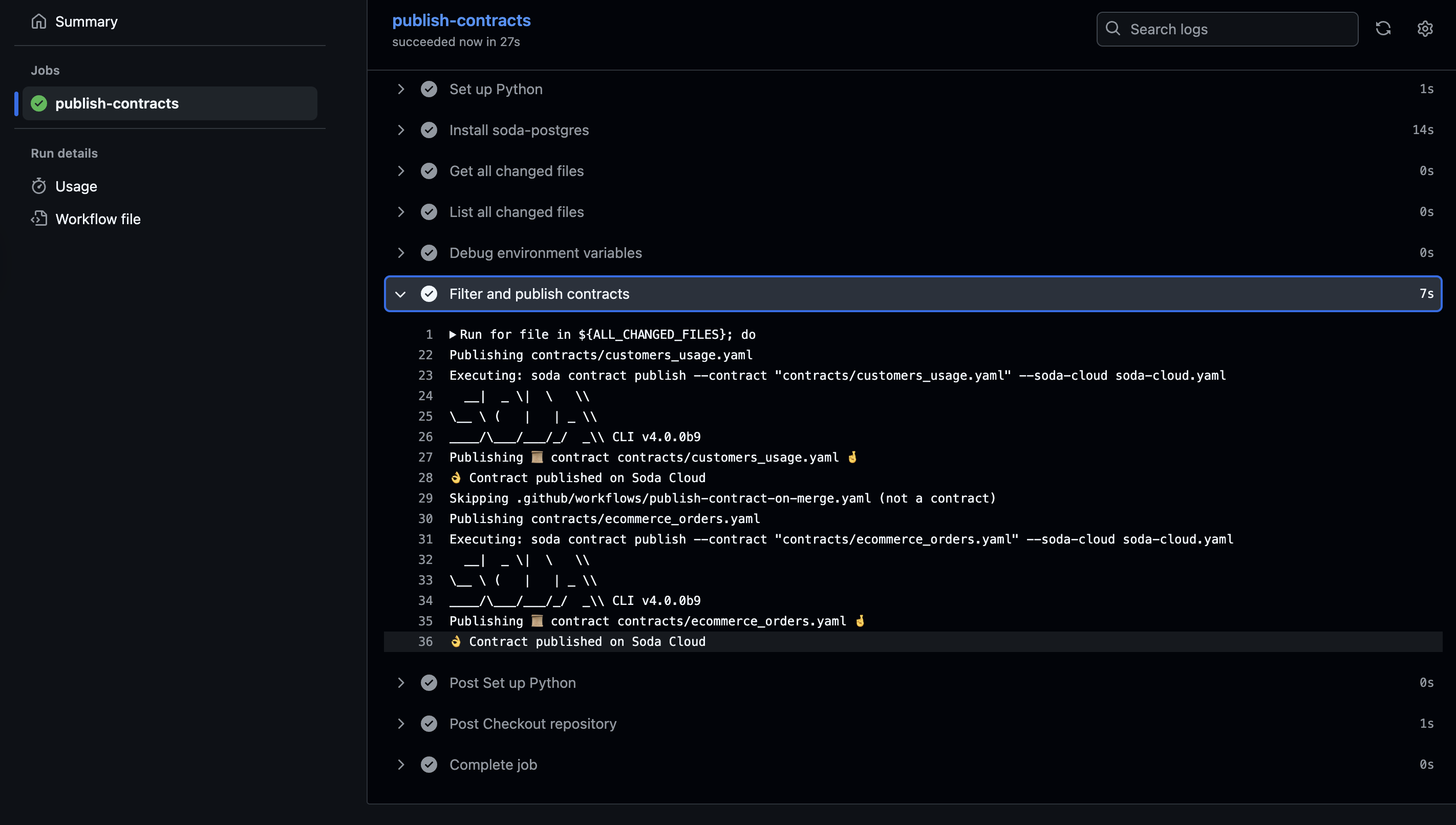
The **Publish Contracts on Merge** workflow automates the publishing of any updated or new Soda contracts when changes are pushed to the `main` branch.

This ensures that all contract changes are automatically deployed to Soda Cloud whenever they're merged into the production branch.

### Action

```yaml
name: Publish Updated Contracts on Merge

on:
  push:
    branches:
      - main

jobs:
  publish-contracts:
    runs-on: ubuntu-latest

    steps:
      - name: Checkout repository
        uses: actions/checkout@v4
        with:
          fetch-depth: 0

      - name: Set up Python
        uses: actions/setup-python@v4
        with:
          python-version: '3.10'

      - name: Install soda-postgres
        run: pip install -i https://pypi.dev.sodadata.io "soda>=4.0.0.dev1" -U

      - name: Get all changed files
        id: changed-files
        uses: tj-actions/changed-files@v46

      - name: List all changed files
        env:
          ALL_CHANGED_FILES: ${{ steps.changed-files.outputs.all_changed_files }}
        run: |
          for file in ${ALL_CHANGED_FILES}; do
            echo "$file was changed"
          done

      - name: Debug environment variables
        env:
          SODA_CLOUD_API_KEY: ${{ secrets.SODA_CLOUD_API_KEY }}
          SODA_CLOUD_API_SECRET: ${{ secrets.SODA_CLOUD_API_SECRET }}
        run: |
          echo "Environment variables status:"
          echo "SODA_CLOUD_API_KEY: $(if [ -n "$SODA_CLOUD_API_KEY" ]; then echo "✅ Set (${#SODA_CLOUD_API_KEY} chars)"; else echo "❌ Not set"; fi)"
          echo "SODA_CLOUD_API_SECRET: $(if [ -n "$SODA_CLOUD_API_SECRET" ]; then echo "✅ Set (${#SODA_CLOUD_API_SECRET} chars)"; else echo "❌ Not set"; fi)"

      - name: Filter and publish contracts
        env:
          ALL_CHANGED_FILES: ${{ steps.changed-files.outputs.all_changed_files }}
          SODA_CLOUD_CONFIG_FILE_PATH: soda-cloud.yaml
          SODA_CLOUD_API_KEY: ${{ secrets.SODA_CLOUD_API_KEY }}
          SODA_CLOUD_API_SECRET: ${{ secrets.SODA_CLOUD_API_SECRET }}
        run: |
          for file in ${ALL_CHANGED_FILES}; do
            if [[ "$file" == contracts/*.yml || "$file" == contracts/*.yaml ]]; then
              echo "Publishing $file"
              echo "Executing: soda contract publish --contract \"$file\" --soda-cloud ${SODA_CLOUD_CONFIG_FILE_PATH}"
              soda contract publish --contract "$file" --soda-cloud ${SODA_CLOUD_CONFIG_FILE_PATH}
            else
              echo "Skipping $file (not a contract)"
            fi
          done

```

### What It Does

1. **Checks out the repo**
2. **Sets up Python**
3. **Installs the latest version of `soda`**
4. **Identifies changed files**
5. **Filters YAML files in the `contracts/` directory**
6. **Publishes valid contracts to Soda Cloud**

### Required GitHub Secrets

Make sure these are set in your repository’s **GitHub Secrets:**

* `SODA_CLOUD_API_KEY`
* `SODA_CLOUD_API_SECRET`

> Learn more about how to [Generate API keys](/reference/generate-api-keys.md)

### Customization Options

<table><thead><tr><th>Option</th><th>Description</th></tr></thead><tbody><tr><td><pre><code>on:
  push:
    branches:
      - main
</code></pre></td><td>Change the Action trigger.</td></tr><tr><td><code>pip install</code></td><td>Can specify a fixed version of <code>soda</code> for stability.</td></tr><tr><td><code>SODA_CLOUD_CONFIG_FILE_PATH</code></td><td>Path to your Soda Cloud config. Can be replaced if your setup uses a different config file name or location.</td></tr><tr><td><code>contracts/*.yml</code> or <code>contracts/*.yaml</code></td><td>Modify file pattern to match a different directory or naming convention.</td></tr></tbody></table>

### Example output

<figure><img src="/files/TJn04pdDUlorL5jq6NmA" alt=""><figcaption></figcaption></figure>

***

## Verify Contracts on Pull Request

### Overview

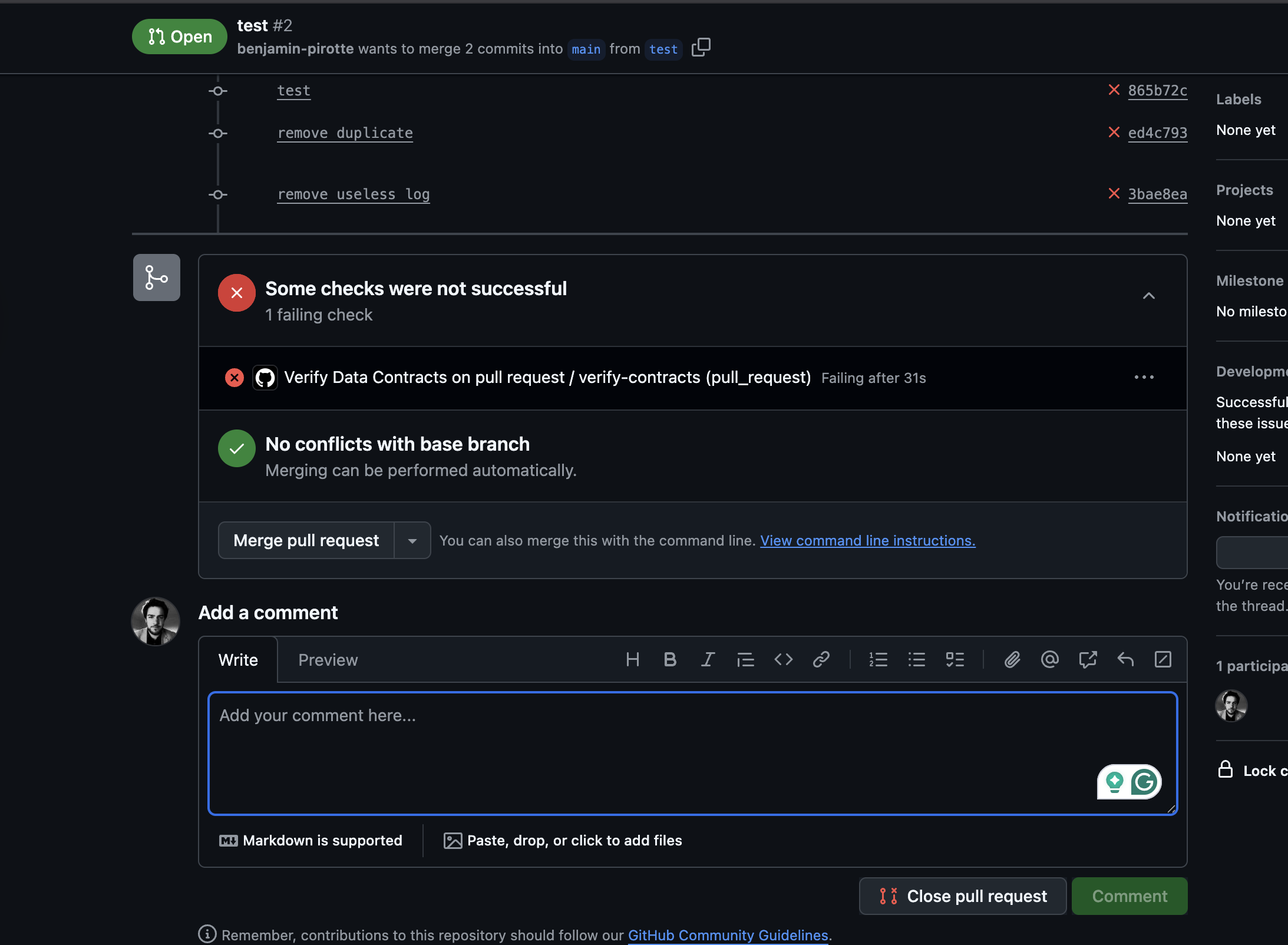
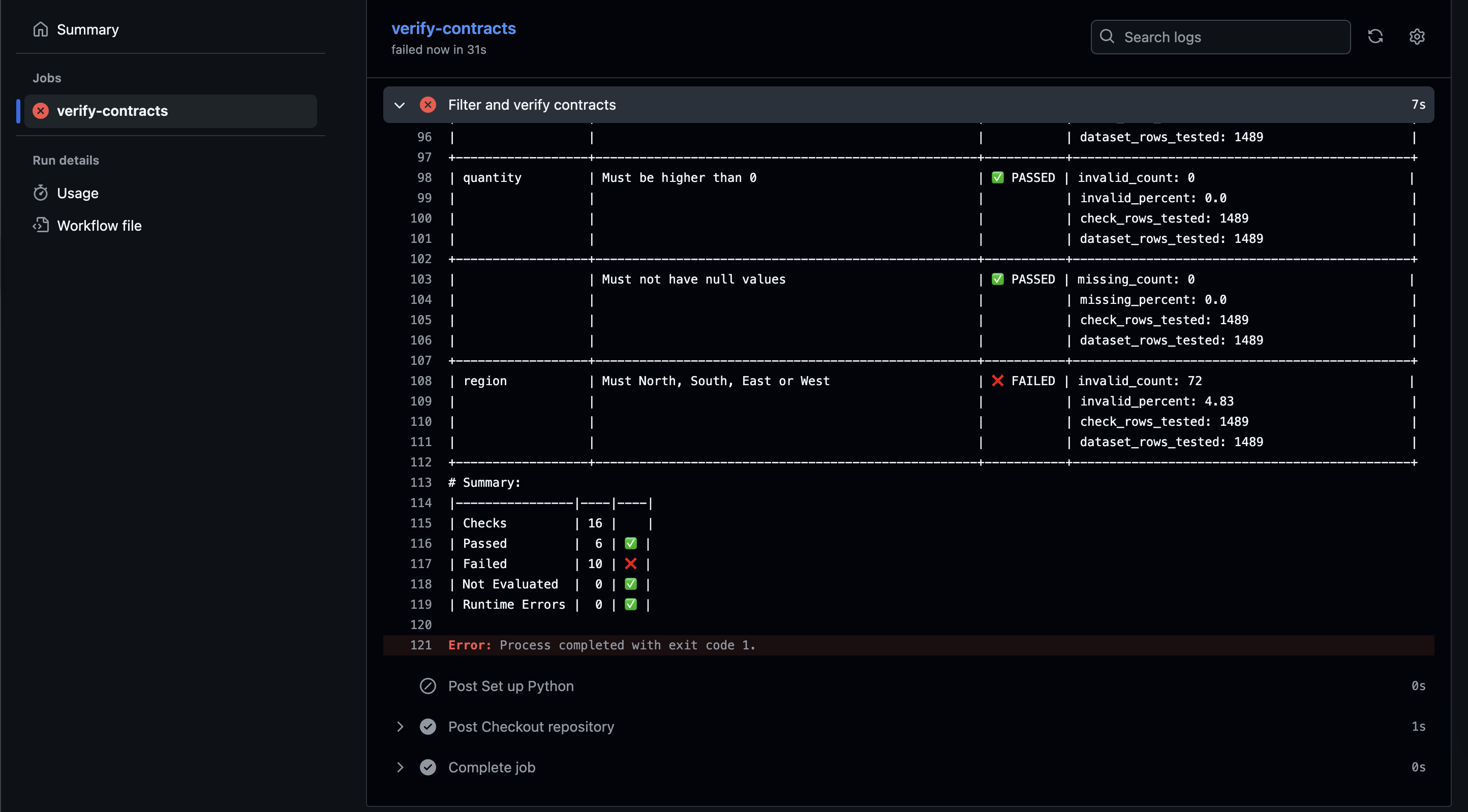
The **Verify Contracts on Pull Request** workflow ensures that contract changes in PRs are valid and do not break expectations before merging.

The workflow runs when a PR is opened, updated, or reopened.

### Action

```yaml
name: Verify Data Contracts on pull request

on:
  pull_request:
    types: [opened, synchronize, reopened]

jobs:
  verify-contracts:
    runs-on: ubuntu-latest

    steps:
      - name: Checkout repository
        uses: actions/checkout@v4
        with:
          fetch-depth: 0

      - name: Set up Python
        uses: actions/setup-python@v4
        with:
          python-version: '3.10'

      - name: Install soda-postgres
        run: pip install -i https://pypi.dev.sodadata.io/simple -U soda-postgres

      - name: Get all changed files
        id: changed-files
        uses: tj-actions/changed-files@v46

      - name: List all changed files
        env:
          ALL_CHANGED_FILES: ${{ steps.changed-files.outputs.all_changed_files }}
        run: |
          for file in ${ALL_CHANGED_FILES}; do
            echo "$file was changed"
          done

      - name: Debug environment variables
        env:
          DATASOURCE_USERNAME: ${{ secrets.DATASOURCE_USERNAME }}
          DATASOURCE_PASSWORD: ${{ secrets.DATASOURCE_PASSWORD }}
        run: |
          echo "Environment variables status:"
          echo "DATASOURCE_USERNAME: $(if [ -n "$DATASOURCE_USERNAME" ]; then echo "✅ Set"; else echo "❌ Not set"; fi)"
          echo "DATASOURCE_PASSWORD: $(if [ -n "$DATASOURCE_PASSWORD" ]; then echo "✅ Set"; else echo "❌ Not set"; fi)"

      - name: Filter and verify contracts
        env:
          ALL_CHANGED_FILES: ${{ steps.changed-files.outputs.all_changed_files }}
          DATASOURCE_CONFIG_FILE_PATH: postgres.yaml
          DATASOURCE_USERNAME: ${{ secrets.DATASOURCE_USERNAME }}
          DATASOURCE_PASSWORD: ${{ secrets.DATASOURCE_PASSWORD }}
        run: |
          for file in ${ALL_CHANGED_FILES}; do
            if [[ "$file" == contracts/*.yml || "$file" == contracts/*.yaml ]]; then
              echo "Verifying $file"
              echo "Executing: soda contract verify --data-source ${DATASOURCE_CONFIG_FILE_PATH} --contract \"$file\""
              soda contract verify --data-source ${DATASOURCE_CONFIG_FILE_PATH} --contract "$file"
            else
              echo "Skipping $file (not a contract)"
            fi
          done

```

### What It Does

1. **Checks out the PR branch**
2. **Sets up Python**
3. **Installs latest `soda-postgres`**
4. **Identifies changed files**
5. **Filters contracts in the `contracts/` directory**
6. **Runs verification checks against a configured data source**

### Required Secrets

Make sure these are set in your repository’s **GitHub Secrets:**

* `DATASOURCE_USERNAME`
* `DATASOURCE_PASSWORD`

These secrets can be customized depending on the data source type and your needs.

### Customization Options

<table><thead><tr><th>Option</th><th>Description</th></tr></thead><tbody><tr><td><pre><code>on:
  pull_request:
    types: [opened, synchronize, reopened]
</code></pre></td><td>Change the Action trigger</td></tr><tr><td><code>pip install</code></td><td><p>Adapt the install command to install the necessary package for your data source.</p><p><a data-mention href="/pages/Ovp9NbJpqBhQz07AImSa">/pages/Ovp9NbJpqBhQz07AImSa</a></p><p>You can specify a fixed version of <code>soda</code> for stability.</p></td></tr><tr><td><code>contracts/*.yml</code> or <code>contracts/*.yaml</code></td><td>Change to match your directory structure.</td></tr><tr><td><code>DATASOURCE_CONFIG_FILE_PATH</code></td><td>Replace with the path to your data source configuration</td></tr><tr><td><code>DATASOURCE_USERNAME</code> and <code>DATASOURCE_PASSWORD</code></td><td>Adapt the secrets used to connect to your data source depending on the data source type and security requirements.</td></tr></tbody></table>

### Example output

<figure><img src="/files/kSBqsgMBbmYa0S24vxKK" alt=""><figcaption></figcaption></figure>

<figure><img src="/files/37ehJhzyH0Hlq9qnFgYk" alt=""><figcaption></figcaption></figure>

<br>

***

{% if (visitor.claims.plan === 'datasetStandard')%}
{% hint style="success" %}
You are **logged in to Soda** and seeing the **Dataset Standard license** documentation. Learn more about [Documentation access & licensing](/reference/documentation-access-and-licensing.md).
{% endhint %}
{% endif %}

{% if (visitor.claims.plan === 'enterprise')%}
{% hint style="success" %}
You are **logged in to Soda** and seeing the **Team license** documentation. Learn more about [Documentation access & licensing](/reference/documentation-access-and-licensing.md).
{% endhint %}
{% endif %}

{% if (visitor.claims.plan === 'enterpriseUserBased')%}
{% hint style="success" %}
You are **logged in to Soda** and seeing the **Enterprise license** documentation. Learn more about [Documentation access & licensing](/reference/documentation-access-and-licensing.md).
{% endhint %}
{% endif %}

{% if !(visitor.claims.plan === 'enterprise' || visitor.claims.plan === 'enterpriseUserBased' || visitor.claims.plan === 'datasetStandard')%}
{% hint style="info" %}
You are **not logged in to Soda** and are viewing the default public documentation. Learn more about [Documentation access & licensing](/reference/documentation-access-and-licensing.md).
{% endhint %}
{% endif %}


---

# Agent Instructions: Querying This Documentation

If you need additional information that is not directly available in this page, you can query the documentation dynamically by asking a question.

Perform an HTTP GET request on the current page URL with the `ask` query parameter:

```
GET https://docs.soda.io/integrations/github.md?ask=<question>
```

The question should be specific, self-contained, and written in natural language.
The response will contain a direct answer to the question and relevant excerpts and sources from the documentation.

Use this mechanism when the answer is not explicitly present in the current page, you need clarification or additional context, or you want to retrieve related documentation sections.