> For the complete documentation index, see [llms.txt](https://docs.soda.io/llms.txt). Markdown versions of documentation pages are available by appending `.md` to page URLs; this page is available as [Markdown](https://docs.soda.io/soda-documentation/organization-and-admin-settings.md).
# Organization and Admin settings
Configure Soda Cloud to match how your organization governs access, identity, and automation, with enterprise-grade controls and network security.
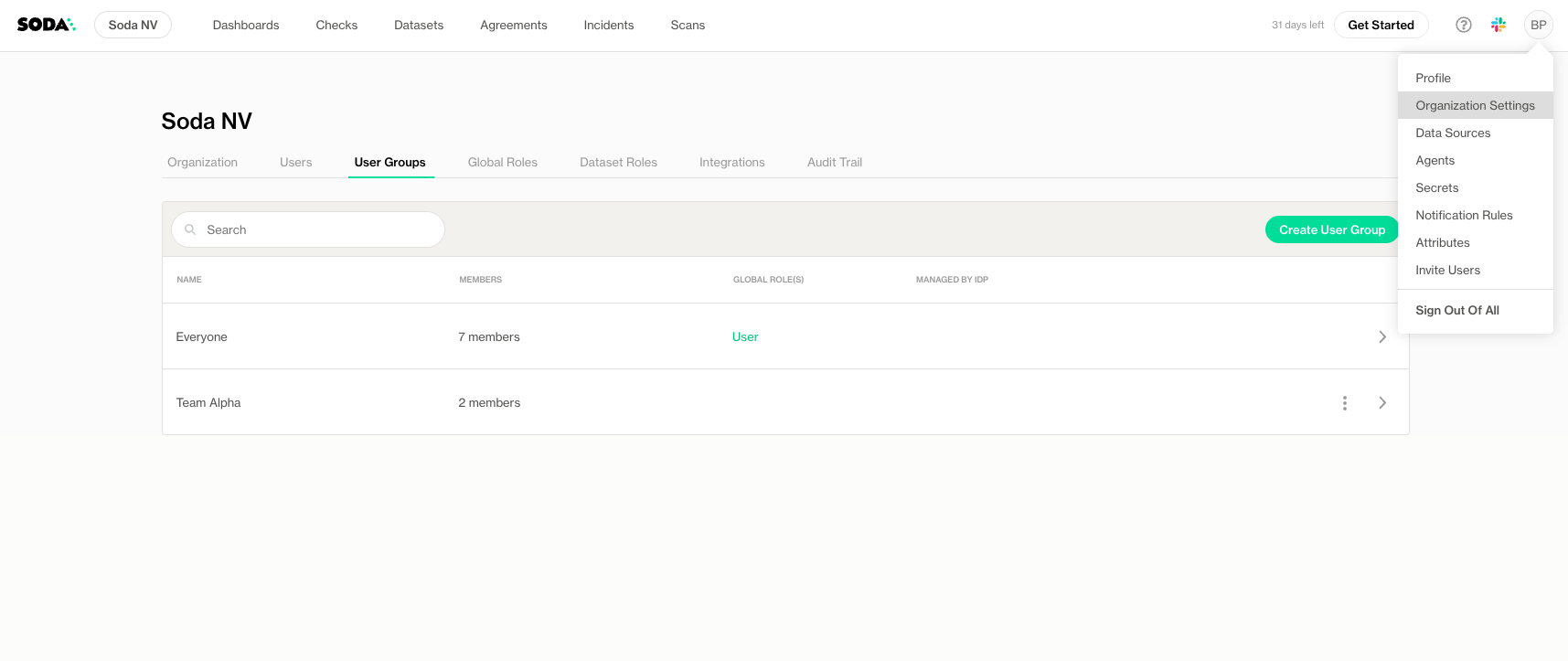
The **Organization and Admin Settings** in Soda Cloud provide a centralized interface for managing your organization’s configuration, roles, user access, and integrations. From setting your organization’s name to defining global roles, managing user groups, and enabling the Soda-hosted Runner, these settings help you tailor Soda Cloud to your team’s needs and governance policies.
To access the settings, click on your avatar, and then click **Organization Settings**.
{% hint style="warning" %}
Only users with the **Manage Organization Settings** global role can access and modify organization settings.
{% endhint %}
***
## Built for enterprise governance
Adopting a data quality platform across an organization raises the same questions as adopting any other system of record: Who can log in? How is their identity managed? What can each role actually do? How do we let CI/CD pipelines act without handing out a person's credentials?
Soda Cloud is designed to answer all of those out of the box.
{% columns %}
{% column %}
#### Identity, your way
Federate authentication through your existing SAML 2.0 identity provider (including Azure AD, Okta, and Google Workspace) and let your IdP remain the source of truth for who works at your company and which teams they belong to.
{% endcolumn %}
{% column %}
#### Permissions that match your org chart
Define what each role can do across the organization and per dataset, with a fully customizable role model. Grant exactly the access each team needs without forcing your structure into a rigid template.
{% endcolumn %}
{% endcolumns %}
{% columns %}
{% column %}
#### Network-level access controls
Restrict access to Soda Cloud to your corporate network, VPN, or any defined set of IP ranges. Requests from anywhere else are blocked before they ever reach authentication.
{% endcolumn %}
{% column %}
#### Automation-ready by design
Run scans, verify contracts, and call the API from CI/CD pipelines using service accounts: machine identities that are separate from any individual user and revocable in one click.
{% endcolumn %}
{% endcolumns %}
### Customizable platform
Soda Cloud allows organizations to have full control over each user and group permissions:
* **Organization-level configuration:** set your organization's identity in the platform, control which Soda capabilities are enabled (including AI-powered assistants and dataset profiling), and manage the storage of data source secrets used by your scans.
* **User management:** invite, deactivate, and organize users into groups, with group-based permission assignment so access scales as the team grows.
* **Single Sign-On (SSO):** connect Soda Cloud to your identity provider, with optional one-way sync of user groups directly from the IdP.
* **Global and dataset roles (RBAC):** design the role model that fits your organization, with separate scopes for what users can do across the platform versus what they can do on a specific dataset.
* **Service accounts:** issue API-only identities for pipelines and integrations, with their own permissions and lifecycle independent of any human user.
* **Network controls:** restrict platform access by IP address or CIDR range, enforced before authentication.
* **Multiple environments:** operate separate organizations for production, staging, and development from the same user profile, so each environment has its own data, roles, and credentials.
### Security and access control at a glance
Soda Cloud treats identity as the security perimeter. Every request is authenticated, scoped to the user's organization, and evaluated through role-based access control before any data is returned.
The result is a platform that supports both **least-privilege access** for sensitive datasets and **broad data democratization** for the rest — without forcing one approach on the entire organization.
> Contact to learn more about Soda Cloud and what it can do for your organization.
## Add multiple organizations
You may find it useful to set up **multiple organizations in Soda Cloud** so that **each corresponds with a different environment** in your network infrastructure, such as production, staging, and development. Such a setup makes it easy for you and your team to access multiple, independent Soda Cloud organizations using the same profile, or login credentials.
Note that **Soda Cloud associates any** [**API keys**](broken://pages/H6Piqnv5lUFCAv1Cvm75) **that you generate within an organization** with both your profile *and* the organization in which you generated the keys. **API keys are not interchangeable between organizations.**
> Contact to request multiple organizations for Soda Cloud.
***
{% hint style="info" %}
You are **not logged in to Soda** and are viewing the default public documentation. Learn more about [Licensing & documentation access](/soda-documentation/reference/documentation-access-and-licensing.md).
{% endhint %}
---
# Agent Instructions
This documentation is published with GitBook. GitBook is the documentation platform designed so that both humans and AI agents can read, navigate, and reason over technical content effectively. Learn more at gitbook.com.
## Querying This Documentation
If you need additional information that is not directly available in this page, you can query the documentation by asking a question.
Perform an HTTP GET request on the following URL with the `ask` and `goal` query parameters:
```
GET https://docs.soda.io/soda-documentation/organization-and-admin-settings.md?ask=&goal=
```
`ask` is the immediate question: it should be specific, self-contained, and written in natural language.
`goal` is what the user is ultimately trying to achieve, the reason they need the answer. Sharing it helps GitBook give you a better, more relevant answer. A goal is most helpful when it describes the outcome the user wants rather than restating the question. For example, with `ask=how do I create an API token`, a goal like `automate deployments from our CI pipeline` lets GitBook tailor the answer to that use case.
The response will contain a direct answer to the question and relevant excerpts and sources from the documentation.
Use this mechanism when the answer is not explicitly present in the current page, you need clarification or additional context, or you want to retrieve related documentation sections.