> For the complete documentation index, see [llms.txt](https://docs.soda.io/llms.txt). Markdown versions of documentation pages are available by appending `.md` to page URLs; this page is available as [Markdown](https://docs.soda.io/integrations/webhook.md).

# Webhook

The **Webhook Integration** in Soda Cloud allows you to send notifications about **check results** (based on notification rules) and **incident updates** to external systems, such as monitoring tools, incident management platforms, or custom endpoints.

This integration is ideal for teams who want to build custom workflows or integrate Soda Cloud alerts into their existing tools.

### Set Up a Webhook Integration

{% hint style="warning" %}
Only users with the **Manage Organization Settings** global role can define webhook integrations. [Global and Dataset Roles](/organization-and-admin-settings/global-and-dataset-roles.md)
{% endhint %}

Follow these steps to configure a Webhook integration in Soda Cloud:

1. Go to the **Integrations** section in **Settings**.
2. Click the **+** button to add a new integration.

<figure><img src="/files/cL7pwQcZ8MtqxTRQzGaf" alt=""><figcaption></figcaption></figure>

3. Select the integration type: **Webhook,** and click next.

<figure><img src="/files/IBhcmMpLM5yGCzsVpSCc" alt=""><figcaption></figcaption></figure>

4. Configure the Webhook
   * **Name**: Provide a clear name for your integration.
   * **URL**: Enter the Webhook endpoint where Soda Cloud should send notifications. **Headers**: (Optional)
   * Add authentication or custom headers required by your endpoint.

<figure><img src="/files/5HsoHyCXYqe8M5iRGFmz" alt=""><figcaption></figcaption></figure>

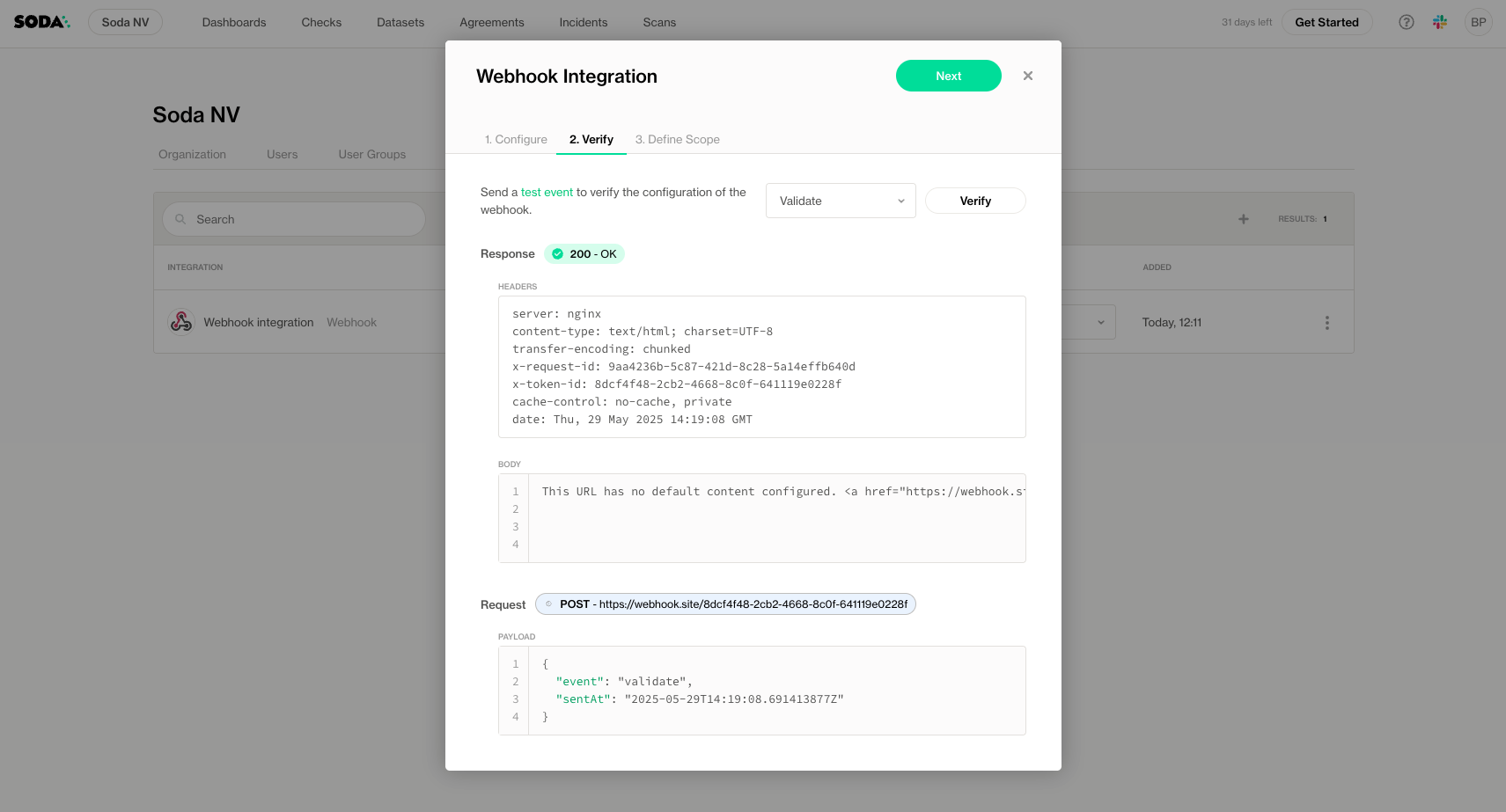
5. Test the Webhook
   * Use the built-in testing tool to simulate events and validate your Webhook integration.
   * You can select different event types to test and develop your integration.
   * For the exact payload structure and details, see the [Webhook reference ✅](https://slite.com/api/public/notes/5e-Y6TfFiYmlii/redirect)

<figure><img src="/files/tFyjFVr8YmfqI17snR5G" alt=""><figcaption></figcaption></figure>

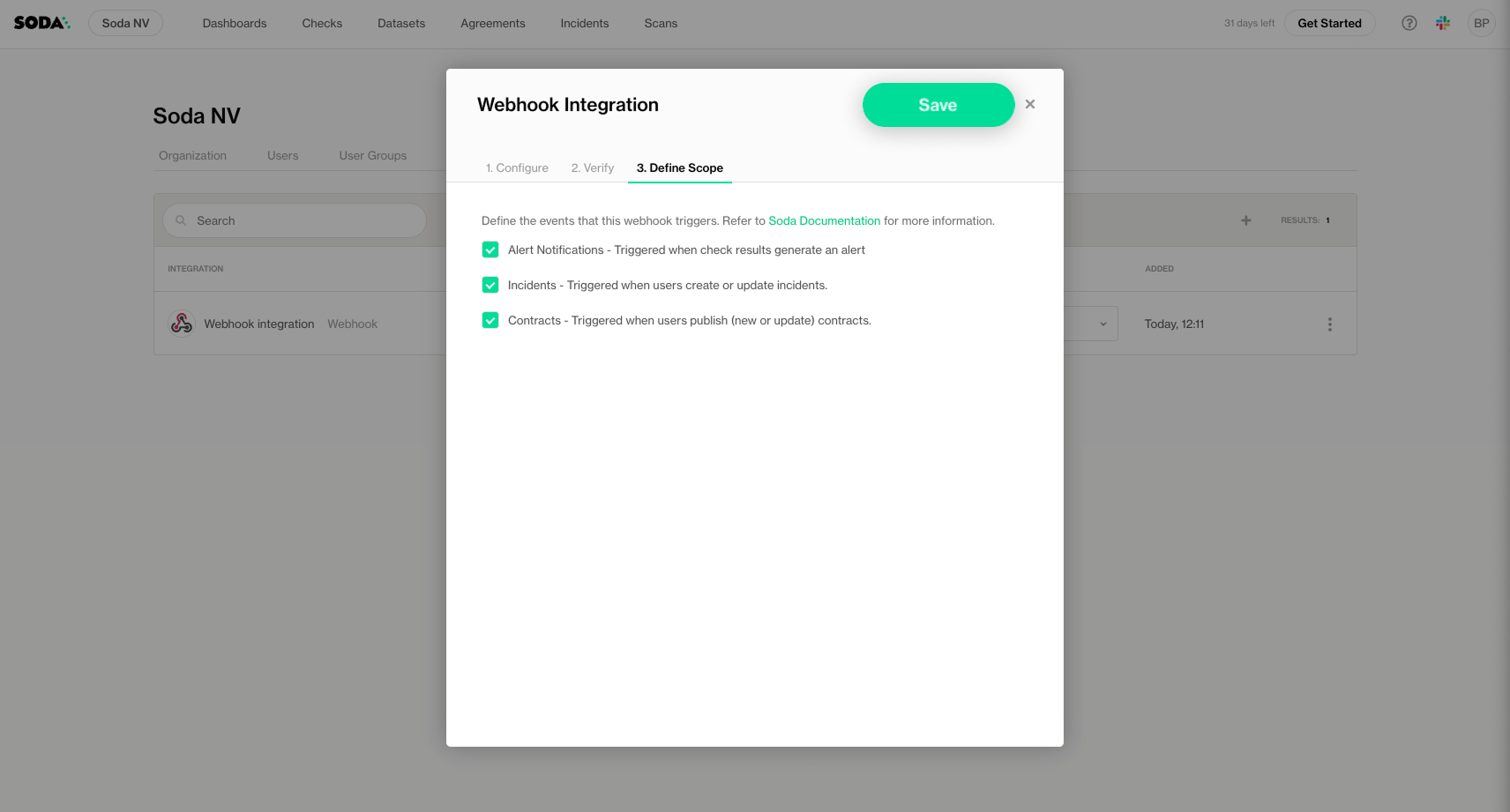
6. Choose the events to send
   * **Alert Notifications**: The integration becomes **available for use in notification rules**. It will only send notifications when you explicitly configure a notification rule to use this Webhook.
   * **Incidents**: Triggered when users create or update incidents in Soda Cloud.
   * **Contracts**: Triggered when users publish new or updated contracts in Soda Cloud.

<figure><img src="/files/AkwoW0TeY7VWFX3vQiPY" alt=""><figcaption></figcaption></figure>

6. Click Save to apply

### Use in Notification Rules

After configuring your Webhook integration with the Alert Notification scope, you can use it in your **notification rules** to send alerts when specific checks fail.

When creating or editing a notification rule, select your configured **Webhook** integration as the recipient.

> For detailed steps and advanced examples, see the [Notifications](/manage-issues/notifications.md)

***

{% if visitor.claims.plan === 'datasetStandard' %}
{% hint style="success" %}
You are **logged in to Soda** and seeing the **Dataset Standard license** documentation. Learn more about [Documentation access & licensing](/reference/documentation-access-and-licensing.md).
{% endhint %}
{% endif %}

{% if visitor.claims.plan === 'enterprise' %}
{% hint style="success" %}
You are **logged in to Soda** and seeing the **Team license** documentation. Learn more about [Documentation access & licensing](/reference/documentation-access-and-licensing.md).
{% endhint %}
{% endif %}

{% if visitor.claims.plan === 'enterpriseUserBased' %}
{% hint style="success" %}
You are **logged in to Soda** and seeing the **Enterprise license** documentation. Learn more about [Documentation access & licensing](/reference/documentation-access-and-licensing.md).
{% endhint %}
{% endif %}

{% if !(visitor.claims.plan === 'enterprise' || visitor.claims.plan === 'enterpriseUserBased' || visitor.claims.plan === 'datasetStandard') %}
{% hint style="info" %}
You are **not logged in to Soda** and are viewing the default public documentation. Learn more about [Documentation access & licensing](/reference/documentation-access-and-licensing.md).

If you do have a Soda license, make sure to **log in to Soda Cloud in this same browser**.
{% endhint %}
{% endif %}


---

# Agent Instructions
This documentation is published with GitBook. GitBook is the documentation platform designed so that both humans and AI agents can read, navigate, and reason over technical content effectively. Learn more at gitbook.com.

## Querying This Documentation
If you need additional information that is not directly available in this page, you can query the documentation dynamically by asking a question.

Perform an HTTP GET request on the current page URL with the `ask` query parameter, and the optional `goal` query parameter:

```
GET https://docs.soda.io/integrations/webhook.md?ask=<question>&goal=<endgoal>
```

`ask` is the immediate question: it should be specific, self-contained, and written in natural language.
`goal` is optional and describes the broader end goal you are ultimately trying to accomplish on behalf of the user. GitBook uses it to tailor the answer towards what is most useful for that goal.

The response will contain a direct answer to the question and relevant excerpts and sources from the documentation.

Use this mechanism when the answer is not explicitly present in the current page, you need clarification or additional context, or you want to retrieve related documentation sections.