> For the complete documentation index, see [llms.txt](https://docs.soda.io/llms.txt). Markdown versions of documentation pages are available by appending `.md` to page URLs; this page is available as [Markdown](https://docs.soda.io/integrations/servicenow.md).

# ServiceNow

> Configure a [Webhook](/integrations/webhook.md) in Soda Cloud to connect to your ServiceNow account.

In ServiceNow, you can create a **Scripted REST API** that enables you to prepare a resource to work as an incoming webhook. Use the **ServiceNow Resource Path** in the URL field in the Soda Cloud integration setup.

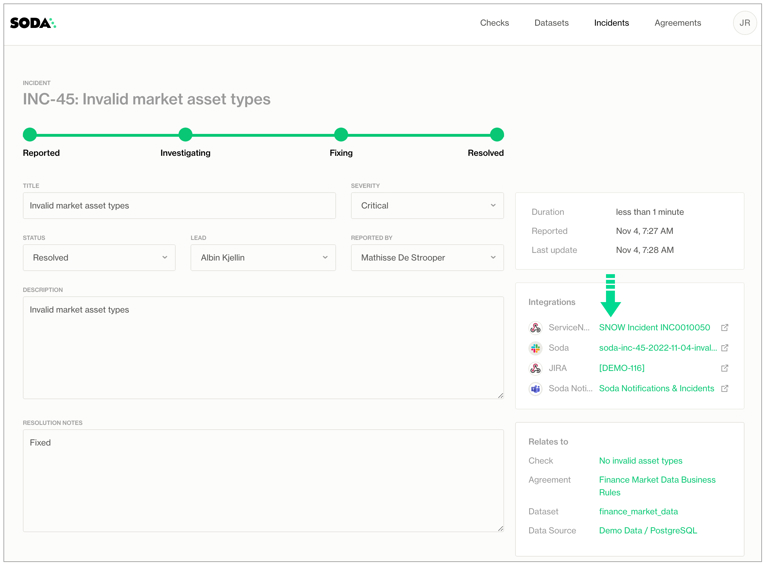
This example offers guidance on how to set up a Scripted REST API Resource to generate an external link, which Soda Cloud displays in the **Incident Details**; see image below. When you change the status of a Soda Cloud incident, the webhook also updates the status of the SNOW issue that corresponds with the incident.

> Refer to [Webhook API](/reference/soda-apis/webhook-api.md) for detailed information.

<figure><img src="/files/ov0moL0OmNO7SRc5X6dg" alt=""><figcaption></figcaption></figure>

## Configuring OAuth 2.0 on an outbound webhook (via API)

When OAuth is configured, **Soda acts as the OAuth client**: before each webhook delivery it fetches an access token from tokenUrl using the client\_credentials grant and attaches it as Authorization: Bearer \<token>.

You do not set an Authorization header yourself. Instead, any Authorization header you put in headers is **stripped** and **replaced**. Auth is configured with fields, not headers.

### OAuth fields

<table><thead><tr><th width="120.00390625">Field</th><th width="124.78125">Required</th><th>Descriptio</th></tr></thead><tbody><tr><td>tokenUrl</td><td>yes</td><td>Token endpoint (e.g. https://&#x3C;instance>.service-now.com/oauth_token.do). Must be publicly resolvable.</td></tr><tr><td>clientId</td><td>yes</td><td>OAuth client id.</td></tr><tr><td>clientSecret</td><td>yes*</td><td>Client secret. Write-only: never returned on read; on update omit to keep, or send a new value to replace.</td></tr><tr><td>scope</td><td>no</td><td>Optional for ServiceNow.</td></tr></tbody></table>

Create — POST /api/command?createIntegration (needs Manage organisation settings):

```json
{
  "settings": {
    "type": "webhook",
    "name": "ServiceNow",
    "url": "https://<instance>.service-now.com/api/x_soda/incident",
    "headers": [ { "name": "Content-Type", "value": "application/json" } ],
    "capabilities": {
      "notifications": { "enabled": true },
      "incidents": { "enabled": true },
      "agreements": { "enabled": false },
      "contracts": { "enabled": false }
    },
    "oauth": {
      "tokenUrl": "https://<instance>.service-now.com/oauth_token.do",
      "clientId": "your-client-id",
      "clientSecret": "your-client-secret",
      "scope": "useraccount"
    }
  }
}
```

Update — POST /api/command?updateIntegration (secret omitted → preserved; type: "webhook" still required):

```json
{
  "integrationId": "<integration-id>",
  "settings": {
    "type": "webhook",
    "oauth": {
      "tokenUrl": "https://<instance>.service-now.com/oauth_token.do",
      "clientId": "your-client-id",
      "scope": "useraccount"
    }
  }
}
```

Runtime behaviour — token cached per integration until expiry (60s safety margin; 5-min default if no expires\_in); on 401 Soda invalidates + refetches + retries once; token request is form-urlencoded with grant\_type=client\_credentials.

## Set up REST APIs

The following steps offer a brief overview of how to set up a ServiceNow Scripted REST API Resource to integrate with a Soda Cloud webhook. Reference the ServiceNow documentation for details:

* [Create a Scripted REST API](https://docs.servicenow.com/en-US/bundle/tokyo-application-development/page/integrate/custom-web-services/task/t_CreateAScriptedRESTService.html) and [Create a Scripted REST API Resource](https://docs.servicenow.com/bundle/tokyo-application-development/page/integrate/custom-web-services/task/t_CreateAScriptedRESTAPIResource.html)
* [ServiceNow Developer: Creating Scripted REST APIs](https://developer.servicenow.com/dev.do#!/learn/courses/quebec/app_store_learnv2_rest_quebec_rest_integrations/app_store_learnv2_rest_quebec_scripted_rest_apis/app_store_learnv2_rest_quebec_creating_scripted_rest_apis)

1. In ServiceNow, start by navigating to the **All** menu, then use the filter to search for and select **Scripted REST APIs**.
2. Click **New** to create a new scripted REST API. Provide a name and API ID, then click **Submit** to save.
3. In the Scipted Rest APIs list, find and open your newly-created API, then, in the **Resources** tab, click **New** to create a new resource.
4. Provide a **Name** for your resource, then select POST as the **HTTP method**.
5. In the **Script** field, define a script that creates new tickets when a Soda Cloud incident is opened, and updates existing tickets when a Soda Cloud incident status is updated. Use the example below for reference. You may also need to define Security settings according to your organizations authentication rules.
6. Click **Submit**, then copy the value of the **Resource path** to use in the URL field in the Soda Cloud integration setup.

```javascript
(function process(/*RESTAPIRequest*/ request, /*RESTAPIResponse*/ response) {


	var businessServiceId = '28***';
	var snowInstanceId = 'dev***';
	
	var requestBody = request.body;
	var requestData = requestBody.data;
	gs.info(requestData.event);
	if (requestData.event == 'incidentCreated'){
		gs.log("*** Incident Created ***");
		var grIncident = new GlideRecord('incident');
		grIncident.initialize();
		grIncident.short_description = requestData.incident.description;

		grIncident.description = requestData.incident.sodaCloudUrl;
		grIncident.correlation_id = requestData.incident.id;
		if(requestData.incident.severity == 'critical'){
			grIncident.impact = 1;
		}else if(requestData.incident.severity == 'major'){
			grIncident.impact = 2;
		}else if(requestData.incident.severity == 'minor'){
			grIncident.impact = 3;
		}
		
		grIncident.business_service = businessServiceId;
		grIncident.insert();
		var incidentNumber = grIncident.number;
		var sysid = grIncident.sys_id;
		var callBackURL = requestData.incidentLinkCallbackUrl;
		var req, rsp;
		
		req = new sn_ws.RESTMessageV2();


		req.setEndpoint(callBackURL.toString());
		req.setHttpMethod("post");
		var sodaUpdate = '{"url":"https://'+ snowInstanceId +'.service-now.com/incident.do?sys_id='+sysid + '", "text":"SNOW Incident '+incidentNumber+'"}';
		req.setRequestBody(sodaUpdate.toString());
		resp = req.execute();
		gs.log(resp.getBody());
		

	}else if(requestData.event == 'incidentUpdated'){
		gs.log("*** Incident Updated ***");
		var target = new GlideRecord('incident');
		target.addQuery('correlation_id', requestData.incident.id);
		target.query();
		target.next();

		if(requestData.incident.status == 'resolved'){
			//Change this according to how SNOW is used.
			target.state = 6;
			target.close_notes = requestData.incident.resolutionNotes;
		}else{
			//Change this according to how SNOW is used.
			target.state = 4;
		}
		target.update();
		
	}


})(request, response);
```

***

{% if visitor.claims.plan === 'datasetStandard' %}
{% hint style="success" %}
You are **logged in to Soda** and seeing the **Dataset Standard license** documentation. Learn more about [Documentation access & licensing](/reference/documentation-access-and-licensing.md).
{% endhint %}
{% endif %}

{% if visitor.claims.plan === 'enterprise' %}
{% hint style="success" %}
You are **logged in to Soda** and seeing the **Team license** documentation. Learn more about [Documentation access & licensing](/reference/documentation-access-and-licensing.md).
{% endhint %}
{% endif %}

{% if visitor.claims.plan === 'enterpriseUserBased' %}
{% hint style="success" %}
You are **logged in to Soda** and seeing the **Enterprise license** documentation. Learn more about [Documentation access & licensing](/reference/documentation-access-and-licensing.md).
{% endhint %}
{% endif %}

{% if !(visitor.claims.plan === 'enterprise' || visitor.claims.plan === 'enterpriseUserBased' || visitor.claims.plan === 'datasetStandard') %}
{% hint style="info" %}
You are **not logged in to Soda** and are viewing the default public documentation. Learn more about [Documentation access & licensing](/reference/documentation-access-and-licensing.md).

If you do have a Soda license, make sure to **log in to Soda Cloud in this same browser**.
{% endhint %}
{% endif %}


---

# Agent Instructions
This documentation is published with GitBook. GitBook is the documentation platform designed so that both humans and AI agents can read, navigate, and reason over technical content effectively. Learn more at gitbook.com.

## Querying This Documentation
If you need additional information that is not directly available in this page, you can query the documentation dynamically by asking a question.

Perform an HTTP GET request on the current page URL with the `ask` query parameter, and the optional `goal` query parameter:

```
GET https://docs.soda.io/integrations/servicenow.md?ask=<question>&goal=<endgoal>
```

`ask` is the immediate question: it should be specific, self-contained, and written in natural language.
`goal` is optional and describes the broader end goal you are ultimately trying to accomplish on behalf of the user. GitBook uses it to tailor the answer towards what is most useful for that goal.

The response will contain a direct answer to the question and relevant excerpts and sources from the documentation.

Use this mechanism when the answer is not explicitly present in the current page, you need clarification or additional context, or you want to retrieve related documentation sections.
