Custom monitors
Learn more about how to use your own SQL queries to build custom SQL Metric Monitors.
Custom SQL Monitors are available for Enterprise users and can be configured via both the Soda Cloud UI and the Monitoring Configuration API.
Custom SQL Monitors enable you to define monitoring logic using your own SQL queries. This is ideal when built-in Soda metrics or anomaly checks don’t meet your needs; for example, when you must aggregate data across multiple tables, compute ratios, or detect anomalies in grouped datasets.
A Custom SQL Monitor runs your SQL query against your connected data source and evaluates its results on a schedule, just like any other Soda monitor.
This feature can be used to:
Define metrics using custom aggregations or joins.
Compute grouped results (e.g.,
GROUP BYcustomer, institution, or region).Apply filters, CTEs, and where clauses to narrow down data.
Integrate results with notification rules to alert your team when certain conditions are met.
How to create a custom SQL monitor
Example scenario: an organization needs to monitor daily incidents per borough and reason in their Bus Breakdowns and Delays dataset, and flag unusual spikes/drops via notification rules.
The goal is to know which boroughs are the ones suffering the most incidents and why that's happening.
Prerequisites
Enterprise plan.
A dataset connected in Soda Cloud.
An API token with permission to author monitors (if creating In the Column Monitoring Configuration API).
In the Soda Cloud UI
Navigate to Datasets → Custom Monitors at the bottom of the page. Click on Add Column Monitor.

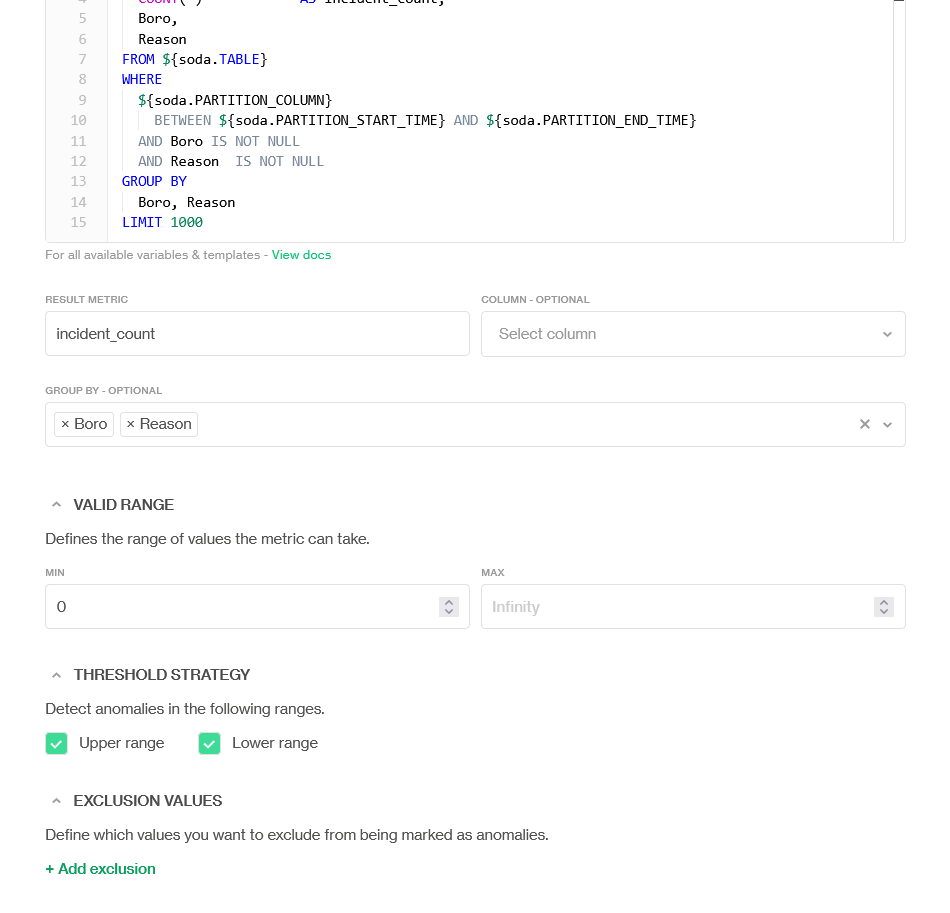
Name your custom monitor and provide the custom SQL query. In this case, we are monitoring incident count by borough and reason.

Provide a Result metric and a Valid range, and define a Threshold strategy. In this case, the result metric is
incident_count; we want to group byBoroandReason, and the valid range cannot be negative, so the minimum value is0. Both Upper range and Lower range anomaly detection are enabled to catch unusual spikes/drops per group.
Click on Add Monitor on the top right.
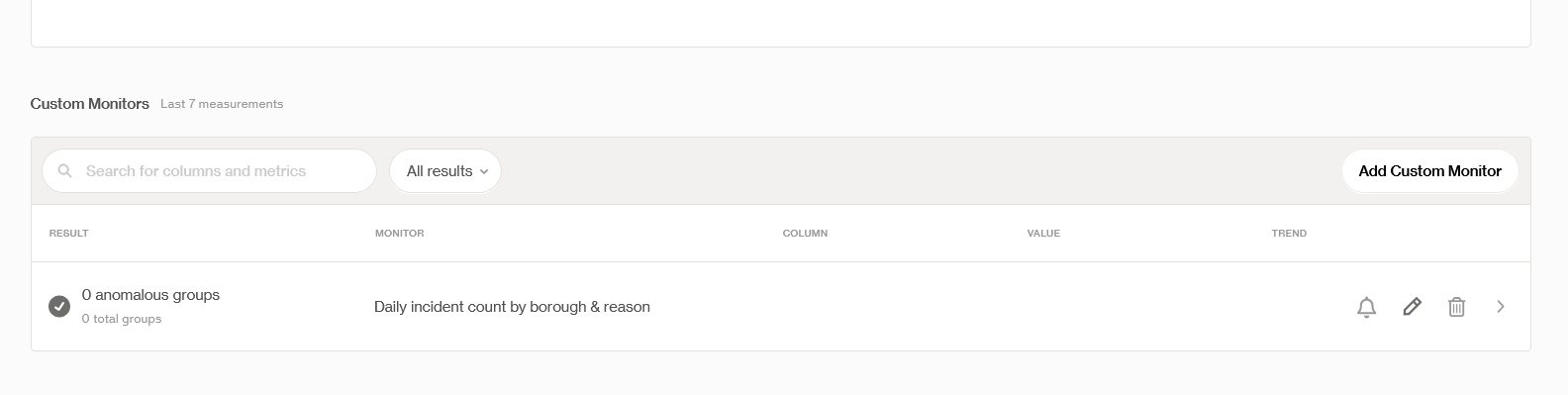
The monitor will now be visible at the bottom of the Metric Monitoring dashboard.

This monitor will:
Run daily and compute
incident_countfor every(Boro, Reason)pair within the partitioned time window.Store grouped results so you can see which areas and causes are trending.
Trigger notifications (based on your organization’s notification rule) when anomaly detection flags a group.
In the Column Monitoring Configuration API
Coming soon
Supported variables
List of all the variables currently supported using ${soda.<variable>} syntax:
SCAN_TIME: time for which the scan is running; has the same value asPARTITION_END_TIME(note this is different from when the scan is running)PARTITION_COLUMN: column used to perform time-based partitioningPARTITION_START_TIME: start time for the partition time windowPARTITION_END_TIME: end time for the partition time windowPARTITION_INTERVAL: duration of the partition time windowTABLE: qualified name of the table being analyzed, e.g."my-schema"."my-table"
Valid range vs. expected range
Metric monitors in Soda use two different types of ranges that serve distinct purposes: expected range and valid range.
Expected range
The expected range represents the values that Soda’s anomaly detection algorithm expects a metric to fall within, based on historical patterns.
It is automatically learned by Soda’s Metric Monitoring model.
It adapts over time as more data is observed.
It is the range used to detect anomalies.
If the measured value falls outside the expected range, Soda flags an anomaly.
Expected range = what usually happens.
Valid range
The valid range defines the absolute bounds of sensible values for a metric.
It is not learned by the model.
It is manually defined, either:
implicitly by Soda for most built-in monitors, or
explicitly by the user for custom monitors and certain built-in monitors (for example,
average).For custom monitors and context-dependent metrics (such as averages), Soda cannot infer a sensible valid range. In these cases, the valid range must be defined by the user.
It is used to constrain the model’s predictions, not to detect anomalies.
If the anomaly detection model predicts an expected range that falls outside the valid range, Soda clips the expected range to the valid range.
Valid range = what is possible or meaningful.
How they work together
Soda’s anomaly detection model predicts an expected range.
Soda checks whether that expected range violates the valid range.
If it does, Soda clips the expected range so it stays within valid bounds.
The clipped expected range is then used to evaluate anomalies.
Example: Row count monitor
Valid range:
(0, +∞)(A dataset cannot have a negative number of rows.)Model prediction:
(-2, 8)Clipped expected range:
(0, 8)
Without a valid range, Soda could surface predictions that do not make sense for the use case. The valid range prevents this.
You are not logged in to Soda and are viewing the default public documentation. Learn more about Documentation access & licensing.
Last updated
Was this helpful?