> For the complete documentation index, see [llms.txt](https://docs.soda.io/llms.txt). Markdown versions of documentation pages are available by appending `.md` to page URLs; this page is available as [Markdown](https://docs.soda.io/soda-documentation/reference/data-flows-between-soda-and-user.md).
# Data flows between Soda & user
A description of the data flows that take place when the user interacts with Soda in an enterprise deployment with a self-hosted runner.
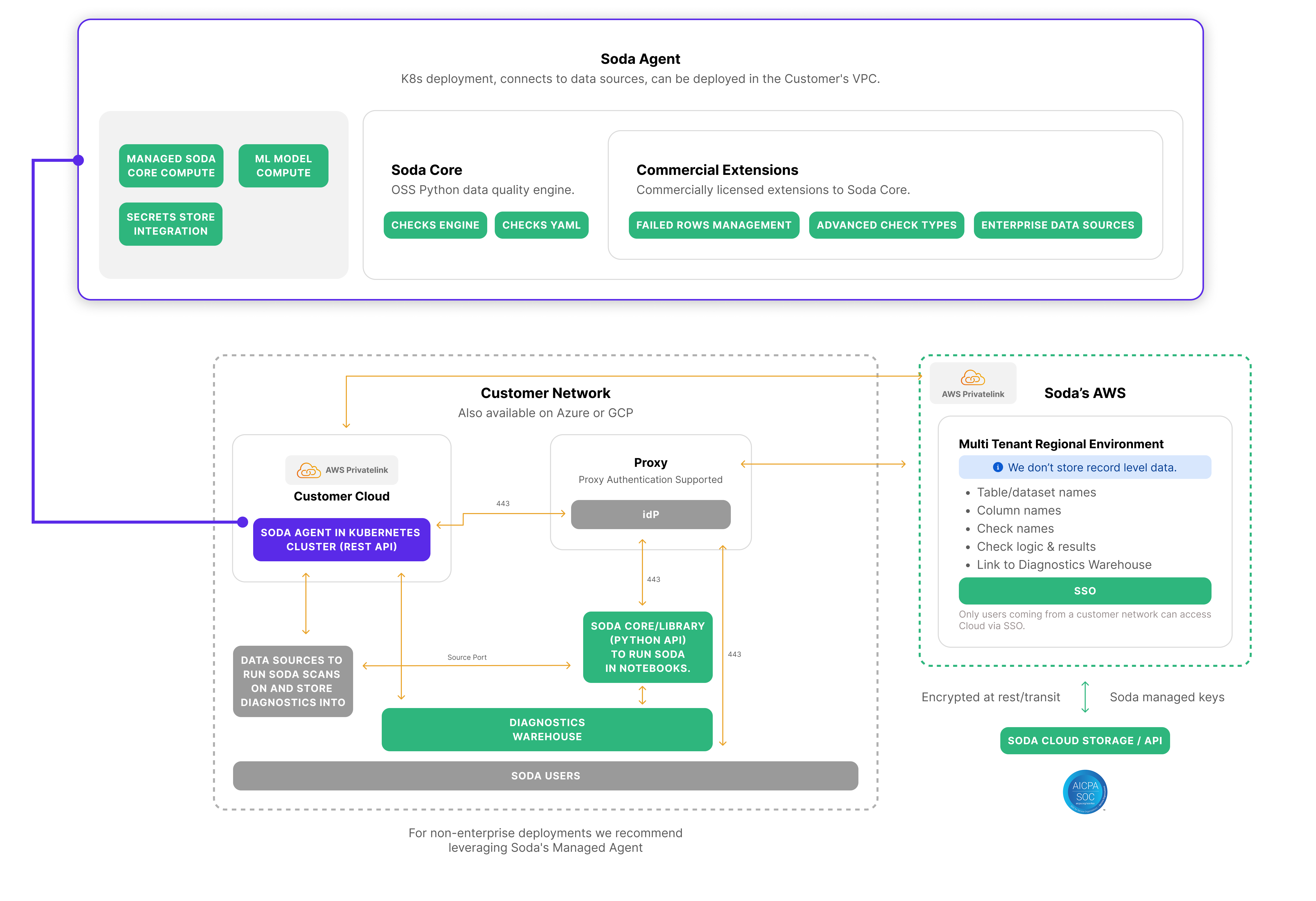
#### Platform architecture
Soda platform architecture diagram
All flows start with instruction retrieval and a Kubernetes Job launch:
## 1. Instruction retrieval by the Runner
{% stepper %}
{% step %}
The Soda Runner deployed in the customer's Kubernetes cluster (within their VPC) continuously polls the Soda Cloud API for any new "instructions."
{% endstep %}
{% step %}
If instructions are available, the Runner retrieves required resources from Soda Cloud, which include:
* The contract file defining the data quality checks.
* Data source connection details, where sensitive credentials are replaced by placeholders for environment variables.
* Diagnostic warehouse connection details for failed-row storage.
{% endstep %}
{% endstepper %}
## 2. Launching a Kubernetes Job
{% stepper %}
{% step %}
Once the resources are retrieved, the Runner launches a Kubernetes Job inside the customer environment to execute the data quality scan.
{% endstep %}
{% step %}
Environment variables (or workload identities via ServiceAccounts) are injected into the Pod to supply secure credentials at runtime.
{% endstep %}
{% step %}
Files such as the contract and configuration are retrieved by the scan process using a call to the Soda Cloud API.
{% endstep %}
{% endstepper %}
***
## Contract Verification
### 3. Data Source Connections
* The Soda process running inside the Job uses the provided details to connect directly to the customer's data sources (e.g., databases or data warehouses).
* This connection stays entirely within the customer's network, ensuring no row-level data leaves the environment.
### 4. Running the Data Quality Contract
{% stepper %}
{% step %}
The Soda Runner translates the data contract into optimized SQL statements
{% endstep %}
{% step %}
The Soda process executes the contract verification, validating the datasets against the defined checks.
During this process:
* Data quality metrics (aggregated statistics, not raw data) are calculated.
* Any rows failing validation checks are isolated for further inspection.
{% endstep %}
{% endstepper %}
### 5. Reporting Results
{% stepper %}
{% step %}
Metrics and summaries are sent back to Soda Cloud via an API call.
* These metrics include table/dataset names, check names, logic, and aggregated results.
{% endstep %}
{% step %}
No row-level data is transmitted to Soda Cloud.
{% endstep %}
{% step %}
Failed rows (if applicable) are written to the diagnostic warehouse inside the customer network, making them accessible for troubleshooting without ever leaving the environment.
{% endstep %}
{% endstepper %}
### 6. Job Completion and Termination
Once the Soda process completes:
{% stepper %}
{% step %}
The Kubernetes Job terminates automatically.
{% endstep %}
{% step %}
The Runner is aware of the termination and signals completion of the instruction back to Soda Cloud through an API call.
{% endstep %}
{% endstepper %}
***
## Metrics Monitoring
### 3. Data source connections
* The Soda process connects directly to the customer's data source and executes SQL to calculate the latest metric value (e.g. row count, null rate). This runs entirely within the customer's network.
### 4. Running the Metrics Monitoring Scan
{% stepper %}
{% step %}
The Runner fetches the metric's history (time-series data) from Soda Cloud via API.
{% endstep %}
{% step %}
The anomaly detection algorithm runs locally inside the Runner.
The algorithm uses the fetched history and the latest value to determine whether the result is anomalous.
{% endstep %}
{% step %}
The Runner sends only the metric value and the anomaly result (pass/fail) back to Soda Cloud.
No raw row data is transmitted.
{% endstep %}
{% endstepper %}
### 5. Job completion and termination
Once the Soda process completes:
{% stepper %}
{% step %}
The Kubernetes Job terminates automatically.
{% endstep %}
{% step %}
The Runner signals completion of the instruction back to Soda Cloud through an API call.
{% endstep %}
{% endstepper %}
***
### Diagnostics Warehouse
The behavior of the Diagnostics Warehouse depends on whether the target is the same data source as the origin or a different one.
> Learn more about the [Diagnostics Warehouse data model](broken://pages/x7jNHrVrxhXlQ9WFF0Qa).
#### Same data source (in-source transfer)
When the Diagnostics Warehouse target is configured as the same connection as the source data source:
* The Runner sends SQL instructions to the data source to move failed rows directly within the warehouse.
* The Runner does **not** extract row-level data—only aggregated check results pass through the Runner.
* By default, all failed rows are transferred; use the [**guardrails**](broken://pages/E1KTiEL4c6zytpedbEZg#set-up-diagnostics-warehouse-for-your-data-source) feature to cap the volume if desired.
#### Different data source (between-source transfer)
When the Diagnostics Warehouse target is a different data source from the origin:
* The Runner queries and extracts the failed rows from the source (all rows by default).
* The Runner then writes those rows into the target Diagnostics Warehouse.
* By default, all failed rows are transferred; use the [**guardrails**](broken://pages/E1KTiEL4c6zytpedbEZg#set-up-diagnostics-warehouse-for-your-data-source) feature to cap the volume if desired.
***
## Security and Isolation
* All communication between Soda Cloud and the Runner is encrypted at rest and in transit.
* Soda Cloud operates in a multi-tenant environment but does not store any record-level data.
## Summary
In this architecture, Soda Cloud orchestrates the scans and collects only aggregated metrics, while all sensitive data stays in the customer's network. For contract verification, failed rows go to a customer-controlled diagnostics warehouse. For metrics monitoring, only the metric value and anomaly result are transmitted to Soda Cloud. In all cases, no row-level data ever leaves the customer's environment.
***
{% hint style="info" %}
You are **not logged in to Soda** and are viewing the default public documentation. Learn more about [Licensing & documentation access](/soda-documentation/reference/documentation-access-and-licensing.md).
{% endhint %}
---
# Agent Instructions
This documentation is published with GitBook. GitBook is the documentation platform designed so that both humans and AI agents can read, navigate, and reason over technical content effectively. Learn more at gitbook.com.
## Querying This Documentation
If you need additional information that is not directly available in this page, you can query the documentation by asking a question.
Perform an HTTP GET request on the following URL with the `ask` and `goal` query parameters:
```
GET https://docs.soda.io/soda-documentation/reference/data-flows-between-soda-and-user.md?ask=&goal=
```
`ask` is the immediate question: it should be specific, self-contained, and written in natural language.
`goal` is what the user is ultimately trying to achieve, the reason they need the answer. Sharing it helps GitBook give you a better, more relevant answer. A goal is most helpful when it describes the outcome the user wants rather than restating the question. For example, with `ask=how do I create an API token`, a goal like `automate deployments from our CI pipeline` lets GitBook tailor the answer to that use case.
The response will contain a direct answer to the question and relevant excerpts and sources from the documentation.
Use this mechanism when the answer is not explicitly present in the current page, you need clarification or additional context, or you want to retrieve related documentation sections.