CLI reference
This guide documents the CLI commands for working with Soda Data Contracts. You can use the CLI to generate, test, publish, and verify contracts using either Soda Core (local execution) or Soda Runner (remote execution).
For full language reference, see: Contract Language reference
For supported data source configurations, see: Data source reference for Soda Core
Nomenclature change: "Agent" is now "Runner"
The Soda Agent has been renamed to Soda Runner across all Soda products and interfaces. This change affects terminology throughout the platform, including:
Soda Cloud UI labels
API permission names:
MANAGE_DATASOURCES_AND_AGENTS→MANAGE_DATASOURCES_AND_RUNNERSCLI flags:
--use-agent→--use-runnerPython API methods:
verify_contract_on_agent→verify_contract_on_runner
If you are following older documentation or have existing scripts and automation that reference "agent", we recommend to gradually replace every occurrence of "agent" / "Agent" with "runner" / "Runner". The underlying functionality is unchanged.
Installation
Soda Python LibrariesMake sure you install the following packages:
sodasoda-<data_source>: the package relevant to the data source(s) you will use. E.g.soda-postgres, orsoda-bigquery.Learn more about supported data sources.
Connect to Soda Cloud
The connection to Soda Cloud is made via a config file (sc_config.yml), used to create and test your Soda Cloud configuration. This is required for publishing contracts or pushing verification results.
Don’t have an account? Book a demo to get started.
Create Soda Cloud config
To connect the CLI or Python API to Soda Cloud, you must provide an sc_config.yml file for authentication, which will be necessary to run scans that send results to Soda Cloud, to publish or verify contracts via CLI, and to use the Python API.
Parameters
--file, -f
Yes
Path to a Soda Cloud YAML configuration file.
--verbose, -v
No
Display detailed logs during execution.
The above command will create the sc_config.yml file, which will look like the following:
Required fields
host
Yes
Soda Cloud region endpoint
api_key_id
Yes
Generated in Soda Cloud
api_key_secret
Yes
Generated in Soda Cloud
You can reference environment variables instead of hardcoding values:
Set them in your environment:
CLI usage
Pass the sc_config.yml file when running CLI commands:
The CLI uses this file to authenticate and send results to Soda Cloud.
Python API usage
Provide the file path when calling Soda Cloud operations:
The Python API reads the file to authenticate and connect to Soda Cloud.
Without a valid sc_config.yml, the CLI and Python API cannot authenticate with Soda Cloud.
Test connection
--soda-cloud, -sc
Yes
Path to a Soda Cloud YAML configuration file
--verbose, -v
No
Display detailed logs during execution.
Configure a data source
These commands help you define a local configuration for your data source (used by Soda Core) and validate the connection.
Create data source config
--file, -f
Yes
Output file path for the data source YAML configuration file.
--verbose, -v
No
Display detailed logs during execution.
By default, the YAML file generated as ds_config.yml is a template for PostgreSQL connections.
To see how to modify it to connect to other data sources, head to Data source reference for Soda Core.
Test data source connection
--data-source, -ds
Yes
Path to a data source YAML configuration file.
--verbose, -v
No
Display detailed logs during execution.
Create a contract
Creating a contract requires having installed the soda package using the Private PyPi installation flow available both for Team and Entreprise license, unless you are using a Runner.
Need access to the private PyPI? Please contact us.
Bootstraps a contract file from an existing dataset's schema. Runs either locally or on a Soda Runner; output is written to a local file, to Soda Cloud as a draft, or both.
Local execution:
Runner execution:
--dataset, -d
Yes
Fully qualified dataset name (data_source_name/database_name/schema_name/table_name) aka Soda Cloud dataset identifier.
--file, -f
Conditional
Path to a contract YAML file to be created. Directories will be created if needed. Required unless --soda-cloud is set.
--data-source, -ds
Conditional
Path to a data source YAML config file. Required for local execution; ignored when --use-runner is set.
--soda-cloud, -sc
Conditional
Path to Soda Cloud YAML config file. Required when --use-runner is set, or when --file is omitted.
--use-runner, -a
No
Run introspection on Soda Runner instead of locally. Default: false.
--no-type-parameters, -ntp
No
Omit data type parameters (precision, scale, length) from generated columns.
--verbose, -v
No
Display detailed logs during execution.
Test a contract (dry run)
Checks that a contract is syntactically valid before publishing or running a verification.
--contract, -c
Yes
Path to a contract YAML file
--verbose, -v
No
Display detailed logs during execution.
Publish a contract
Publishing a new version of a contract to Soda Cloud requires additional permissions in Soda Cloud.
If you are publishing a new version for an existing dataset, you must have the Manage contract permission for that dataset.
If you are publishing a new dataset, you must have the global permission Create new datasets and data sources with Soda Library.
Learn more about permissions in Soda Cloud: Global and Dataset Roles.
Publishes a local contract to Soda Cloud, making it the source of truth for verification.
--contract, -c
Yes
Path to a contract YAML file.
--soda-cloud, -sc
Yes
Path to Soda Cloud YAML config file.
--verbose, -v
No
Display detailed logs during execution.
This action requires the "Manage contract" permission on the dataset; the user is identified based on the API key provided in the Soda Cloud configuration.
Fetch a contract from Soda Cloud
To fetch a contract from Soda Cloud, you must have the View permission for that dataset.
Learn more about permissions in Soda Cloud
You can fetch a contract from Soda Cloud to output it in a local file.
--dataset, -d
Yes
Soda Cloud dataset identifier.
--file, -f
Yes
The path to a contract YAML file to update or create.
--soda-cloud, -sc
Yes
Path to Soda Cloud YAML config file.
--verbose, -v
no
Display detailed logs during execution.
Verify a contract
Publishing verification results to Soda Cloud with --publish requires additional permissions in Soda Cloud.
If you are publishing to an existing dataset, you must have the Manage contract permission for that dataset.
If you are publishing a new dataset, you must have the global permission Create new datasets and data sources with Soda Library.
Learn more about permissions in Soda Cloud
Executes a contract verification to check if the dataset complies with its expectations. You can verify a local contract file or a Soda Cloud contract either locally (in your Python environment) or remotely with a Soda Runner.
--use-runner, -a
No
Use Soda Runner for execution
--publish
No
Publish results and contract to Soda Cloud. This action requires the "Manage contract" permission on the dataset; the user is identified based on the API key provided in the Soda Cloud configuration. Learn more about permissions here: Dataset Attributes & Responsibilities
--data-source, -ds
without --use-runner
Path to a data source YAML config file
--contract, -c
without --use-runner
Path to the contract YAML file
--soda-cloud, -sc
with --use-runner or with --publish
Path to a Soda Cloud YAML config file
--dataset, -d
with --use-runner
Soda Cloud dataset identifier
--set
No
Override contract variables at runtime (can be used multiple times)
--check-filter, -cf
No
Filter checks by field. Format: key=value. Can be repeated. Supported keys: type, name, column, path, qualifier, attributes.<key>. Wildcards (*, ?) supported. See Run a subset of checks
--verbose, -v
No
Display detailed logs during execution
Override variables
Use the --set option to define or override variables in the contract when running a verification.
--set
No
Define variable key-value pairs for substitution
Contract Collaboration
Soda enables collaboration on data contracts through requests and proposals. Data consumers can request changes, propose updates, and iterate with dataset owners until alignment is reached. From the CLI, you can fetch, review, and publish proposals, ensuring contract changes are tracked and versioned in Git.
Fetch a proposal
Fetches the content of a proposal from Soda Cloud and saves it as a contract file, which can then be published to Git. This allows dataset owners to incorporate approved changes into version-controlled data contracts.
-r
Yes
The request number. Identifies the request to fetch. Request numbers can be found when reviewing a proposal. See screenshot below.
-p
No
The proposal number. Defaults to the latest proposal if not specified. Proposal numbers are shown as the decimal part when reviewing a proposal. See screenshot below.
--soda-cloud, -sc
Yes
Path to the Soda Cloud config file (e.g., soda-cloud.yaml).
--f
Yes
Path to the output file where the contract will be written.
Push a proposal to Soda Cloud
Uploads a contract file to Soda Cloud as a proposal for a specific request. This allows dataset consumers or owners to share updates directly from the CLI and provide context with an accompanying message.
-sc, --soda-cloud
Yes
Path to the Soda Cloud configuration file.
-f, --file
Yes
Path to the contract file to be pushed to Soda Cloud.
-r, --request
Yes
The Contract Request number to which the proposal belongs.
-m, --message
No
A descriptive message about the changes being proposed.
Transition a request
Updates the status of a contract request in Soda Cloud. This is useful for marking a request as open, resolved, or closed when no action will be taken.
-sc, --soda-cloud
Yes
Path to the Soda Cloud configuration file.
-r, --request
Yes
The Contract Request number to be transitioned.
-s, --status
Yes
• open → Reopen or keep the request active
• done → Mark the request as completed.
• wontDo → Mark the request as closed without changes (“won’t do”).
Run a subset of checks
You can choose to run only specific checks from your contract using check filters (--check-filter) or check paths (--check-paths). Both options can be combined.
Check filters and check paths are only available when running Soda Core locally.
They are not supported with Soda Runner and cannot be used together with the --use-runner option.
Check filters
Use --check-filter (or -cf) to select checks by their properties. Each filter is a key=value expression.
Supported fields
type
Check type
type=missing, type=schema
name
Check name (custom or default)
name=Email format
column
Column name (column-level checks only)
column=customer_email
path
Full YAML path to the check
path=columns.id.checks.missing
qualifier
Check qualifier
qualifier=c2
attributes.<key>
Custom attribute value (supports list-valued attributes)
attributes.severity=critical
Learn more about check names, qualifiers, and attributes in the Contract Language reference.
Combining multiple filters
Repeat -cf to add multiple filters. Filters follow AND/OR grouping logic:
Same field (OR): at least one value must match.
Different fields (AND): all field groups must match.
Wildcards
Filter values support wildcards using * (matches any sequence of characters) and ? (matches any single character). Matching is case-sensitive.
List-valued attributes
When filtering by an attribute that contains a list (e.g., tags: [prod, critical]), check filters support two matching modes:
Member match — use a plain value to match if any element in the list matches. Wildcards are supported.
Full list match — use [a,b] syntax to match only if the list equals that exact set of values. Order does not matter. Wildcards are not supported in full list match mode.
For list elements that contain commas or spaces, use double quotes inside the brackets:
Values containing shell special characters ([, ], *, ?) must be quoted on the command line.
Check paths
Use --check-paths (or -cp) to select checks by their hierarchical location in the contract YAML.
A check path is the hierarchical location of a check within your YAML contract file. It follows the contract's structure and identifies the exact check(s) to run.
A check path is composed of the keys that define where the check is located in the YAML. It can reference:
a check at the dataset level (e.g.
checks.freshness),a column-level check (e.g.
columns.last_updated_on.checks.invalid)a check with a qualifier (see Check qualifiers) (e.g.
columns.last_updated_on.checks.invalid.5bb8b1orchecks.row_count.5bb8b1) .
Each segment of the path corresponds to a level in the YAML hierarchy, separated by dots (.).
Example:
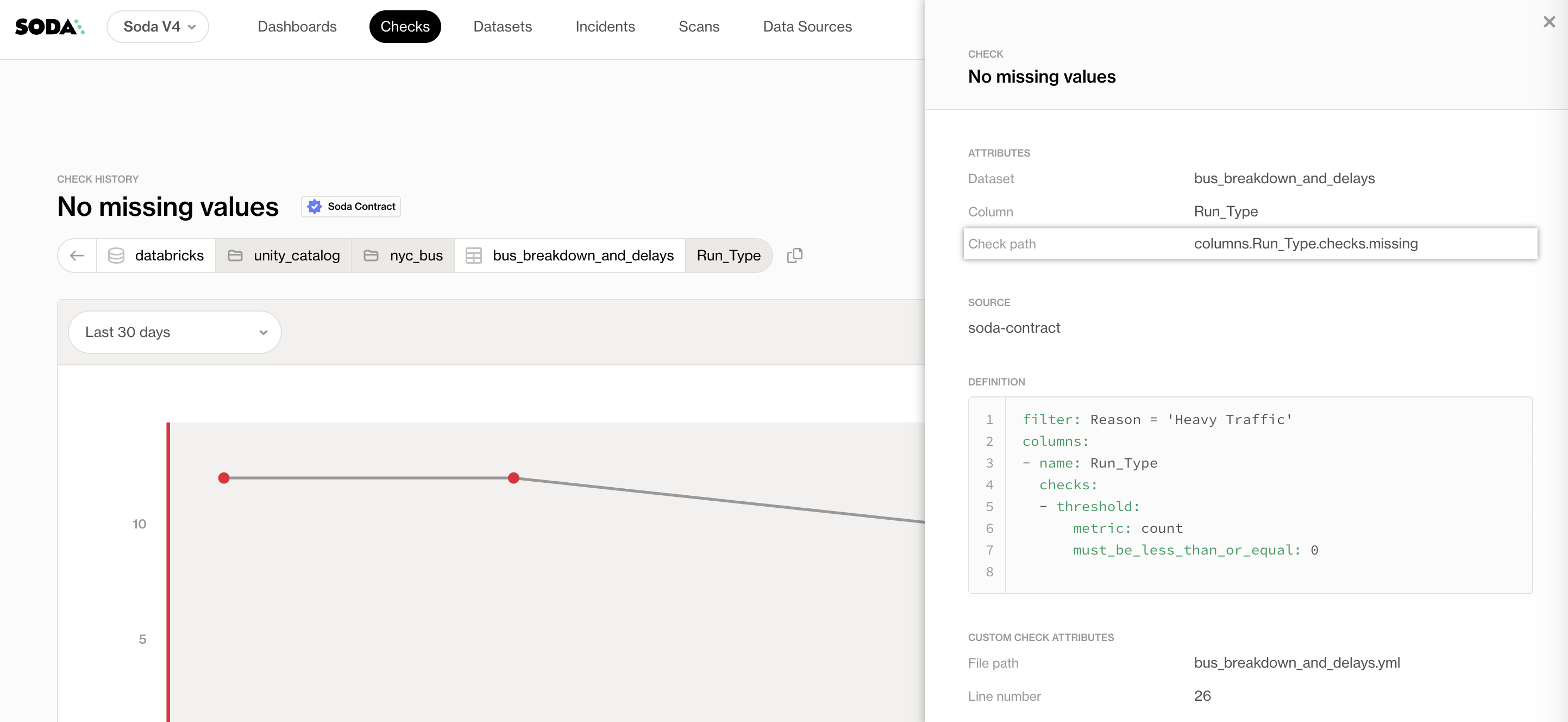
On Soda Cloud, the check path of a given check can be found on the check page in the check info panel.

Combining check filters and check paths
You can use --check-filter and --check-paths together. The path selectors from --check-paths are combined with any other check filters using AND logic across different fields.
Behavior and results
The behavior below applies to both --check-filter and --check-paths.
One or more valid filters or paths provided
Only matching checks are executed.
Empty --check-paths
e.g. ... --check-paths --verbose ...
Ignored; all checks execute.
No checks match the filters
e.g. ... -cf type=nonexistent
No checks execute.
Partial match
e.g. ... -cf type=freshness -cf type=nonexistent
Only matching checks execute (in this case, only the freshness check).
Results in Soda Cloud
When using --check-filter or --check-paths, only the checks matching the selection are executed.
Checks not matching the filters are not executed and therefore remain unchanged in Soda Cloud.
Their status, metrics, and results are not updated; they are effectively untouched during this run.
However, in the Reporting API, the response will include all checks defined in the contract, representing, for each scan, the outcomes of all checks.
Checks that were skipped (because they did not match the filters) are still present in the list of check results, but are marked with CheckResultsData.level: excluded.
You are not logged in to Soda and are viewing the default public documentation. Learn more about Documentation access & licensing.
Last updated
Was this helpful?
