> For the complete documentation index, see [llms.txt](https://docs.soda.io/llms.txt). Markdown versions of documentation pages are available by appending `.md` to page URLs; this page is available as [Markdown](https://docs.soda.io/soda-documentation/soda-v3/sodacl-reference/schema.md).
# Schema checks
Use a SodaCL schema check to validate column presence, absence, or position in a table, or the type of data column contains.
Use a schema check to validate the presence, absence or position of columns in a dataset, or to validate the type of data column contains.
```yaml
checks for dim_product:
- schema:
name: Confirm that required columns are present
warn:
when required column missing: [weight_unit_measure_code, product_subcategory_key, made_up_column]
fail:
when required column missing:
- product_key
- product_alternate_key
- schema:
warn:
when forbidden column present: [credit_card]
when wrong column type:
standard_cost: money
fail:
when forbidden column present: [pii*]
when wrong column type:
reorder_point: smallint
- schema:
name: Columns out of order
warn:
when wrong column index:
style: 1
fail:
when wrong column index:
model_name: 22
- schema:
name: Any schema changes
warn:
when schema changes: any
```
## Define schema checks
✖️ Requires Soda Core Scientific (included in a Soda Runner)\
✔️ Supported in Soda Core\
✔️ Supported in Soda Library + Soda Cloud\
✔️ Supported in Soda Cloud Agreements + Soda Runner\
✔️ Available as a no-code check with a self-hosted Soda Runner connected to any Soda-supported data source, except Spark, and Dask and Pandas\
OR\
with a Soda-hosted Runner connected to a BigQuery, Databricks SQL, MS SQL Server, MySQL, PostgreSQL, Redshift, or Snowflake data source\
In the context of [SodaCL check types](/soda-documentation/soda-v3/sodacl-reference/metrics-and-checks.md#check-types), schema checks are unique. Schema checks always employ alert configurations – specifying warn and/or fail alert conditions – with **validation keys**. Refer to [Add alert configurations](/soda-documentation/soda-v3/sodacl-reference/optional-config.md#add-alert-configurations) for exhaustive alert configuration details.
The validation key:value pairs in schema checks set the conditions for a warn or a fail check result. See a [List of validation keys](#list-of-validation-keys) below.
For example, the following check uses the `when required column missing` validation key to validate that specific columns are present in a dataset; if any of columns in the list are absent, the check result is fail.
```yaml
checks for dim_product:
- schema:
fail:
when required column missing:
- standard_cost
- list_price
- weight
```
In the example above, the value for the validation key is in a nested list format, but you can use an inline list of comma-separated values inside square brackets instead. The following example yields identical check results to the example above.
```yaml
checks for dim_product:
- schema:
fail:
when required column missing: [standard_cost, list_price, weight]
```
You can define a schema check with both warn and fail alert conditions, each with multiple validation keys. Refer to [Configure multiple alerts](/soda-documentation/soda-v3/sodacl-reference/optional-config.md#configure-multiple-alerts) for details. Be aware, however, that a single schema check only ever produces a *single check result*. See [Expect one check result](#expect-one-check-result) below for details.
The following example is a single check; Soda executes each of its validations during a scan. Note that unlike the nested list of column names in the example above, the nested key:value pairs that form the value for these validation keys are indented, but do not use a `-`.
```yaml
checks for dim_product:
- schema:
warn:
when forbidden column present: [standard_cost]
when wrong column type:
standard_cost: money
weight: double precision
fail:
when forbidden column present: [sombrero]
when wrong column type:
reorder_point: smallint
```
Add a `schema_name` parameter to a schema check to address a situation in which you need to explicitly identify or override a dataset's schema in the data source.
```yaml
checks for dim_employee:
- schema:
schema_name: staff.pr
name: Required columns present
warn:
when required column missing: [last_name, birth_date]
```
## Define schema evolution checks
✖️ Requires Soda Core Scientific (included in a Soda Runner)\
✖️ Supported in Soda Core\
✔️ Supported in Soda Library + Soda Cloud\
✔️ Supported in Soda Cloud Agreements + Soda Runner\
✔️ Available as a no-code check with a self-hosted Soda Runner connected to any Soda-supported data source, except Spark, and Dask and Pandas\
✔️ Available as a no-code check with a Soda-hosted Runner connected to a BigQuery, Databricks SQL, MS SQL Server, MySQL, PostgreSQL, Redshift, or Snowflake data source\
Rather than specifying exact parameters for column changes, you can use the `when schema changes` validation key to warn or fail when indistinct changes occur in a dataset.
Soda Cloud must have at least two measurements to yield a check result. In other words, the first time you run a scan to execute a schema evolution check, Soda returns no results because it has nothing against which to compare; the second scan that executes the check yields a check result.
```yaml
checks for dim_customer:
- schema:
warn:
when schema changes: any
fail:
when schema changes:
- column delete
- column add
- column index change
- column type change
```
The output in Soda Cloud displays the output of all the alert states during the scan.
## Optional check configurations
Apply an in-check filter to return results for a specific portion of the data in your dataset.
-
✓
Use quotes when identifying dataset or column names; see example. Note that the type of quotes you use must match that which your data source uses. For example, BigQuery uses a backtick (`) as a quotation mark.
#### Example with check name
```yaml
checks for dim_product:
- schema:
name: Confirm that required columns are present
warn:
when required column missing: [weight_unit_measure_code, product_subcategory_key]
```
#### Example with alert configuration
```yaml
checks for dim_product:
- schema:
warn:
when forbidden column present: [standard_cost]
```
#### Example with quotes
```yaml
checks for dim_product:
- schema:
warn:
when wrong column type:
standard_cost: "money"
```
#### Example with wildcards
You can use `*` or `%` as wildcard characters in a list of column names. If the column name begins with a wildcard character, add single quotes as per the example below.
```yaml
checks for dim_product:
- schema:
fail:
when forbidden column present:
- credit_card
- obsolete_%
- '%SALARY%'
- pii*
```
#### Example with for each
```yaml
for each dataset T:
datasets:
- dim_product_%
checks:
- schema:
warn:
when schema changes: any
```
#### Example with dataset filter
```yaml
filter CUSTOMERS [daily]:
where: TIMESTAMP '{ts_start}' <= "ts" AND "ts" < TIMESTAMP '${ts_end}'
checks for CUSTOMERS [daily]:
- schema:
fail:
when forbidden column present:
- credit_card
```
## List of validation keys
| Validation key | Values |
| ------------------------------- | ------------------------------------------------------------------------------------------------------------------------------------------------------------------------------------------------------------------------------------------------------------------ |
| `when required column missing` |
one or more column names in an inline list of comma-separated values, or a nested list
|
| `when forbidden column present` |
one or more column names in an inline list of comma-separated values, or a nested list
nested key:value pair to identify column:expected\_position\_in\_dataset\_index
|
| `when schema changes` |
any as an inline value column add as a nested list item column delete as a nested list item column index change as a nested list item column type change as a nested list item
|
## Expect one check result
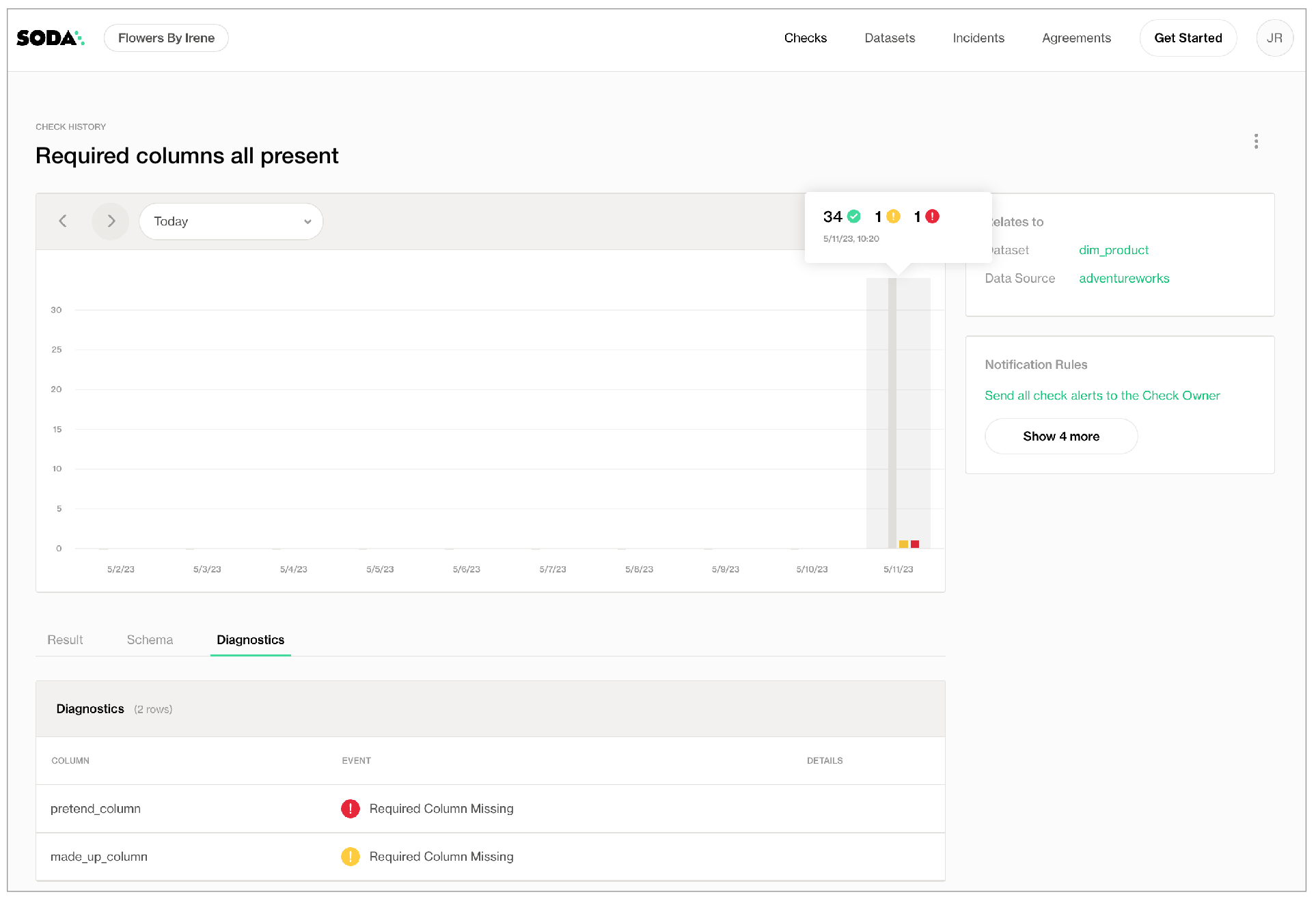
Be aware that a check that contains one or more alert configurations only ever yields a *single* check result; one check yields one check result. If your check triggers both a `warn` and a `fail`, the check result only displays the more severe, failed check result.
Using the following example, Soda Library, during a scan, discovers that the data in the dataset triggers both alerts, but the check result at the bottom is `Oops! 1 failures`. Nonetheless, the results in the `Scan summary` section of the CLI output still display both the warn and fail alerts as having been triggered.
```yaml
checks for dim_product:
- schema:
name: Required columns all present
warn:
when required column missing: [weight_unit_measure_code, product_subcategory_key, made_up_column]
fail:
when required column missing: [pretend_column]
```
```shell
Soda Library 1.0.x
Soda Core 3.0.x
Scan summary:
1/1 check FAILED:
dim_product in adventureworks
Required columns all present [FAILED]
fail_missing_column_names = [pretend_column]
warn_missing_column_names = [made_up_column]
schema_measured = [product_key integer, product_alternate_key character varying ...]
Oops! 1 failures. 0 warnings. 0 errors. 0 pass.
Sending results to Soda Cloud
Soda Cloud Trace: 7845***
```
## Example: Detect PII
To address a common use case, you may wish to use a schema check in combination with a for each configuration and wildcard characters to automatically detect columns that contain personally identifiable information (PII) in your datasets, as in the following example.
```yaml
for each dataset R:
tables:
# Apply the check to any dataset that begins with retail.
- retail%
checks:
- schema:
fail:
when forbidden column present: ['*name*', '*address*', '*phone*', '*email*']
```
## Go further
* Learn more about [SodaCL metrics and checks](/soda-documentation/soda-v3/sodacl-reference/metrics-and-checks.md) in general.
* Use a [reference check](/soda-documentation/soda-v3/sodacl-reference/reference.md) to validate matching contents between datasets.
* Reference [tips and best practices for SodaCL](/soda-documentation/soda-v3/soda-cl-overview/quick-start-sodacl.md#tips-and-best-practices-for-sodacl).
> Need help? Join the [Soda community on Slack](https://community.soda.io/slack).
---
# Agent Instructions
This documentation is published with GitBook. GitBook is the documentation platform designed so that both humans and AI agents can read, navigate, and reason over technical content effectively. Learn more at gitbook.com.
## Querying This Documentation
If you need additional information that is not directly available in this page, you can query the documentation by asking a question.
Perform an HTTP GET request on the following URL with the `ask` and `goal` query parameters:
```
GET https://docs.soda.io/soda-documentation/soda-v3/sodacl-reference/schema.md?ask=&goal=
```
`ask` is the immediate question: it should be specific, self-contained, and written in natural language.
`goal` is what the user is ultimately trying to achieve, the reason they need the answer. Sharing it helps GitBook give you a better, more relevant answer. A goal is most helpful when it describes the outcome the user wants rather than restating the question. For example, with `ask=how do I create an API token`, a goal like `automate deployments from our CI pipeline` lets GitBook tailor the answer to that use case.
The response will contain a direct answer to the question and relevant excerpts and sources from the documentation.
Use this mechanism when the answer is not explicitly present in the current page, you need clarification or additional context, or you want to retrieve related documentation sections.