Loading...
Loading...
Loading...
Loading...
Loading...
Loading...
Loading...
Loading...
Loading...
Loading...
Loading...
Loading...
Access a glossary of Soda terminology.
Soda's licensing model is based on the volume of active checks. An active check is one that Soda has executed during a scan at least once in the past 90 days. A single check, whether it has been executed during a scan one time, fifty times, or five hundred times in the last 90 days counts as an active check.
(Deprecating) A collection of checks that serve as a contract between stakeholders that stipulates the expected and agreed-upon state of data quality in a data source.
A configuration in a SodaCL check that you use to explicitly specify the conditions that warrant a warn result. See .
An out-of-the-box metric that you can configure in a checks YAML file. See .
A test for data quality that you write using the Soda Checks Language (SodaCL). Technically, it is a Python expression that checks metrics to see if they match the parameters you defined for a measurement. See .
The file in which you define SodaCL checks. Soda Library uses the input from this file to prepare, then run SQL queries against your data. See .
The component in Soda Cloud that stores metric measurements. This component facilities the visualization of changes to your data over time.
A saved set of filters in the Checks dashboard that you can access via a dropdown. Also known as a Saved View.
A column in a dataset in your data source.
The key in the key-value pair that you use to define what qualifies as a missing or valid value in a column. A Soda scan uses the value of a column configuration key to determine if a check should pass, warn, or fail. For example, in valid format: UUID , valid format is a column configuration key and UUID is the only format of the data in the column that Soda considers valid. See and .
The file in which you configure data source connection details and Soda Cloud connection details.
A storage location that contains a collection of datasets, such as Snowflake, Amazon Athena, or GCP BigQuery.
A representation of a tabular data structure with rows and columns. A dataset can take the form of a table in PostgreSQL or Snowflake, a stream, or a DataFrame in a Spark application.
A collaborative messaging and check proposal space that data producers and consumers can use to establish agreed-upon rules for data quality. See: .
A ticket you create and associate with a failed check result so as to track your team’s investigation and resolution of a data quality issue. See .
The value for a metric that Soda Library collects during a scan.
A property of the data in your dataset. See .
(Deprecated) A set of details you define in Soda Cloud which Soda SQL used when it ran a scan. Now deprecated and replaced by a .
A SodaCL check you create via the Soda Cloud user interface.
A setting you configure in a Soda Cloud agreement that defines whom to notify with check results after a scan.
The file in which you define SodaCL reconciliation checks. See .
A command that executes checks to extract information about data in a data source. See .
A collection of checks YAML files that contain the checks for data quality you wish to scan at a specific time, including details for which Soda Agent to use to connect to which data source. Effectively, a scan definition provides the what, when, and where to run a scan.
A unique identifier that you add to a programmatic scan or to the soda scan command using the -s option. Soda Cloud uses the scan definition name to correlate subsequent scan results, thus retaining an historical record of the measurements over time.
The schedule you customize in Soda Cloud to instruct a Soda Agent to execute scans at a regular cadence.
The self-hosted or Soda-hosted Helm chart that faciliates a secure connection between your Soda Cloud account and your data sources. See .
The domain-specific language to define Soda Checks in a checks YAML file. A Soda Check is a test that Soda Library executes when it scans a dataset in your data source.
A web application that enables you to examine scan results and create agreements. Create a Soda Cloud account at .
A free, open-source, Python library and command-line tool that enables you to use the Soda Checks Language to turn user-defined input into aggregated SQL queries that test for data quality. See Soda Core in .
A Python library and CLI tool that is a commercial extension of Soda Core. Connect Soda Library with over a dozen data sources and Soda Cloud, and use the Soda Checks Language to turn user-defined input into aggregated SQL queries that test for data quality.
Soda Spark was an extension of Soda SQL that allowed you to run Soda SQL functionality programmatically on a Spark DataFrame. It has been replaced by Soda Library configured to .
Soda SQL was an open-source command-line tool that scanned the data in your data source. Replaced by Soda Library.
The value for a metric that Soda checks against during a scan. See .
In Soda Cloud, the key-value pair that you use to define what qualifies as a missing valid value in a column. A Soda scan uses the value defined in a validity rule to determine if it should pass or fail a check. See also: .
To understand how users are using Soda Library, the Soda dev team added telemetry event tracking to Soda Library. See instructions to opt-out.
To understand how users are using Soda Library, and to proactively capture bugs and performance issues, the Soda development team has added telemetry event tracking to Soda Library.
Soda tracks usage statistics using the Open Telemetry Framework. The data Soda tracks is completely anonymous, does not contain any personally identifiying information (PII) in any form, and is purely for internal use.
Soda Library collects usage statistics by default. You can opt-out from sending Soda Library usage statistics at any time by adding the following to your ~/.soda/config.yml or .soda/config.yml
For the open source developer tools and free trial version of our software, Soda offers free support to the Soda community of users in Slack.
For the open source developer tools and free trial version of our software, Soda offers free support to the Soda community of users in Slack. Join the Soda community in Slack to ask and answer questions.
Community memebers are also welcome to create and/or resolve issues in the public, open-source Soda Core repository in GitHub.
For customers using Soda Cloud Enterprise, Soda adheres to a Service Level Agreement (SLA) that outlines the support and maintenance services that Soda provides.
Generally speaking, the SLA for enterprise customers outlines Soda Cloud availability and Soda's incident and error support. Refer to the official SLA in your Enterprise contract for details.
Note, if you use a Soda Agent you deployed in a Kubernetes cluster, you cannot opt out of sending usage statistics.
Learn How Soda works.
send_anonymous_usage_stats: falseSoda SQL and Soda Spark have been deprecated and replaced by Soda Core.
The very first Soda OSS tools, Soda SQL and Soda Spark, served their community well since 2021. They have been deprecated. about the decision to deprecate and move forward with Soda Core.
Soda SQL was the original command-line tool that Soda created to test for data quality. It has been replaced by Soda Core.
Soda Spark was an extension of Soda SQL that allowed you to run Soda SQL functionality programmatically on a Spark DataFrame. It has been replaced by Soda Core configured to [connect with Apache Spark](
).
The GitHub repository for the legacy tools has been archived but is still read-only accessible, including the documentation.
Establish a baseline understanding of the concepts involved in deploying a Soda Agent.
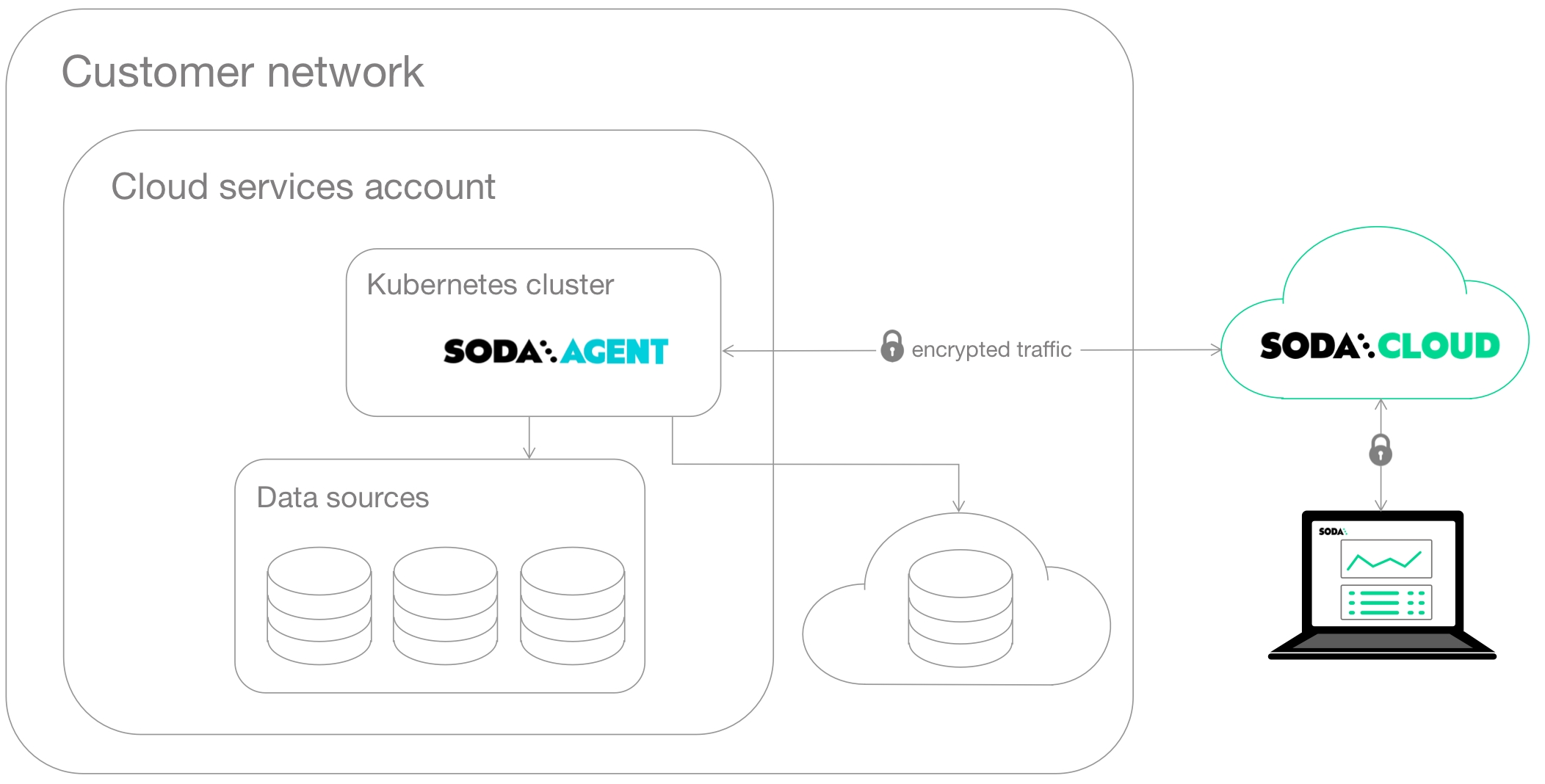
The Soda Agent is a tool that empowers Soda Cloud users to securely access data sources to scan for data quality. For a self-hosted agent, create a Kubernetes cluster in a cloud services provider environment, then use Helm to deploy a Soda Agent in the cluster.
This setup enables Soda Cloud users to securely connect to data sources (Snowflake, Amazon Athena, etc.) from within the Soda Cloud web application. Any user in your Soda Cloud account can add a new data source via the agent, then write their own no-code checks to check for data quality in the new data source.
What follows is an extremely abridged introduction to a few basic elements involved in the deployment and setup of a self-hosted Soda Agent.
Soda Library is a Python library and command-line tool that serves as the backbone of Soda technology. It is the software that performs the work of converting user-defined input into SQL queries that execute when you run scans for data quality in a data source. Connect Soda Library to a Soda Cloud account where you and your team can use the web application to collaborate on data quality monitoring.
Both Soda Library and Soda Cloud make use of Soda Checks Language (SodaCL) to write checks for data quality. The checks are tests that Soda Library executes when it runs a scan of your data.
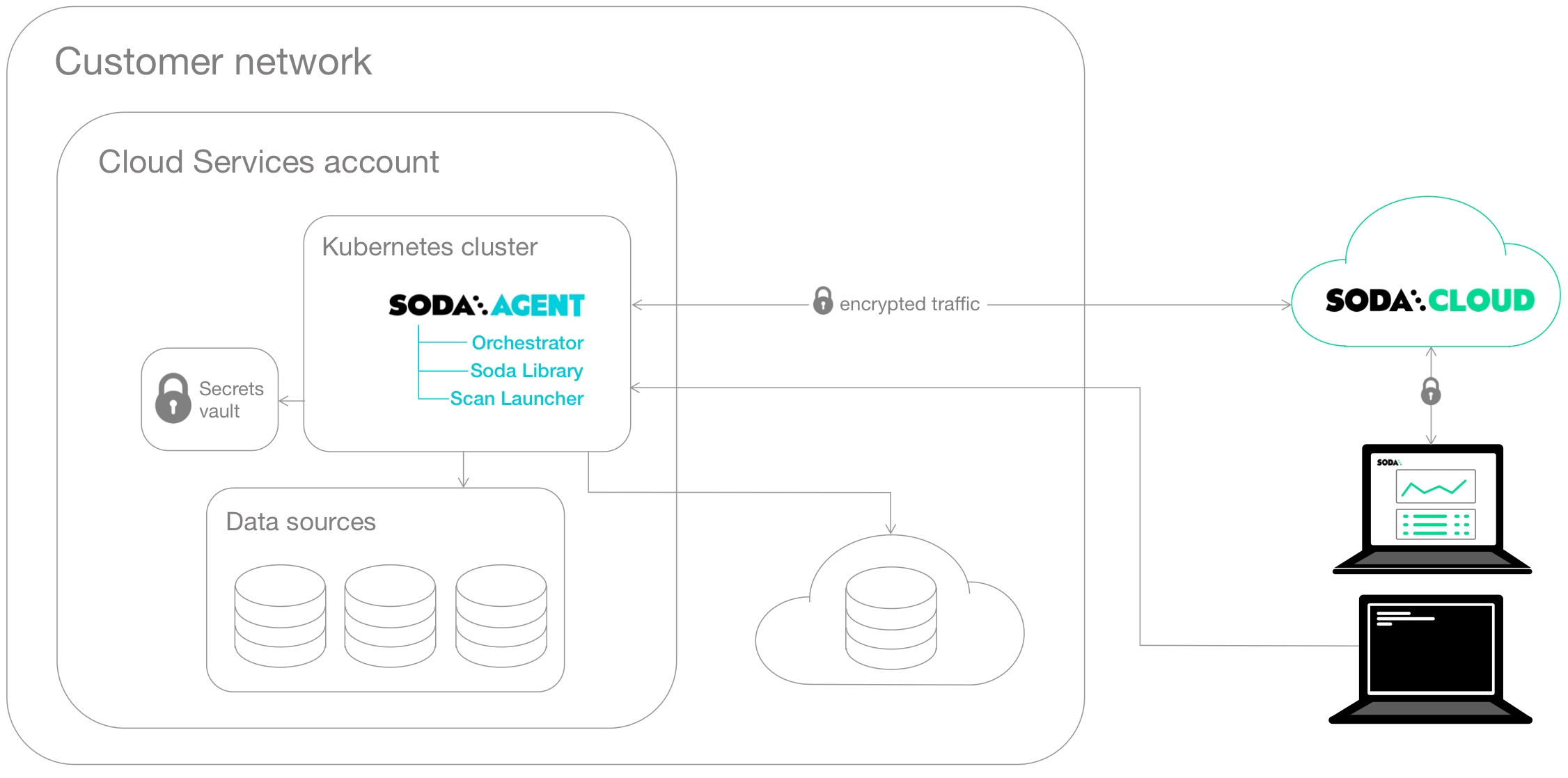
Soda Agent is essentially Soda Library functionality that you deploy in a Kubernetes cluster in your own cloud services provider environment. When you deploy an agent, you also deploy two types of workloads in your Kubernetes cluster from a Docker image:
a Soda Agent Orchestrator which creates Kubernetes Jobs to trigger scheduled and on-demand scans of data
a Soda Agent Scan Launcher which wraps around Soda Library, the tool which performs the scan itself
Kubernetes is a system for orchestrating containerized applications; a Kubernetes cluster is a set of resources that supports an application deployment.
You need a Kubernetes cluster in which to deploy the containerized applications that make up the Soda Agent. Kubernetes uses the concept of Secrets that the Soda Agent Helm chart employs to store connection secrets that you specify as values during the Helm release of the Soda Agent. Depending on your cloud provider, you can arrange to store these Secrets in a specialized storage such as or . See: .
The Jobs that the agent creates access these Secrets when they execute. Learn more about .
Within a cloud services provider environment is where you create your Kubernetes cluster. You can deploy a Soda Agent in any environment in which you can create Kubernetes clusters such as:
Amazon Elastic Kubernetes Service (EKS)
Microsoft Azure Kubernetes Service (AKS)
Google Kubernetes Engine (GKE)
Any Kubernetes cluster version 1.21 or greater which uses standard Kubernetes
Helm is a package manager for Kubernetes which bundles YAML files together for storage in a public or private repository. This bundle of YAML files is referred to as a Helm chart. The Soda Agent is a Helm chart. Anyone with access to the Helm chart’s repo can deploy the chart to make use of YAML files in it. Learn more about .
The Soda Agent Helm chart is stored on a and published on . Anyone can use Helm to find and deploy the Soda Agent Helm chart in their Kubernetes cluster
in a Kubernetes cluster.
Soda works in several ways to ensure your data and systems remain private. We offer secure connections, SSO, and observe compliance and reporting regulations.
Soda works in several ways to ensure your data and systems are secure and remain private.
See also: Soda Privacy Policy
As a result of an independent review in July 2025, Soda has been found to be SOCII Type 2 compliant. Contact [email protected] for more information.
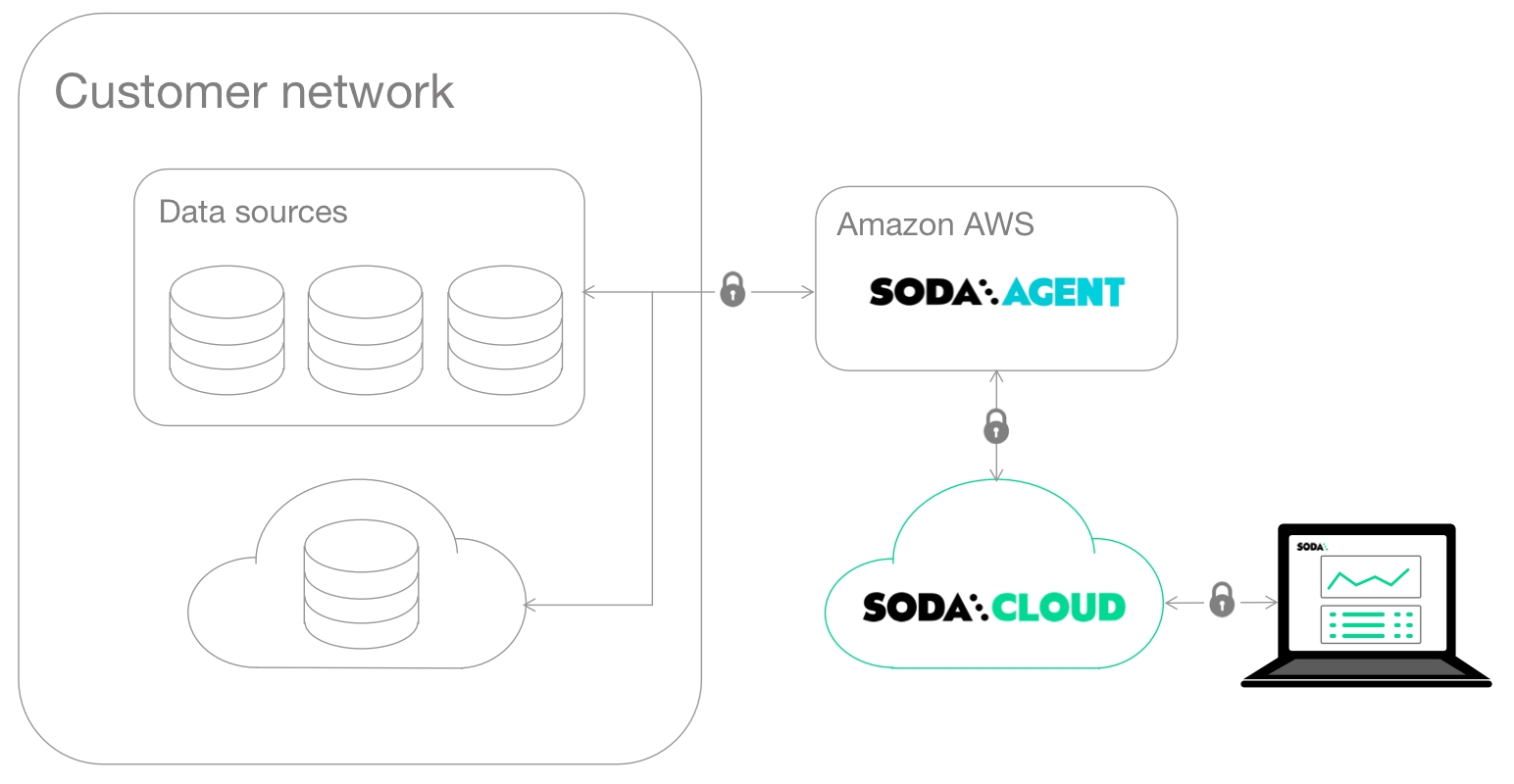
Soda hosts agents in a secure environment in Amazon AWS. As a SOC 2 Type 2 certified business, Soda responsibly manages Soda-hosted agents to ensure that they remain private, secure, and independent of all other hosted agents.
Soda encrypts values pertaining to data source connections and only uses the values to access the data to perform scans for data quality. It uses to encrypt and store the values you provide for access to your data source. AMS KMS keys are certified under the .
Soda encrypts the secrets you provide via Soda Cloud both in transit and at rest. This means that secrets leave your browser already encrypted and can only be decrypted using a Private Key that only the Soda Agent can access.
Once you enter data source access credentials into Soda Cloud, neither you or any user or entity can access the values because they have been encrypted and can only be decrypted by the Soda Agent.
Installed in your environment, you use the Soda Library command-line tools to securely connect to a data source using system variables to store login credentials.
Soda Library uses a secure API to connect to Soda Cloud. When Soda Library completes a scan, it pushes the scan results to your Soda Cloud account where you can log in and examine the details in the web application.
Notably, your Soda Cloud account does not store the raw data that Soda Library scans. Soda Library pushes metadata to Soda Cloud; by default all your data stays inside your private network.
Soda Cloud does store the following:
metadata, such as column names
aggregated metrics, such as averages
sample rows and failed rows, if you explicitly set up your configuration to send this data to Soda Cloud
Where your datasets contain or private information, you may not want to send failed row samples from your data source to Soda Cloud. In such a circumstance, you can in Soda Cloud.
Read more about Soda’s .
You can set up Soda Cloud to send events to your services using integrations like Soda Webhooks. If your destination services are behind a firewall, you may need to passlist Soda Cloud's egress IP addresses to allow communication. The current IP addresses used by Soda Cloud are:
EU: 54.78.91.111, 52.49.181.67
US: 34.208.202.240, 52.35.114.145
Ensure these addresses are allowed in your firewall settings to avoid any disruptions in receiving events from Soda Cloud.
Organizations that use a SAML 2.0 single sign-on (SSO) identity provider can add Soda Cloud as a service provider. Once added, employees of the organization can gain authorized and authenticated access to the organization’s Soda Cloud account by successfully logging in to their SSO. Refer to for details.
Locally, for testing purposes, using tools like Minikube, microk8s, kind, k3s, or Docker Desktop with Kubernetes support.
Need help? Join the .
If your data source accepts allowlisted IP addresses, add the Soda Cloud IP address to the allowlist to access your data sources via the Soda-hosted Agent. Obtain this IP address in Soda Cloud when connecting a new data source.
Learn more about active checks and datasets as they are defined in Soda's licensing model.
Soda’s licensing model can include volume-based measures of active checks, or a similar model based on active datasets.
An active dataset is one for which Soda has executed at least one check, excluding empty datasets. A dataset counts as active if you add configuration for:
a check
automated monitoring checks; see Add automated monitoring checks
an anomaly detection dashboard (available in 2025); see
An active check is one that Soda has executed during a scan at least once in the past 90 days. A single check, whether it has been executed during one scan, fifty scans, or five hundred scans in the last 90 days counts as one active check.
A single check is identifiable as a test that yields a single result.
A check with one or more counts as a single check. The following is an example of a single active check as it only ever yields one result: pass, warn, fail, or error. Note, A check that results in an error counts as an active check. Soda executes the check during a scan in order to yield a result; if the result is an error, it is still a result.
A check that is included as part of a configuration yields a single result for each dataset against which it is executed. The following example produces four check results and, thus, has four active checks and four active datasets.
Similarly, a single check that is included in a scan against two data sources, or two environments such as staging and production, counts as two active checks for two active datasets. The following example checks.yml file contains as a single check. The scan commands that follow instruct Soda to execute the check on two different environments which counts as two active checks for two active datasets. See also: .
A check that involves data comparison between multiple datasets in the same, or different, data sources counts as a single check. The following example has four checks, two and two , and counts as two active datasets.
Similarly, a that compares data between source and target datasets in the same, or different, data sources counts as a single active check running against a single active dataset which, for this type of check, is the target dataset. The following example has five active checks for five active datasets.
Where a check involves grouping its results by category, as in a configuration, the check itself still counts as a single check. The following example has one active check for one active dataset.
Access information about that you can use in SodaCL checks.
Reference the Soda Community Code of Conduct for guidelines for behaviors. Be safe, be respectful, be yourself.
This code of conduct describes the tenets of the inclusive and harassment-free environment that is the Soda Community. We do not tolerate harassment or discrimination of any participant in any form.
We are genuinely proud of our growing and enthusiastic Soda community, both on and offline. It is delightful to be a part of something new and exciting in the industry, and we want to keep it that way!
As such, we are dedicated to making sure the Soda community is a welcoming place for everyone to participate, collaborate, innovate, and have fun! It is this spirit that we offer this code of conduct and encourage all our members to be safe, be respectful, and be yourself.
We hope to maintain an environment in which all individuals can interact and collaborate in a positive way. Examples of behavior that contribute to creating a welcome environment include:
Need help? Join the .
Need help? Join the Soda community on Slack.
checks for dim_reseller:
  - duplicate_count(phone):
      warn: when between 1 and 10
fail: when > 10for each dataset T:
datasets:
- dim_employee
- dim_customer
- dim_product
- dim_reseller
checks:
- row_count:
fail:
when < 5
warn:
when > 10checks for dim_customer:
- row_count > 0soda scan -d snowflake_prod -c configuration.yml -s prod_run checks.yml
soda scan -d snowflake_staging -c configuration.yml -s stage_run checks.ymlchecks for dim_customer:
- row_count same as dim_department_group
- row_count same as retail_customers in aws_postgres_retail
checks for dim_department_group:
- values in (department_group_name) must exist in dim_employee (department_name)
- values in (birthdate) must not exist in dim_department_group_prod (birthdate)reconciliation Production:
datasets:
source:
dataset: dim_customer
datasource: mysql_adventureworks
target:
dataset: dim_customer
datasource: snowflake_retail
checks:
- row_count diff = 0
- duplicate_count(last_name):
fail: when diff > 10%
warn: when diff is between 5% and 9%
- avg(total_children) diff < 10
- rows diff < 5
- schema:
types:
- source: bit
target: boolean
- source: enum
target: stringchecks for fact_internet_sales:
- group by:
group_limit: 10
query: |
SELECT sales_territory_key, AVG(discount_amount) as average_discount
FROM fact_internet_sales
GROUP BY sales_territory_key
fields:
- sales_territory_key
checks:
- average_discount:
fail: when > 40
name: Average discount percentage is less than 40% (grouped-by sales territory)Using welcoming and inclusive language
Being respectful of differing viewpoints and experiences
Gracefully accepting constructive criticism
Focusing on what is best for the overall community
Showing empathy towards other community members
We appreciate your involvement in this community and your support in keeping it a fun and welcoming environment for all.
The Soda community does not tolerate harassment or discrimination of any kind.
Examples of harassment include:
Offensive comments or use of intimidating imagery or symbols related to a person’s identity, including: gender, gender identity and expression, sexual orientation, disability, mental illness, neuro(a)typicality, physical appearance, pregnancy status, veteran status, political affiliation, marital status, body size, age, race, color, disability, national origin, ethnic origin, nationality, immigration status, language, religion or lack thereof, socioeconomic status, or other identity marker.
Unwelcome comments regarding a person’s lifestyle choices and practices, including those related to food, health, parenting, relationships, drugs, and employment.
Deliberate misgendering, using inappropriate pronouns, or use of “dead” or rejected names.
Gratuitous or off-topic sexual images or behavior.
Physical contact and simulated physical contact (such as textual descriptions like “hug” or “backrub”) without consent or after a request to stop.
Threats of violence.
Incitement of violence towards any individual or group, including encouraging a person to commit suicide or to engage in self-harm.
Deliberate intimidation.
Stalking or following, online or in the physical world.
Harassing photography or recording, including logging online activity for harassment purposes.
Sustained disruption of discussion.
Unwelcome sexual attention.
Patterns of inappropriate social contact, such as requesting/assuming inappropriate levels of intimacy with others.
Continued one-on-one communication after requests to cease.
Deliberate “outing” of any aspect of a person’s identity, as mentioned above, without their consent except as necessary to protect vulnerable people from intentional abuse.
Publication of private communication.
Jokes that resemble the above, such as , still count as harassment even if meant satirically or ironically.
If you have questions or concerns about these rules, please send a Direct Message to a Soda employee or email [email protected].
If you are being harassed by a member of our community, notice that someone else is being harassed, or have any other concerns, please notify a Soda employee via Direct Message in Slack.
Note: If the person who is harassing you is a Soda employee, they will not be involved in handling or resolving the incident.
The Soda team will respond to any complaint as promptly as we can. If you do not get a timely response (for example, if no Soda employees are currently online) then please put your personal safety and well-being first, and consider logging out and/or contacting us by email at [email protected].
This code of conduct applies to our community’s spaces, but if you are being harassed by a member of our community outside our spaces, we still want to know about it. We will take all good-faith reports of harassment by our members seriously. This includes harassment outside our spaces and harassment that took place at any point in time. The Soda team reserves the right to exclude people from the Soda community based on their past behavior, including behavior outside of our spaces and behavior towards people who are not in this community.
In order to protect admins from abuse and burnout, we reserve the right to reject any report we believe to have been made in bad faith. Reports intended to silence legitimate criticism may be deleted or ignored without response.
Soda treats every code of conduct violation report with seriousness and care.
If a member’s immediate safety and security is threatened, an individual Soda employee may take any action that they deem appropriate, up to and including temporarily banning the offender from the Soda community. In less immediate situations, at least two Soda employees will discuss the offense and mutually arrive at a suitable response, which will be shared with the offender privately. Whatever the resolution that they decide upon, which may include permanent expulsion of the community member, the decision of the Soda employees involved in a violation case will be considered final.
We will respect confidentiality requests for the purpose of protecting victims of abuse. At our discretion, we may publicly name a person about whom we’ve received harassment complaints, or privately warn third parties about them, if we believe that doing so will increase the safety of our members or the general public. We will not name harassment victims without their affirmative consent.
This Code of Conduct is adapted from the Cribl.io code of conduct (https://cribl.io/code-of-conduct/), itself adapted from other community codes of conduct including the Community Covenant (http://community-covenant.net) and the and the LGBTQ in Tech community code of conduct (http://lgbtq.technology/coc.html).
We respectfully and gratefully acknowledge the effort that many people before us put into creating the rules to establish and maintain safe community environments.
Soda utilizes user-defined input to prepare SQL queries to find bad data, visualize results, set up alerts, and track dataset health over time.
Soda is a tool that enables Data Engineers, Data Scientists, and Data Analysts to test data for quality where and when they need to.
Is your data fresh?
Is it complete or missing values?
Are there unexpected duplicate values?
Did something go wrong during transformation?
Are all the date values valid?
Are anomalous values disrupting downstream reports?
These are questions that Soda answers.
Soda works by taking the data quality checks that you prepare and using them to run a scan of datasets in a data source.
A scan is a command which instructs Soda to execute data quality checks on your data source to find invalid, missing, or unexpected data. When data quality checks fail, they surface bad-quality data and present check results that help you investigate and address quality issues.
Working together, Soda Library or a Soda Agent, Soda Cloud and Soda Checks Language (SodaCL) empower you and your colleagues to collaborate on data quality testing.
Soda Library is a Python library and CLI tool that performs the work of converting user-defined input into SQL queries that execute when you run scans for data quality. This "engine" of Soda uses the data source connection information you provide in a configuration YAML file, and the data quality checks you define in a checks YAML file, to run on-demand or scheduled scans of your data. Soda Library pushes scan results to your Soda Cloud account to enable you and your colleagues to analyze check results, investigate issues, and track dataset health over time.
The Soda Agent is a self-hosted or Soda-hosted containerized Soda Library deployed in a Kubernetes cluster in a cloud services provider environment, such as Azure or AWS. Deploy a self-hosted Soda Agent to use Soda Library while meeting infrastructure team’s security rules and requirements. See for details.
Soda Cloud communicates with Soda Library installed as a library and CLI tool in your development environment, or as an agent in your cloud service-based environment. While Soda Library is the mechanism that executes scans, Soda Cloud is what makes data quality results accessible and shareable by multiple team members. Use it to access visualized scan results, discover data quality anomalies, set up alerts for quality checks that fail, and track data quality health over time. Connect your Soda Cloud account to the ticketing, messaging, and data cataloging tools you already use to embed Soda quality checks into your team's existing processes and pipelines.
Soda uses the input in the checks YAML files to prepare SQL queries that it runs against your data during a scan. During a scan, Soda does not ingest your data, it only scans it for quality metrics, then uses the metadata to prepare scan results. (An exception to this rule is when Soda collects failed row samples that it presents in scan output to aid with issue investigation, a feature you can .
After a scan, each check results in one of three default states:
pass: the values in the dataset match or fall within the thresholds you specified
fail: the values in the dataset do not match or fall within the thresholds you specified
error: the syntax of the check is invalid
A fourth state, warn, is something you can explicitly configure for individual checks.
Soda makes the results available in the command-line and in your online account, and notifies you of failed checks by email, Slack, MS Teams, or any messaging platform your team already uses.
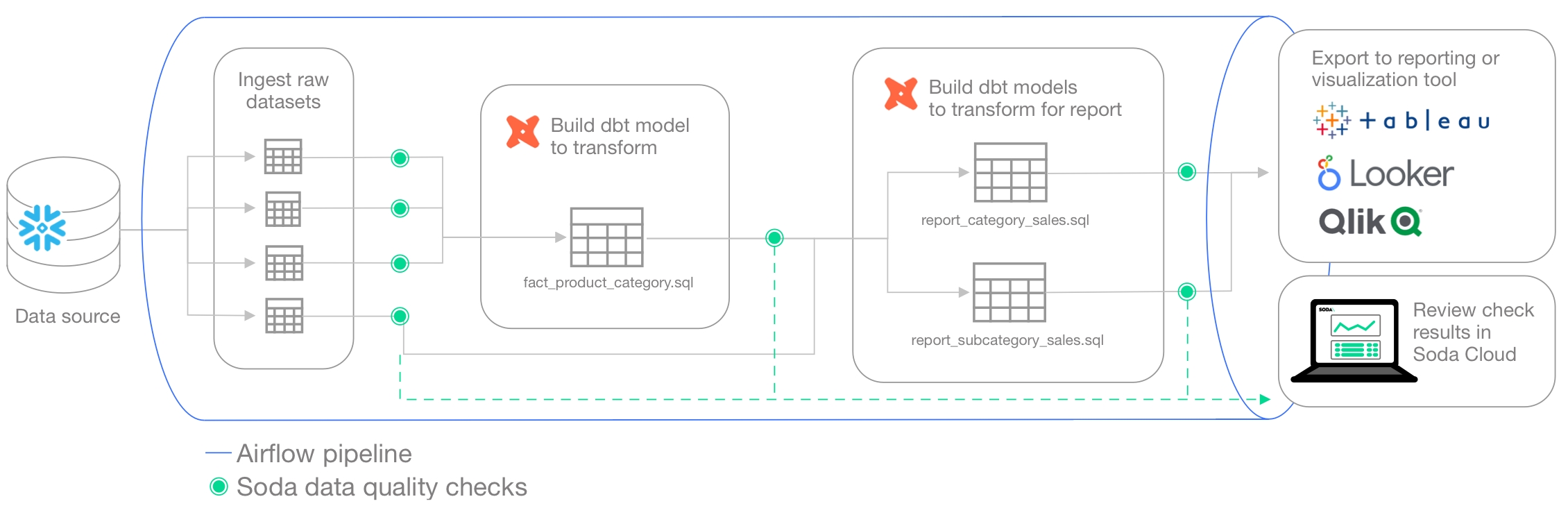
You can programmatically embed Soda scan executions in your data pipeline after ingestion and transformation to get early and precise warnings in Soda about data quality issues before they have a downstream impact. Upon receiving a data quality alert in Slack, for example, your team can take quick action in Soda Cloud to identify the issue and open an incident to investigate the root cause. See .
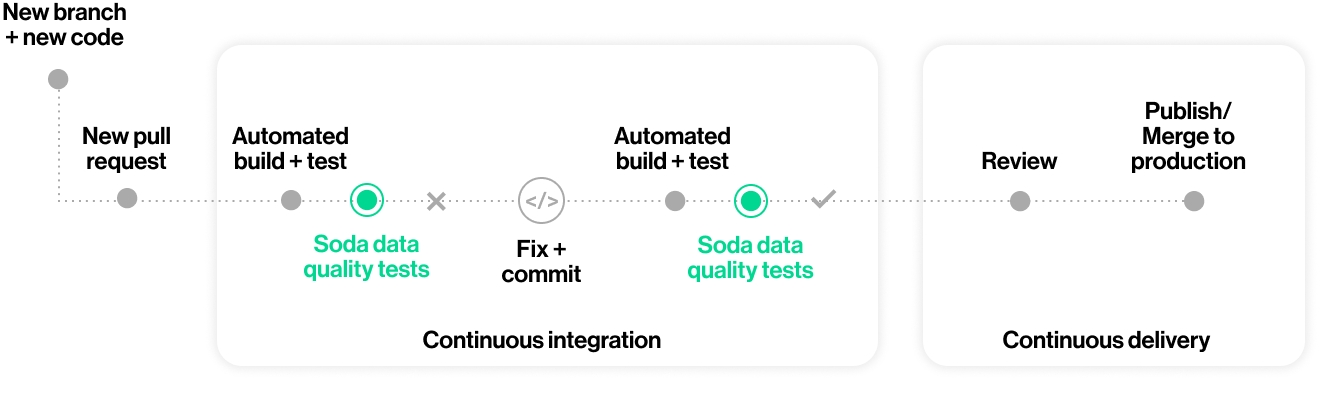
You can also add Soda scans to your CI/CD development lifecycle to ensure that any changes you make to dbt models or other changes or added transformations are checked for data quality before merging into production, preventing data quality issues from impacting business operations. In conjunction with GitHub Actions, for example, you can automate scans for data quality whenever a team member creates a new pull request to ensure that “checking for data quality” is a regular part of your software development lifecycle. An ounce of prevention in development is worth a pound of cure in production! See .
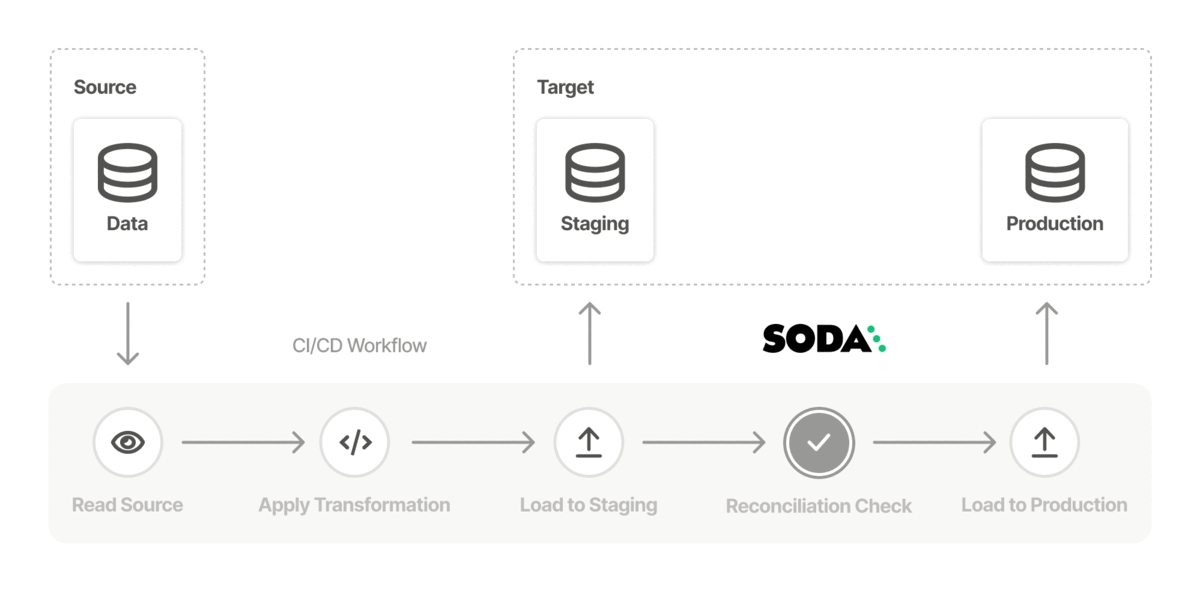
Use Soda to test the quality in a data migration project at both source and target, both before and after migration to prevent data quality issues from polluting a new data source. See .
Learn more about the ways you can use Soda in .
with your data catalog.
Auto-generate tailored to your data.
Set up bulk to send alerts for failed checks.
To define data quality checks, you use the Soda Checks Language (SodaCL), which is a YAML-based, domain-specific language for data quality testing. A Soda check is a test that Soda Library executes when it scans a dataset in your data source. Technically, it is a Python expression that checks metrics to see if they match the parameters you defined for a measurement. Designed as a human-readable language, SodaCL includes over 25 built-in metrics and checks that you can use to write Soda Checks for data quality, including metrics for missing values, duplicates, schema changes, and freshness; see example below.
Create incidents to track issue investigation.
Use the Soda Cloud Reporting API to prepare reports on dataset test coverage and overall health.
Automatically profile your datasets.
Use failed row samples to investigate data quality issues.
Write custom SQL checks for your own use cases.
Ingest dbt test results into your Soda Cloud account to visualize results and track trends over time.
Need help? Join the Soda community on Slack.
Learn Soda Library Basics, Soda Library Operation, Soda Library Automation and Soda Cloud.
Soda Library is Python library and CLI tool that enables Data Engineers to test data for quality where and when they need to. The Soda Agent is a self-hosted or Soda-hosted containerized Soda Library deployed in a Kubernetes cluster, so the behavior described below for Soda Library is more or less the same for Soda Agent.
Soda Library utilizes user-defined input to prepare SQL queries that run checks on datasets in a data source to find invalid, missing, or unexpected data. When checks fail, they surface the data that you defined as “bad” in the check. Armed with this information, you and your data engineering team can diagnose where the “bad” data entered your data pipeline and take steps to prioritize and resolve issues.
Use Soda Library to manually or programmatically scan the data that your organization uses to make decisions. Optionally, you can integrate Soda Library with your data orchestration tool, such as Airflow, to schedule scans and automate actions based on scan results. Connect Soda Library to a Soda Cloud account where you and your team can use the web application to monitor check results and collaborate to keep your data issue-free.
This tool checks the quality of data inside . It enables you to perform four basic tasks:
connect to your data source
connect to a Soda Cloud account
define checks to surface bad-quality data
run a scan for data quality against your data
To connect to a data source such as Snowflake, Amazon Athena, or GCP BigQuery, you use a configuration.yml file which stores access details for your data source and connection details for your Soda Cloud account. (Except for connections to Spark DataFrames which do not use a configuration YAML file.) Refer to for details and links to data source-specific connection configurations.
To define the data quality checks that Soda Library runs against a dataset, you use a checks.yml file. A Soda Check is a test that Soda Library performs when it scans a dataset in your data source. The checks YAML file stores the Soda Checks you write using .
For example, you can define checks that look for things like missing or forbidden columns in a dataset, or rows that contain data in an invalid format. See for more details.
In your own local environment, you create and store your checks YAML file anywhere you wish, then identify its name and filepath in the scan command. In fact, you can name the file whatever you like, as long as it is a .yml file and it contains checks using the SodaCL syntax.
You write Soda Checks using SodaCL’s built-in metrics, though you can go beyond the built-in metrics and write your own SQL queries, if you wish. The example above illustrates two simple checks on two datasets, but SodaCL offers a wealth of that enable you to define checks for more complex situations.
To scan your data, you use the soda scan CLI command. Soda Library uses the input in the checks YAML file to prepare SQL queries that it runs against the data in one or more datasets in a data source. It returns the output of the scan with each check's results in the CLI.
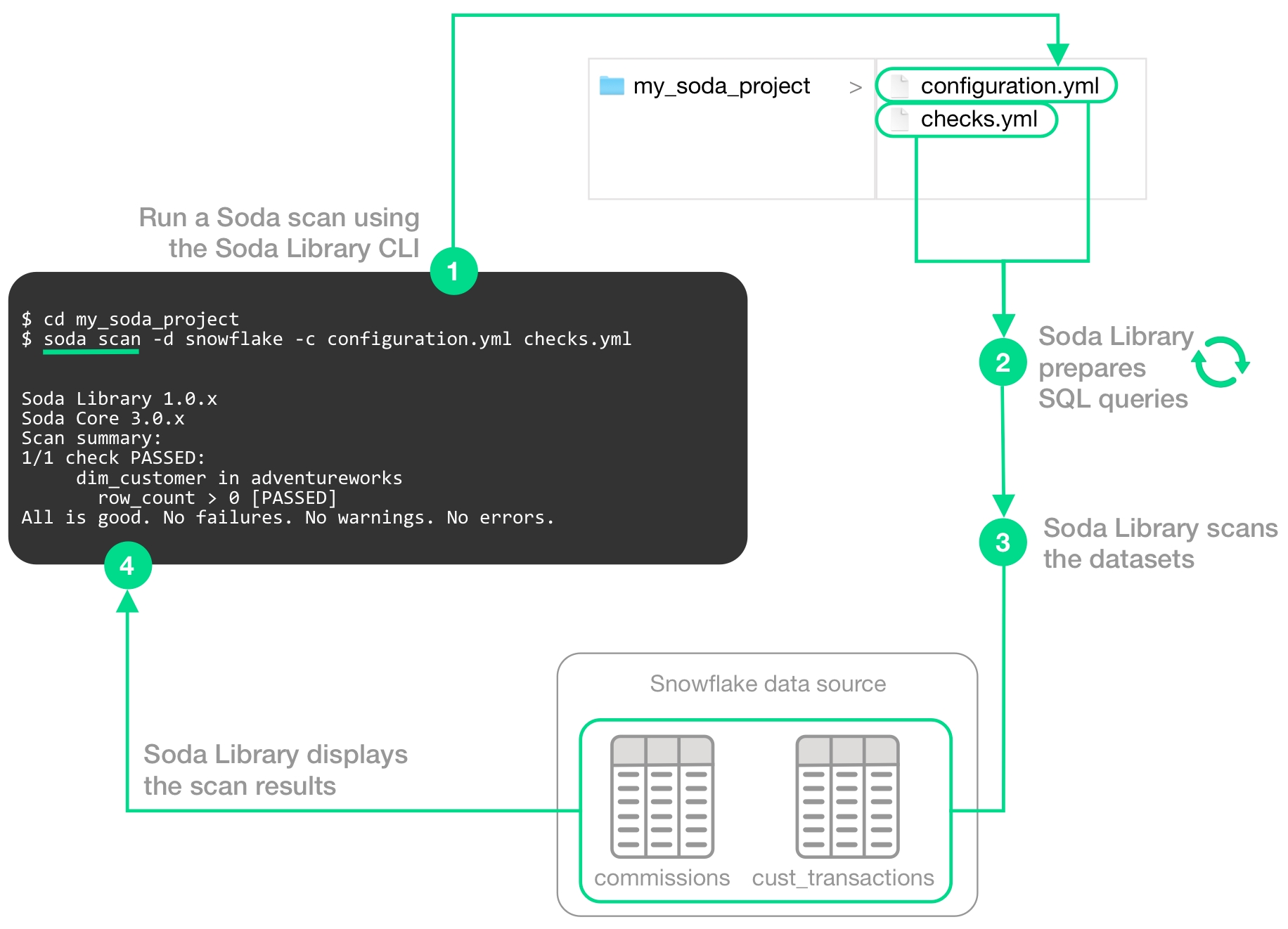
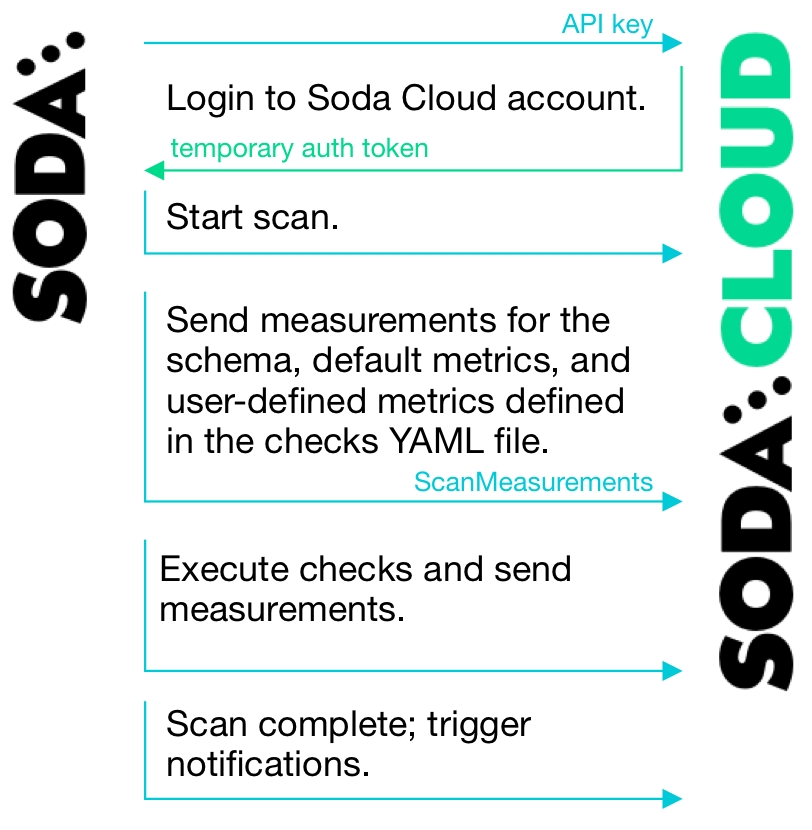
The following image illustrates what Soda Library does when you initiate a scan.
1 - You trigger a scan using the soda scan CLI command from your Soda project directory which contains the configuration.yml and checks.yml files. The scan specifies which data source to scan, where to get data source access info, and which checks to run on which datasets.
2 - Soda Library uses the checks you defined in the checks YAML to prepare SQL queries that it runs on the datasets in your data source.
3 - When Soda Library runs a scan, it performs the following actions:
fetches column metadata (column name, type, and nullable)
executes a single aggregation query that computes aggregate metrics for multiple columns, such as missing, min, or max
for each column each dataset, executes several more queries
4 - As a result of a scan, each check results in one of three default states:
pass: the values in the dataset match or fall within the thresholds you specified
fail: the values in the dataset do not match or fall within the thresholds you specified
error: the syntax of the check is invalid
A fourth state, warn, is something you can explicitly configure for individual checks. See .
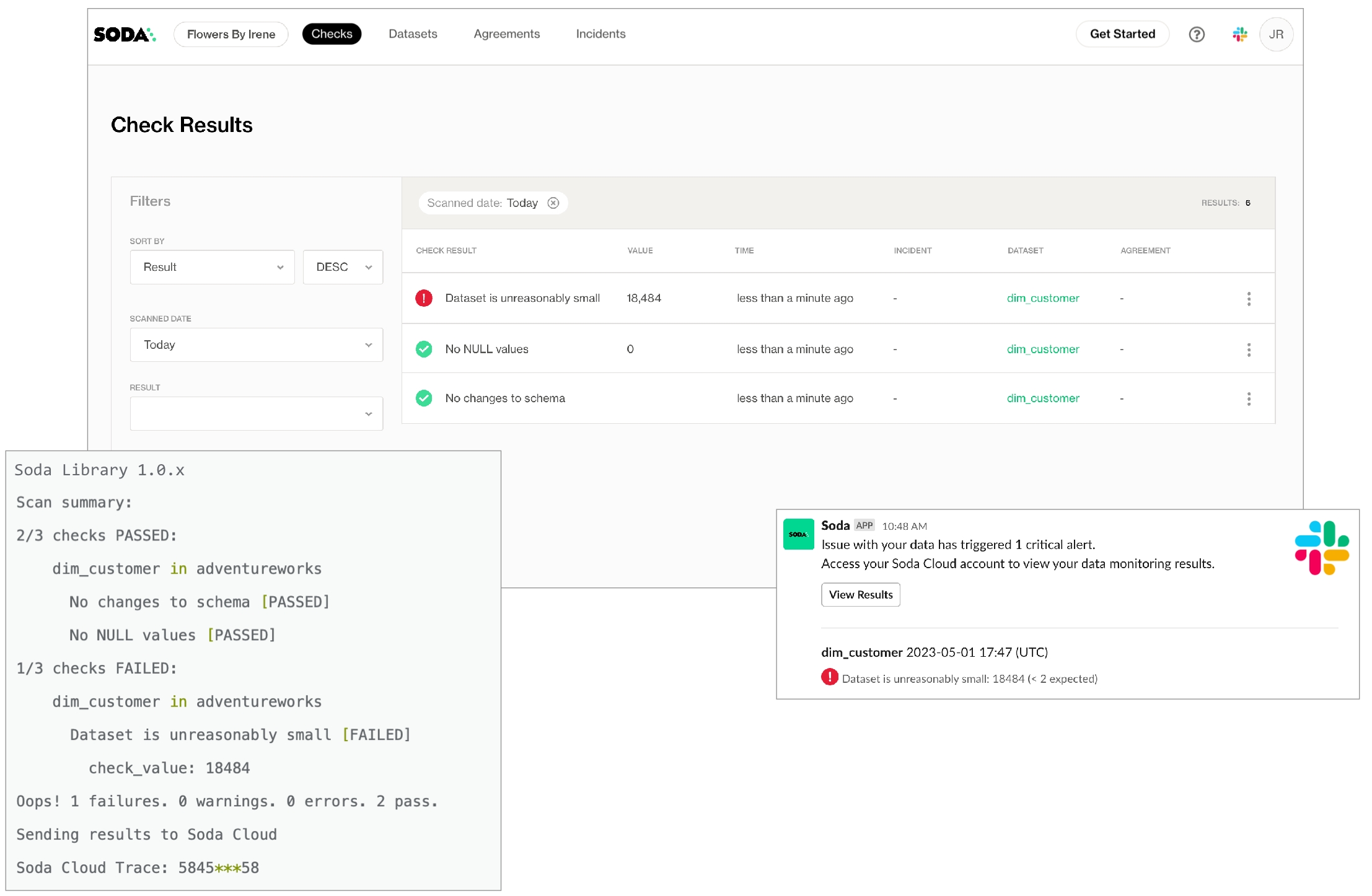
The scan results appear in your Soda Library command-line interface (CLI) and the latest result appears in the Checks dashboard in the Soda Cloud web application; examples follow.
Optionally, you can add --local option to the scan command to prevent Soda Library from sending check results and any other metadata to Soda Cloud.
The Soda Cloud web application integrates with your Soda Library implementation giving your team broader visibility into your organization’s data quality. Soda Library pushes scan results to your Soda Cloud account where you can examine the results.
Soda Library does not send data to Soda Cloud; it only ever pushes metadata to the cloud. All your data stays inside your private network. An exception to this rule is when Soda collects failed row samples that it presents in scan output to aid with issue investigation, a feature you can .
The web app serves to complement Soda Library. Use Soda Cloud to:
access visualized check results
track check results over time with the Cloud Metric Store that records past measurements
set up and send alert notifications when bad-quality data surfaces
examine failed row samples
To automate scans on your data, you can use Soda Library to programmatically execute scans. Based on a set of conditions or a specific schedule of events, you can instruct Soda Library to, for example, automatically run scans in your development workflow in GitHub. Refer to the for details.
Alternatively, you can integrate Soda Library with a data orchestration tool such as, Airflow, Dagster, or Prefect to schedule automated scans. You can also configure actions that the orchestration tool can take based on scan output. For example, you may wish to scan your data at several points along your data pipeline, perhaps when new data enters a warehouse, after it is transformed, and before it is exported to another data source or tool. Refer to for details.
Learn more about the you can use to check for data quality.
Learn how to prepare of your data.
Learn more about the ways you can use Soda in .
Use to investigate data quality issues.
checks for CUSTOMERS:
  - row_count > 0:
    name: Dataset is not empty
  - missing_count(last_name) = 0:
      missing values: [N/A, None]
      name: No NULL values
  - duplicate_count(phone) < 0:
      name: All phone numbers unique
  - schema:
      name: Columns have been added, removed, or changed
      warn:
        when required column missing: [id, size, distance]
        when forbidden column present: [pii_%]
        when wrong column type:
          id: varchar
          distance: integer
        when wrong column index:
          id: 0

checks for ORDERS:
  - freshness(created_at) < 2h:
      name: Data is recent
profile columns and examine sample data
create and track data quality incidents so your team can collaborate in Slack to resolve them
collaborate with team members to review details of scan results that can help you to diagnose data issues
Write custom SQL checks for your own use cases.
data_source adventureworks:
  type: postgres
  host: localhost
  port: '5432'
  username: postgres
  password: secret
  database: postgres
  schema: public

soda_cloud:
  host: cloud.soda.io
  api_key_id: 2e0ba0cb-**7b
api_key_secret: 5wdx**aGuRg# Check for absent or forbidden columns in dataset
checks for dataset_name:
- schema:
warn:
when required column missing: [column_name]
fail:
when forbidden column present: [column_name, column_name2]
# Check an email column to confirm that all values are in email format
checks for dataset_name:
- invalid_count(email_column_name) = 0:
valid format: emailsoda scan -d adventureworks -c configuration.yml checks.ymlSoda Library 1.0.x
Soda Core 3.0.x
Sending failed row samples to Soda Cloud
Scan summary:
6/9 checks PASSED:
paxstats in paxstats2
row_count > 0 [PASSED]
check_value: 15007
Look for PII [PASSED]
duplicate_percent(id) = 0 [PASSED]
check_value: 0.0
row_count: 15007
duplicate_count: 0
missing_count(adjusted_passenger_count) = 0 [PASSED]
check_value: 0
anomaly detection for row_count [PASSED]
check_value: 0.0
Schema Check [PASSED]
1/9 checks WARNED:
paxstats in paxstats2
Abnormally large PAX count [WARNED]
check_value: 659837
2/9 checks FAILED:
paxstats in paxstats2
Validate terminal ID [FAILED]
check_value: 27
Verify 2-digit IATA [FAILED]
check_value: 3
Oops! 2 failure. 1 warning. 0 errors. 6 pass.
Sending results to Soda Cloud
Soda Cloud Trace: 4774***8Review the architecture and resources of Soda which connects to data sources to perform scans of datasets
Your Soda architecture depends upon the flavor of Soda (deployment model) you chose when you set up your environment. The following offers a high-level view of the architecture of a few flavors of Soda.
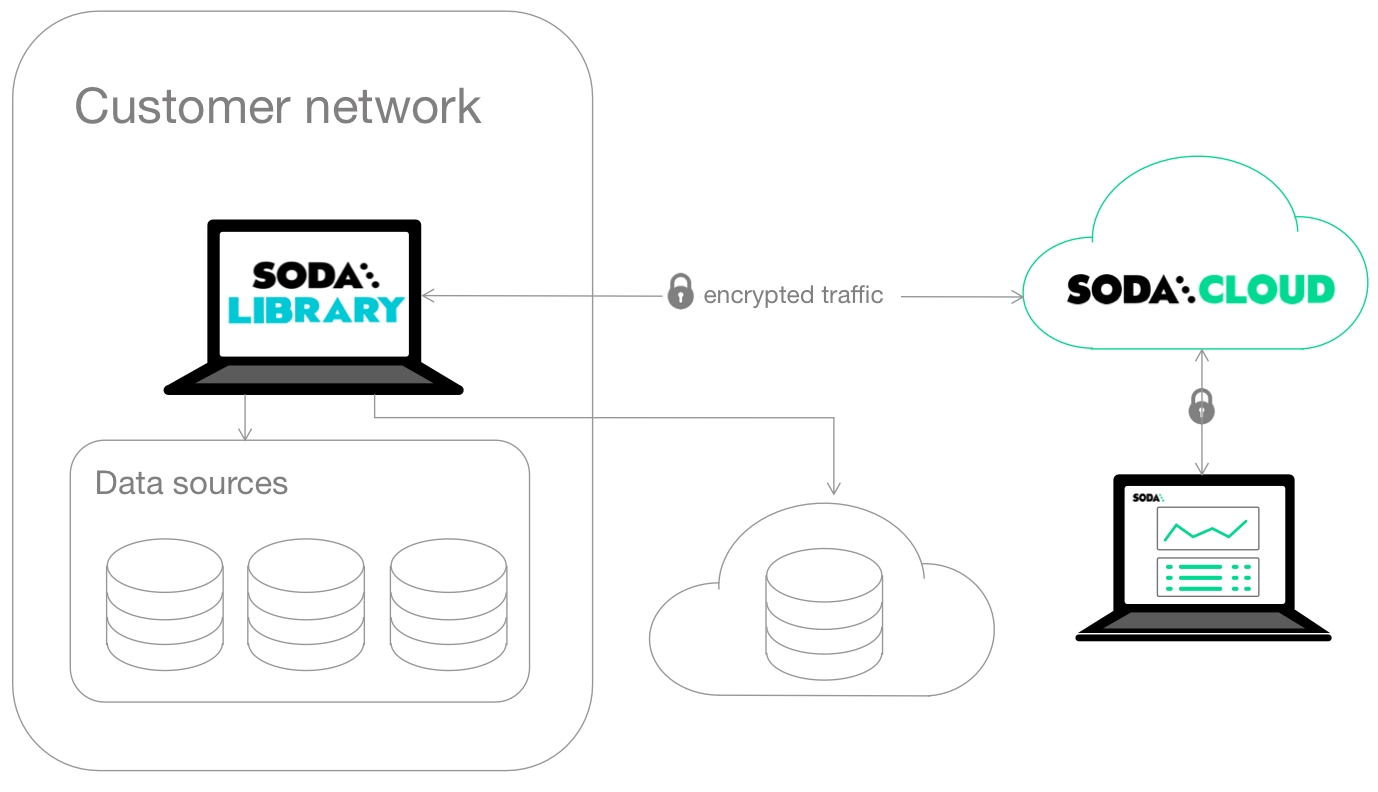
This deployment model is a simple setup in which you install Soda Library locally and connect it to Soda Cloud via API keys.
Soda Library connects to data sources and performs scans of each dataset in a data source. When you connect Soda Library to a Soda Cloud account, it pushes scan results to Soda Cloud where users in your organization can view check results, access Cloud Metric Store data, and integrate with Slack to investigate data quality Incidents.
When Soda Library completes a scan, it uses a secure API to push the results to your Soda Cloud account where you can log in and examine the details in the web application. Notably, Soda Library only pushes metadata to Soda Cloud, barring any failed rows you explicity instruct Soda Library to send to Soda Cloud. By default all your data stays inside your private network. See .
You can use checks to view samples of data that , and track data quality over time. Soda Cloud stores your scan results and prepares charts that represent the volume of failed checks in each scan. These visualizations of your scan results enable you to see where your data quality is improving or deteriorating over time.
This deployment model provides a secure, out-of-the-box Soda Agent to manage access to data sources from within your Soda Cloud account. Quickly configure connections to your data sources in the Soda Cloud user interface, then empower all your colleagues to explore datasets, access check results, customize collections, and create their own no-code checks for data quality. Soda-hosted agent supports connections to BigQuery, Databricks SQL, MS SQL Server, MySQL, PostgreSQL, Redshift, and Snowflake data sources.
This deployment model enables a data or infrastructure engineer to deploy Soda Library as an agent in a Kubernetes cluster within a cloud-services environment such as Google Cloud Platform, Azure, or AWS.
The engineer can manage access to data sources while giving Soda Cloud end-users easy access to Soda check results and enabling to write their own checks for data quality. Users connect to data sources and write checks for data quality directly in the Soda Cloud user interface.
Soda Cloud is made up of several parts, or resources, that work together to define checks, execute scans, and display results that help you gauge the quality and reliability of your data.
It is helpful to understand these resources and how they relate, or connect, to each other if you are establishing for your organization’s Soda Cloud account, or if you are planning to delete an existing resource.
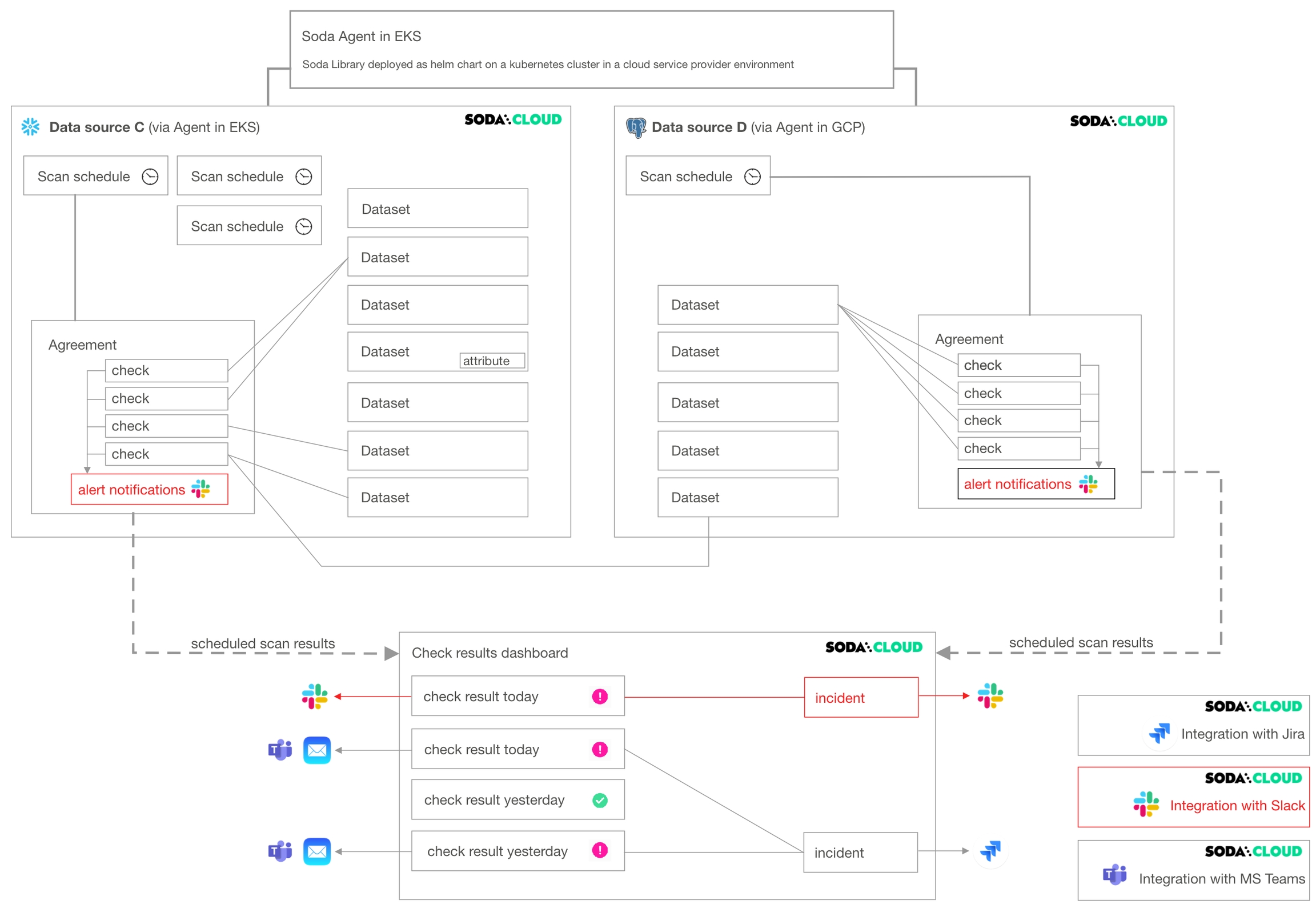
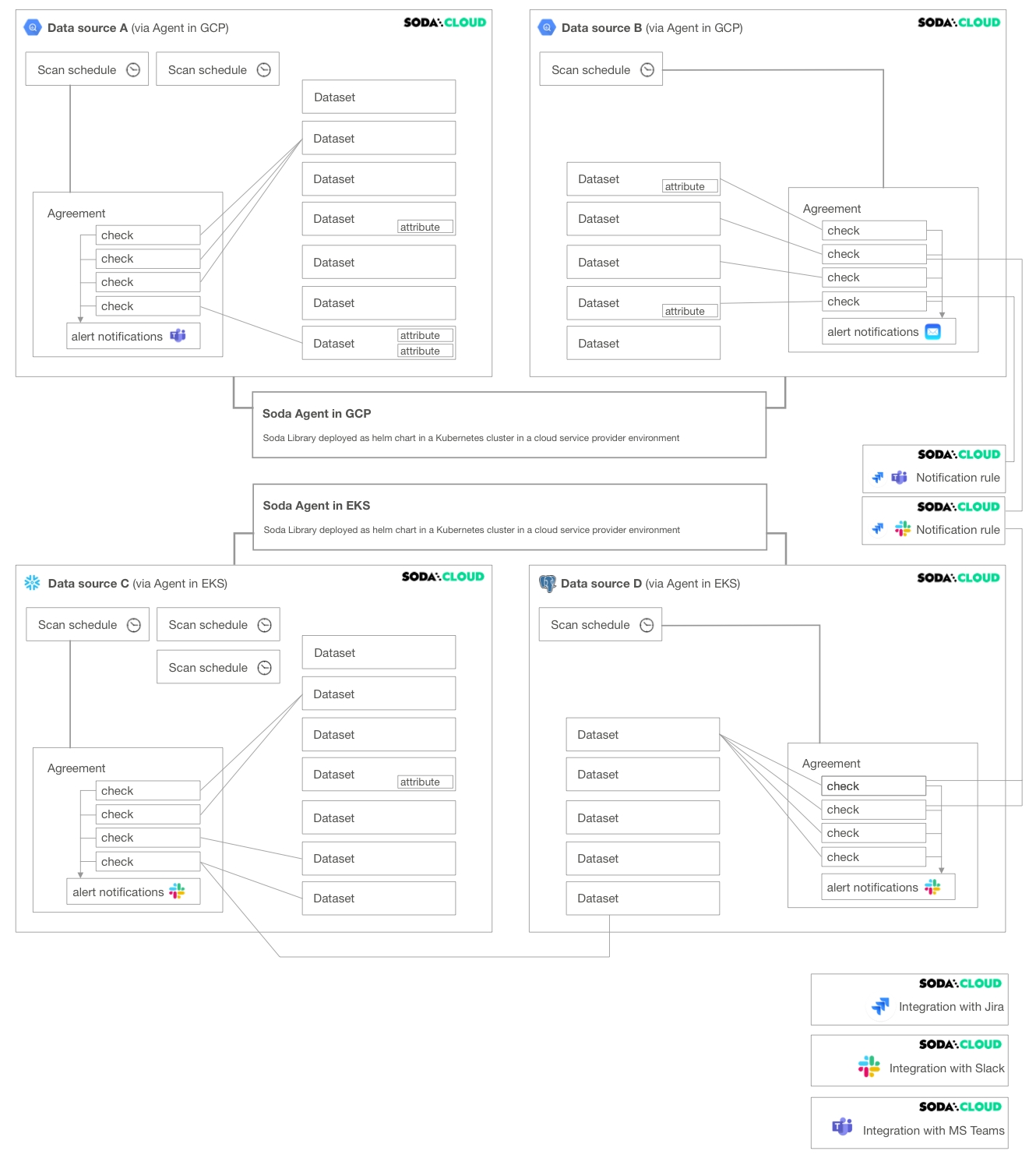
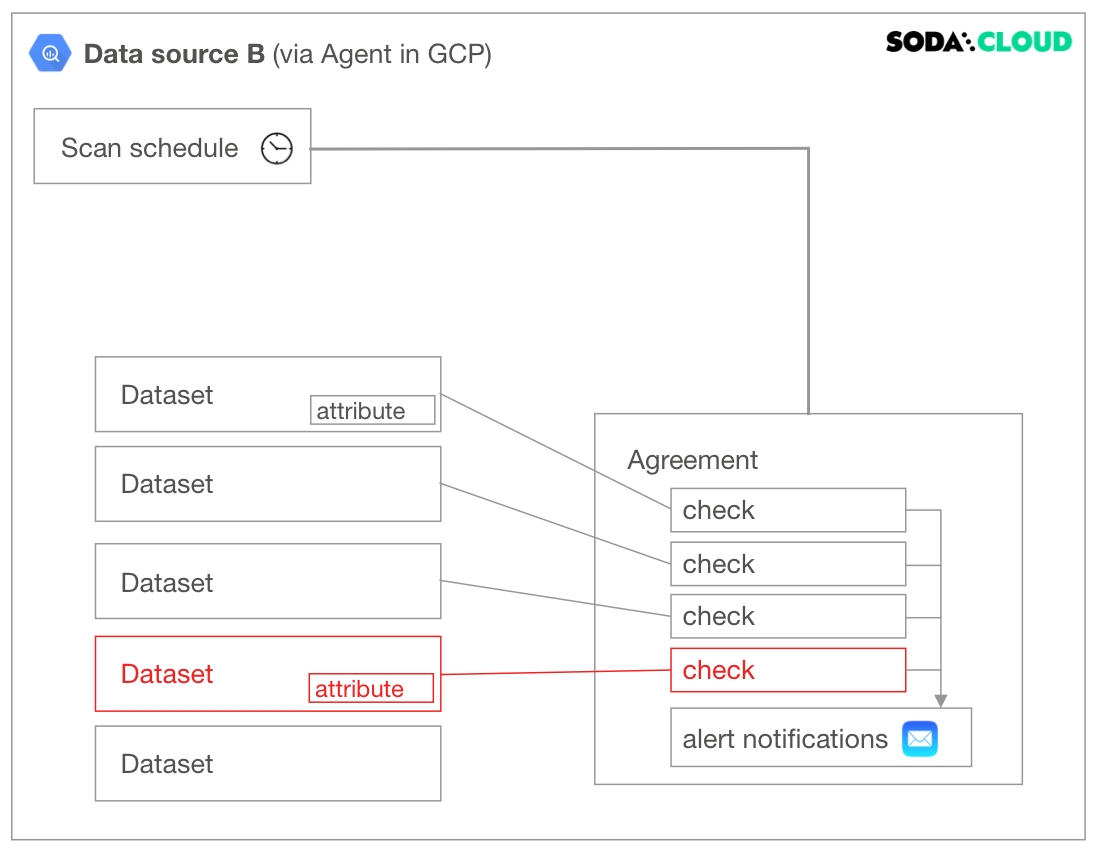
The following diagram illustrates an example deployment of a single Soda Cloud account with two Soda Agents, each of which connects to two data sources. A Soda Cloud Administrator has also created integrations with Slack, Jira (via a webhook), and MS Teams.
A Soda Agent is Soda Library that has been deployed in Kubernetes cluster in a cloud services provider environment. It enables Soda Cloud users to securely connect to data sources such as Snowflake, BigQuery, and PostgreSQL.
about Soda Agent.
A data source in Soda Cloud is a representation of the connection to your data source. Notably, it does not contain any of your data†, only data source metadata that it uses to check for data quality.
about adding new data sources.
Within the context of Soda Cloud, a data source contains:
datasets which represent tabular structures with rows and columns in your data source; like data sources, they do not contain your data†, only metadata. Datasets can contain user-defined attributes that help filter and organize check results.
scan definitions, sometimes referred to as a scan schedule, which you use to define a Soda scan execution schedule for the data source.
agreements in which you write checks to define what good data looks like. Agreements also specify where to send alert notifications when a check result warns or fails, such as to a Slack channel in your organization.
about notification rules.
† An exception to this rule exists when you configure Soda Cloud to collect sample data from a dataset, or samples of failed rows from a dataset when a check result fails.
As the example deployment diagram illustrates, the different resources in Soda Cloud have several connections to each other. You can responsibly delete resources in Soda Cloud -- it warns you about the relevant impact before executing a deletion! -- but it may help to visualize the impact a deletion may have on your deployment before proceeding.
The following non-exhaustive list of example deletions serve to illustrate the potential impact of deleting.
Deleting a dataset affects individual checks defined inside an agreement. If you have multiple agreements which contain checks against a particular dataset, all of those checks, and consequently the agreements they are in, are impacted when you delete a dataset. Further, if the dataset contains attributes, those attributes disappear with the dataset upon deletion.
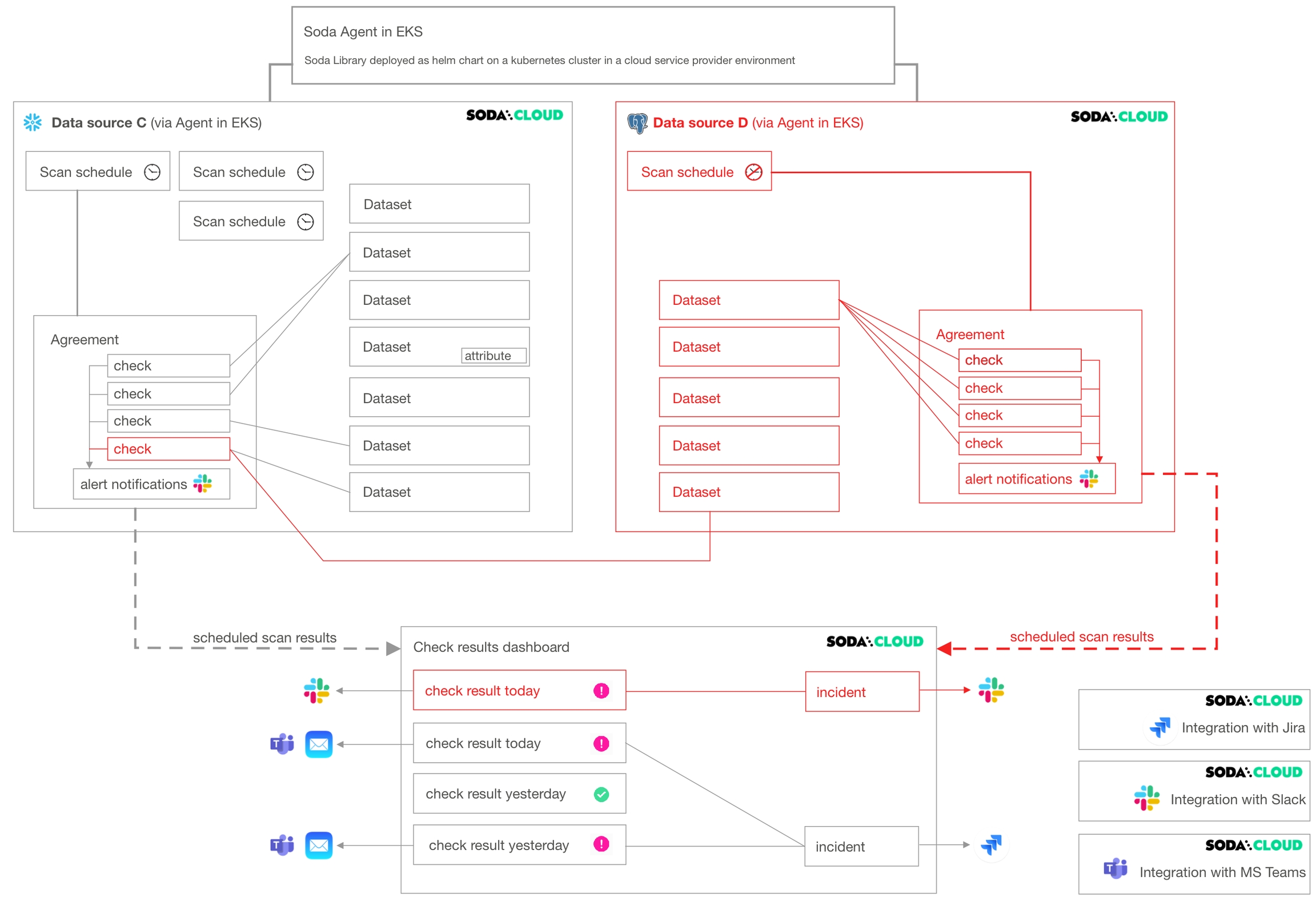
Deleting a data source affects many other resources in Soda Cloud. As the following diagram illustrates, when you delete a data source, you delete all its datasets, scan definitions, agreements, and the checks in the agreements.
If an agreement contains a that compares the row count of datasets between data sources (as does the agreement in Data source C in the diagram), deleting a data source affects more than the checks and agreements it contains.
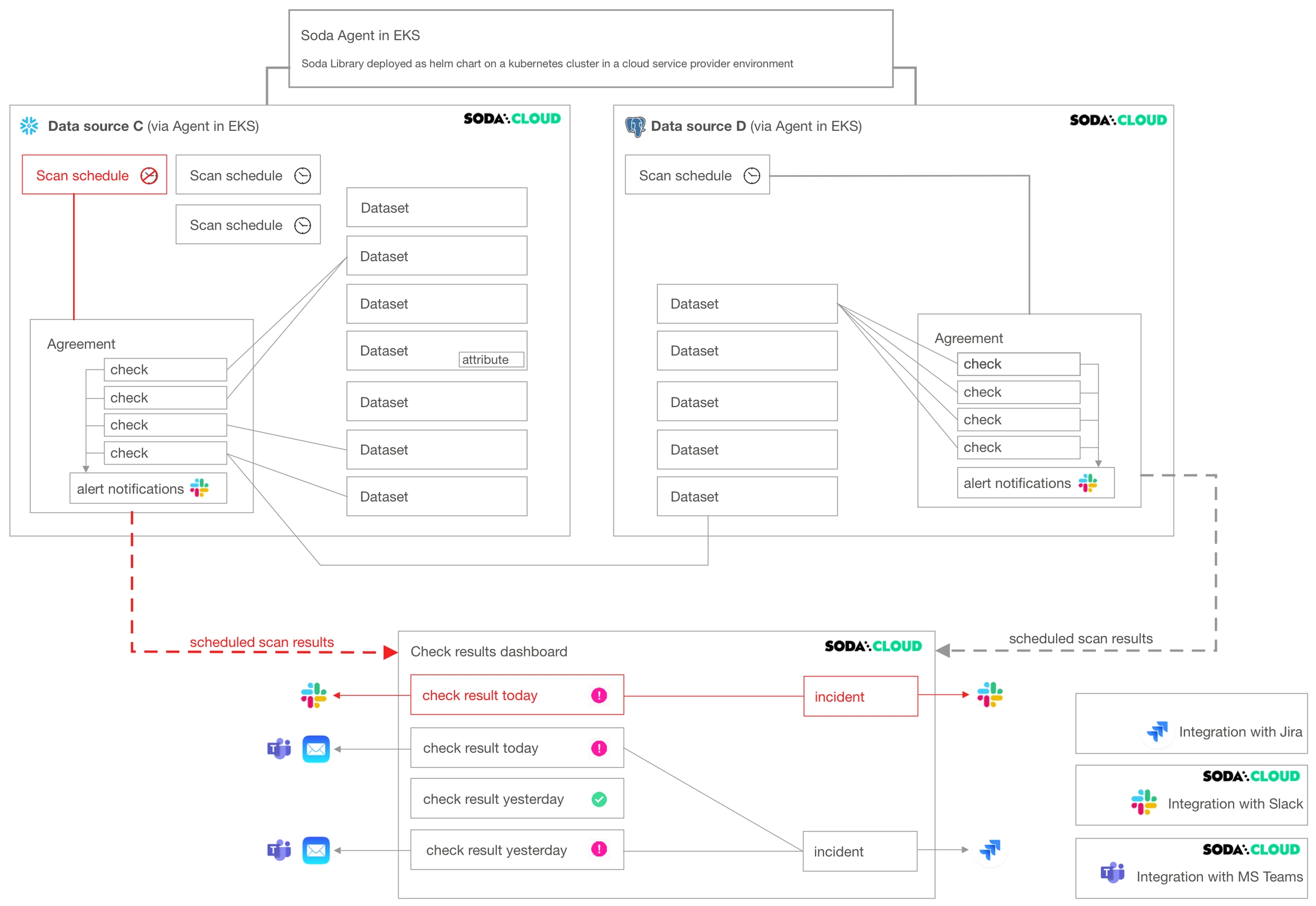
Deleting a scan definition has the potential to impact multiple agreements in a data source. Among other things, the scan definition defines the cadence that Soda Cloud uses to execute scans of data in the data source.
Soda does not scan any agreements that reference a deleted scan definition. Consequently, your Checks dashboard in Soda Cloud no longer displays checks for the agreement, nor would Soda Cloud send alert notifications.
A Soda Cloud Administrator has the ability to add, edit, and delete integrations with third-party service providers.
As the example diagram indicates, deleting a Slack integration prevents Soda Cloud from sending alert notifications to Slack when check results warn or fail, and prevents users from connecting an to a Slack channel to collaborate on data quality issue resolution.
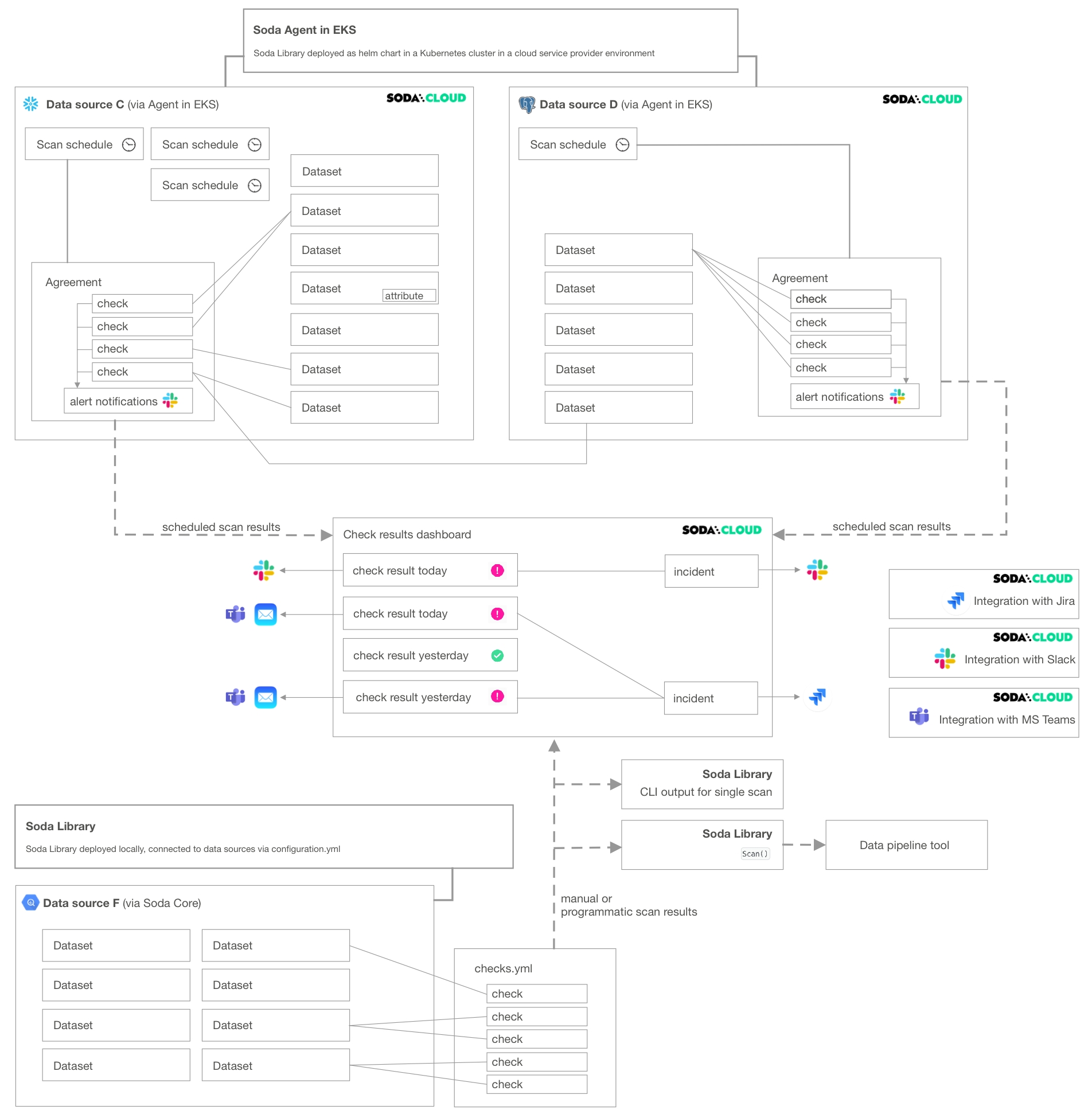
If your Soda Cloud account is also connected to Soda Library, your deployment may resemble something like the following diagram.
Note that you can delete resources that appear in Soda Cloud as a result of a manual or programmatic Soda Library scan. However, unless you delete the reference to the resource at its source – the checks.yml file or configuration.yml file – the resource will reappear in Soda Cloud when Soda Library sends its next set of scan results.
For example, imagine you use Soda Library to run scans and send results to Soda Cloud. In the checks.yml file that you use to define your checks, you have the following configuration:
In Soda Cloud, you can see dataset-q because Soda Library pushed the scan results to Soda Cloud which resulted in the creation of a resource for that dataset. In Soda Cloud, you can use the UI to delete dataset-q, but unless you also remove the checks for dataset-q configuration from your checks.yml file, the dataset reappears in Soda Cloud the next time you run a scan.
Create a Soda Cloud account at .
As a business user, learn how to write SodaCL checks in in Soda Cloud.
Learn more about viewing in Soda Cloud.
An integration is a built-in Soda Cloud feature that enables you to connect with a third-party service provider, such as Slack.
A notification rule is a tool to bulk-edit where and when to send alert notifications when check results warn or fail.
Need help? Join the Soda community on Slack.
checks for dataset-q:
  - missing_count(last_name) < 10