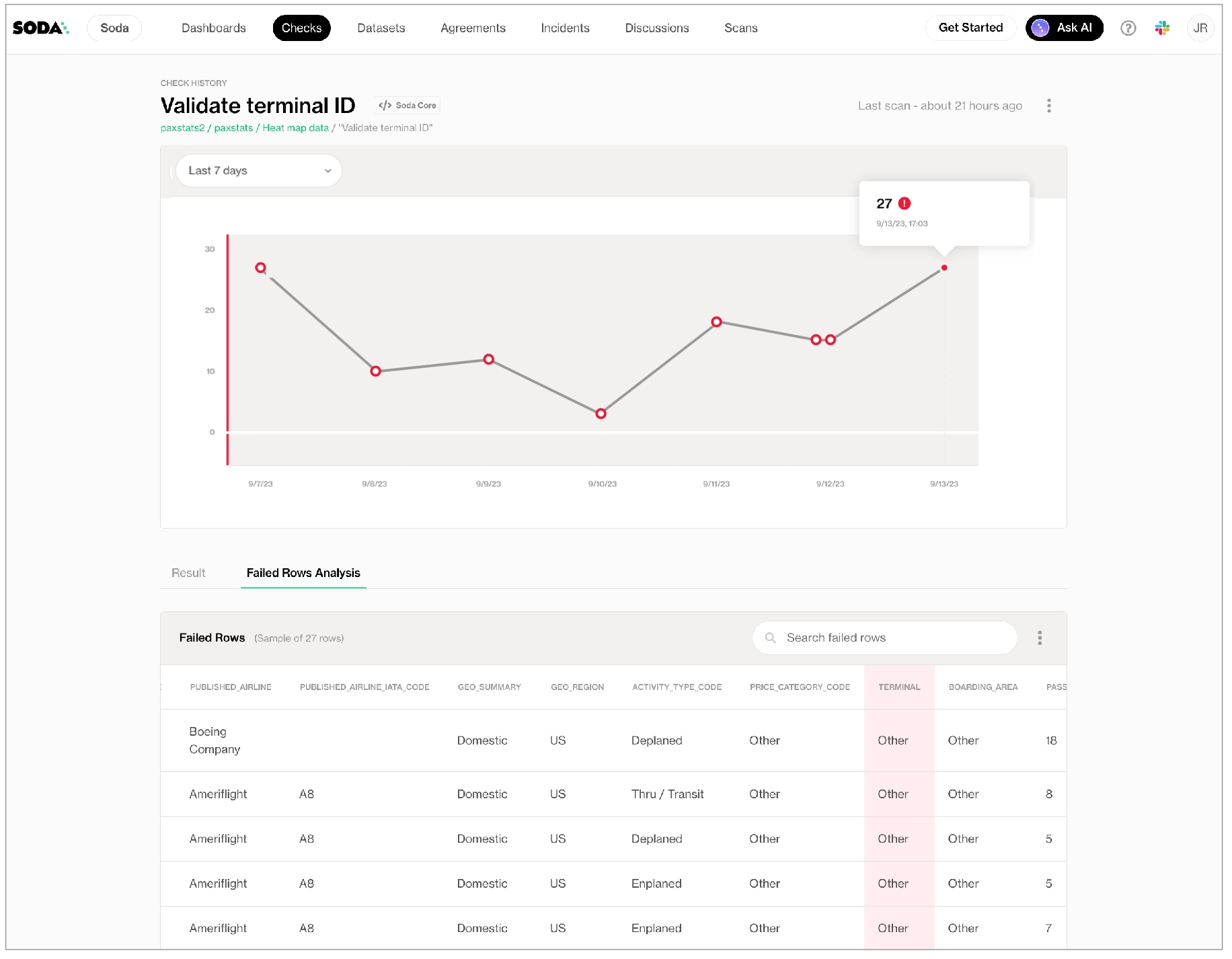
When a Soda scan results in a failed check, Soda Cloud displays details of the scan results in each check's Check History page. To offer more insight into the data that failed a check during a scan, you can enable Soda Cloud to display failed rows samples in a check's history.
After a scan has completed, from the Checks dashboard, select an individual check to access its Check History page, then click the Failed Rows Analysis tab (pictured below) to see the failed rows samples associated with a failed check result.
There are two ways Soda collects and displays failed row samples in your Soda Cloud account.
Implicitly: Soda automatically collects 100 failed row samples for the following checks:
checks that use a
checks that use a
By default, implicit and explicit collection of failed row samples is enabled in Soda Cloud. If you wish, you can adjust this setting as follows.
As a user with permission to do so, navigate to your avatar > Organization Settings.
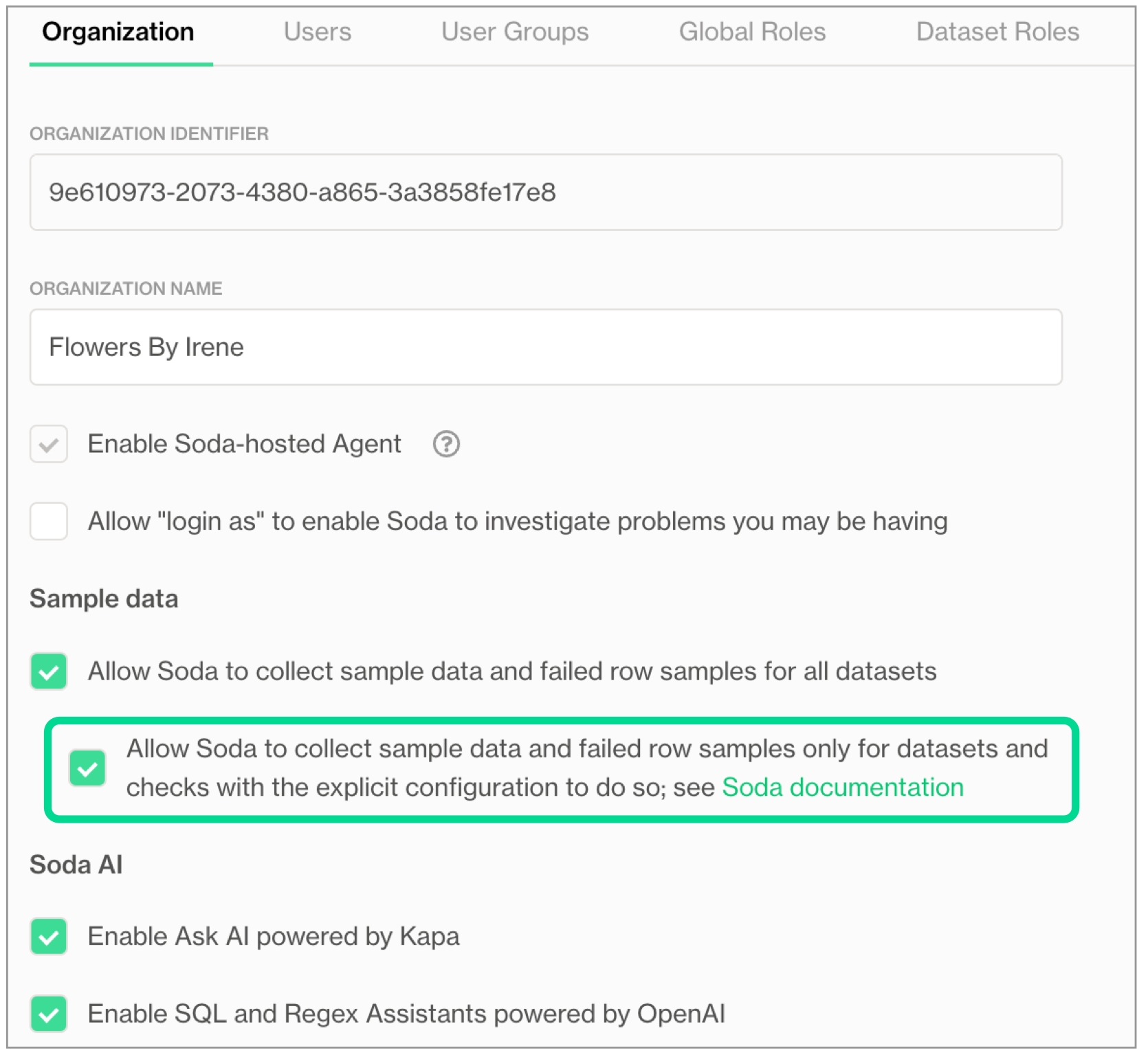
Check, or uncheck, the box to Allow Soda to collect sample data and failed row samples for all datasets. A checked box means default sampling is enabled.
(Optional) Soda Library 1.6.1 or Soda Agent 1.1.27 or greater Check the nested box to Allow Soda to collect sample data and failed row samples only for datasets and checks with the explicit configuration to do so to limit both dataset sampling and implicit failed row collection to only those checks which have configured sample columns or collect failed rows
While the following tables may be useful in deciding how to configure failed row sample collection for your organization, be aware that you can use combinations of configurations to achieve your sampling objectives.
Some configurations apply only to no-code checks, or only to checks defined using SodaCL in an agreement in Soda Cloud or in a YAML file for use with Soda Library; refer to individual configuration instructions for details.
Where some of your data is sensitive, you can either disable the Soda Cloud sampler completely for individual data sources, or use one of several ways to customize the Soda Cloud sampler to restrict failed row sample collection to only those datasets and columns you wish.
See also:
See also:
Where datasets in a data source contain sensitive or private information, you may not want to collect failed row samples. In such a circumstance, you can disable the collection of failed row samples for checks that implicitly do so.
Adjust your data source connection configuration in Soda Cloud or in a configuration YAML file to disable all samples for an individual data source, as in the following example.
For checks which implicitly collect failed rows samples, you can add a configuration to the data source connection configuration to prevent Soda from collecting failed rows samples from specific datasets that contain sensitive data.
To do so, add the sampler configuration to your data source connection configuration in Soda Cloud or in a configuration YAML file to specify exclusion of all the columns in datasets you list, as per the following example which disables all failed row sample collection from the customer_info and payment_methods datasets.
Rather than disabling failed row collection for all the columns in a dataset, you can add a configuration to prevent Soda from collecting failed rows samples from specific columns that contain sensitive data. For example, you may wish to exclude a column that contains personal identifiable information (PII) such as credit card numbers from the Soda query that collects samples.
To do so, use the sampler configuration to your data source connection configuration in Soda Cloud or in a configuration YAML file to specify the columns you wish to exclude, as per the following examples. Note that the dataset names and the lists of samples columns support wildcard characters (% or *).
OR
Optionally, you can use wildcard characters in the sampler configuration to design the sampling exclusion you wish.
If you wish to set a limit on the samples that Soda implicitly collects for an entire data source, you can do so by adjusting the configuration YAML file, or editing the Data Source connection details in Soda Cloud, as per the following syntax. This configuration also applies to checks defined as no-code checks.
Alternatively, you can set a samples limit for a datasource using the Soda Library by modifying the value of an attribute of the Scan class object:
Soda executes the exclude_columns values cumulatively. For example, for the following configuration, Soda excludes the columns password, last_name and any columns that begin with pii_ from the retail_customers dataset.
The exclude_columns configuration also applies to any custom sampler, in addition to the Soda Cloud sampler.
The exclude_columns configuration does not apply to .
A samples columns or collect failed rows configuration for an individual check does not override an
Where some of your data is sensitive, you can either disable the Soda Cloud sampler completely, or use one of several ways to customize the Soda Cloud sampler in the user interface to restrict failed row sample collection to only those datasets and columns you wish.
The configurations described below correspond with the optional Soda Cloud setting in Organization Settings (see image below) which limits failed row sample collection to only those checks which implicitly collect failed row samples and which include the samples columns or collect failed rows configuration, and/or to checks in datasets that are set to inherit organization settings for failed row samples, or for which failed row samples is disabled. The Allow Soda to collect sample data and failed row samples only for datasets and checks with the explicit configuration to do so setting is compatible with Soda Library 1.6.1 or Soda Agent 1.1.27 or greater.
See also:
See also:
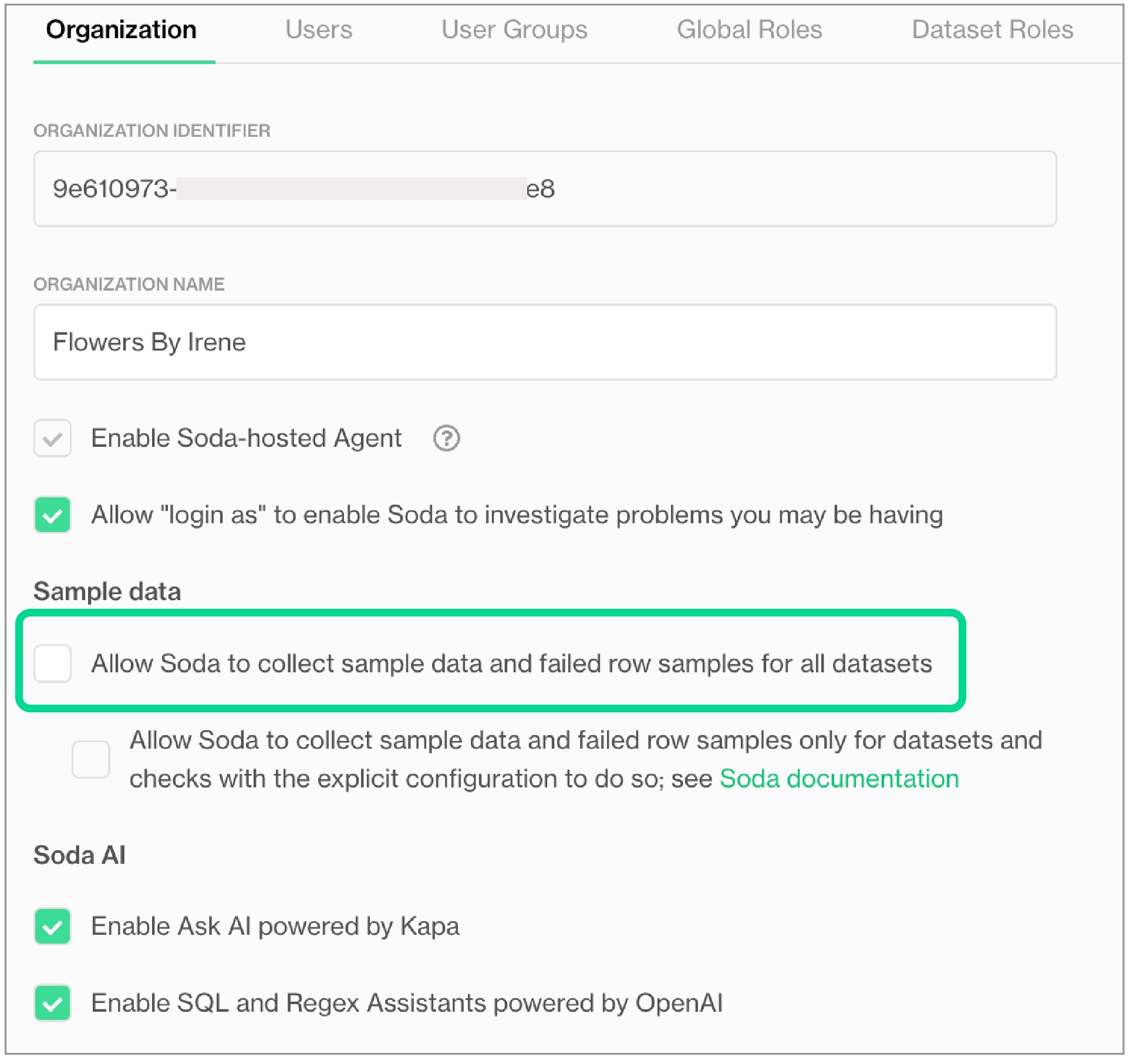
If your data contains sensitive or private information, you may not want to collect any failed row samples, whatsoever. In such a circumstance, you can disable the collection of failed row samples completely. To prevent Soda Cloud from receiving any sample data or failed row samples for any datasets in any data sources to which you have connected your Soda Cloud account, proceed as follows:
As a user with to do so, log in to your Soda Cloud account and navigate to your avatar > Organization Settings.
In the Organization tab, uncheck the box to Allow Soda to collect sample data and failed row samples for all datasets, then Save.
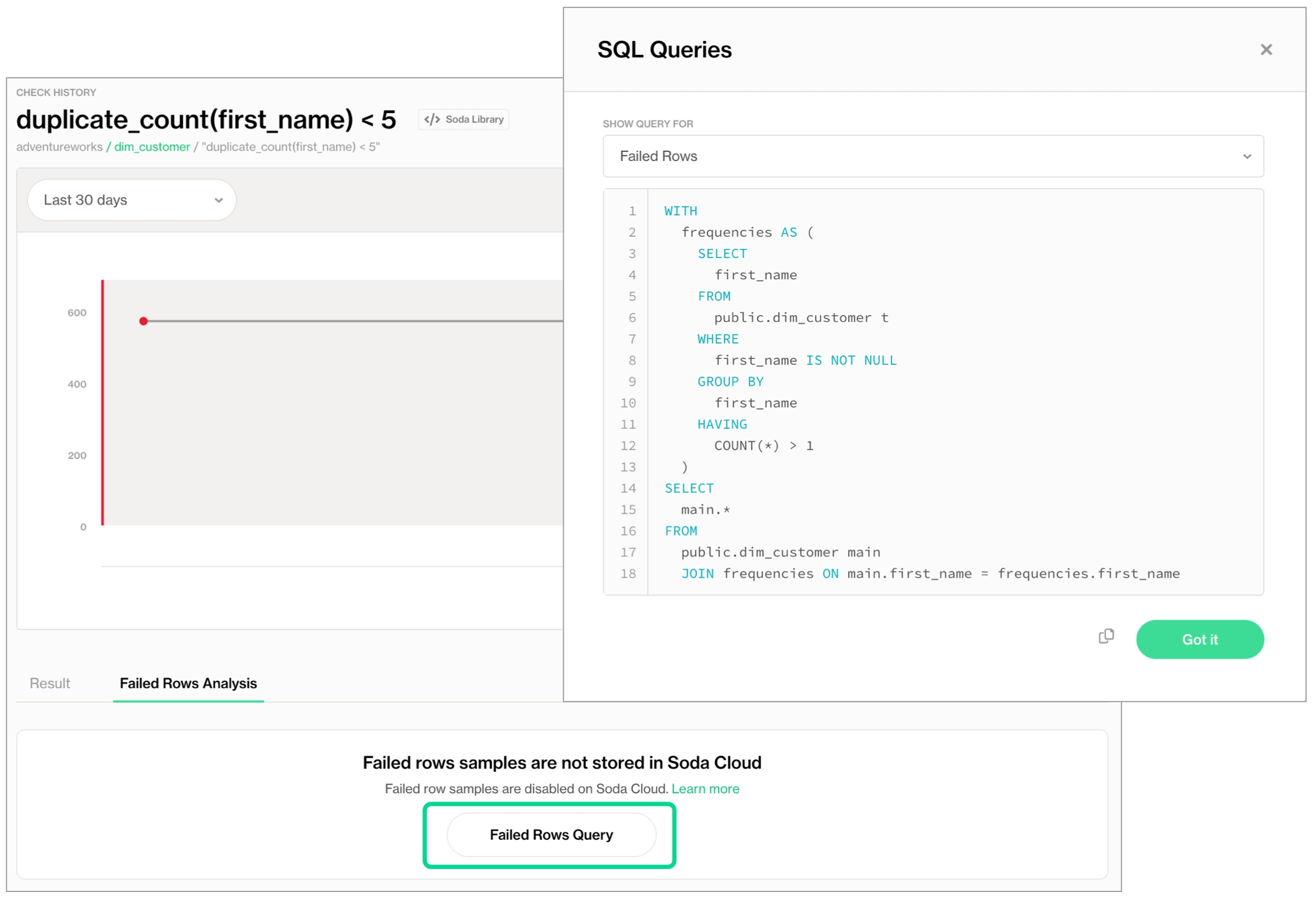
If disabled for a dataset, Soda executes the check during a scan and does not display any failed rows in the Check History page. Instead, it displays an explanatory message and offers the failed rows SQL query that a user with direct access to the data can copy and run elsewhere to retrieve failed row samples for the check.
Rather than adjusting the data source connection configuration, you can adjust an individual dataset's settings in the Soda Cloud user interface so that it collects no failed row samples for checks which implicitly collect them.
Note, however, that users with the permission to add checks to a dataset can add the collect failed rows or samples columns parameters to a check in an agreement, or a checks YAML filed, or inline in a programmatic scan to override the Dataset's Disabled setting. See .
As a user with permission to edit a dataset, log in to Soda Cloud, then navigate to the Dataset for which you never want Soda to collect failed row samples.
Click the stacked dots at the upper-right, then select Edit Dataset.
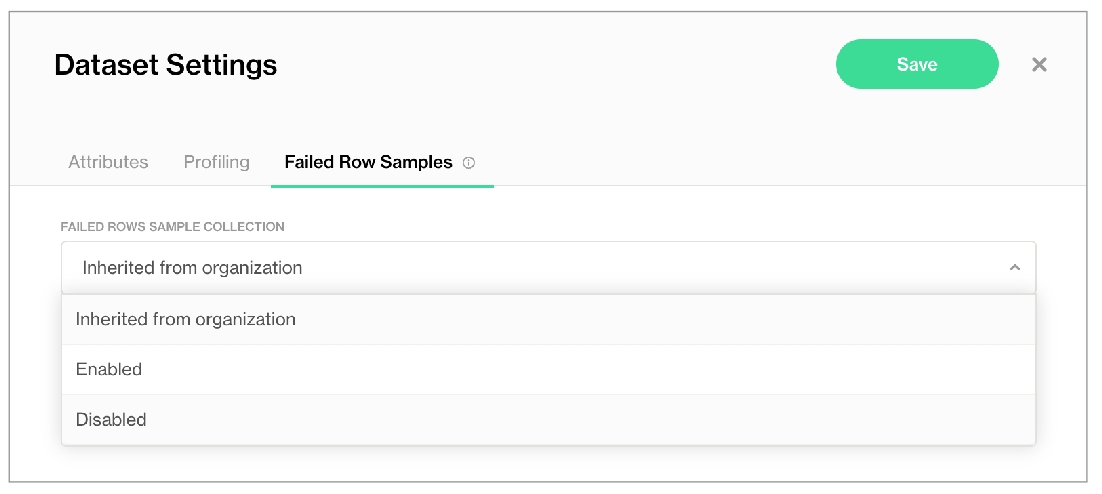
In the Failed Row Samples tab, use the Failed Rows Sample Collection dropdown to select Disabled. Alternatively, if you have checked the box in Organization Settings to Allow Soda to collect sample data and failed row samples for all datasets, you can select Inherited from organization in this dropdown to apply the Soda Cloud account-level rule that applies to all datasets.
If disabled for a dataset, Soda executes the check during a scan and does not display any failed rows in the Check History page. Instead, it displays an explanatory message and offers the failed rows SQL query that a user with direct access to the data can copy and run elsewhere to retrieve failed row samples for the check.
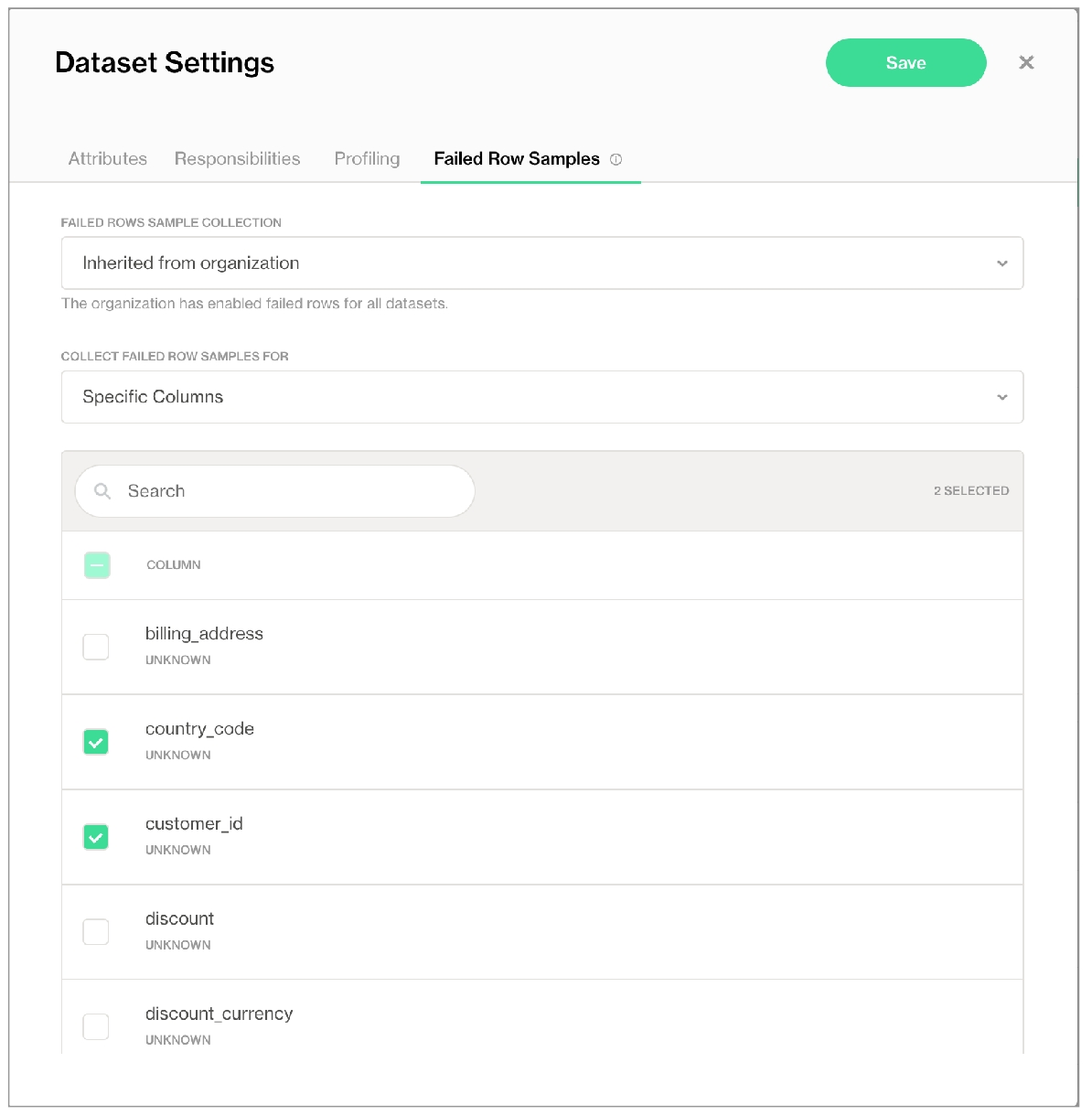
Alternatively, you can adjust a dataset's settings in Soda Cloud so that it collects failed row samples only for specific columns.
As a user with permission to edit a dataset, log in to Soda Cloud, then navigate to the Dataset for which you never want Soda to collect failed row samples.
Click the stacked dots at the upper-right, then select Edit Dataset.
In the Failed Row Samples tab, use the dropdown to select Specific Columns, further selecting the columns from which to gather failed row samples.
💡 Consider customizing sampling for checks via Soda Cloud settings; see .
When you add sampling parameters to checks—collect failed rows or samples columns—the check level configurations override other settings or configurations according to the following table. See also: .
Add a collect failed rows parameter to a check that implicitly collects failed row samples to instruct the Soda Cloud sampler to collect failed rows samples for an individual check. Provide a boolean value for the configuration key, either true or false.
You can also use a samples columns configuration to an individual check to specify the columns for which Soda implicitly collects failed row sample values. At the check level, Soda only collects the check's failed row samples for the columns you specify in the list, as in the duplicate_count example below. The comma-separated list of samples columns supports wildcard characters (% or *).
Note that do not support the sample columns parameter. Instead, Soda dynamically generates failed rows samples based on the recon check’s diagnostic, and displays only the columns that are relevant to the data being compared.
Alternatively, you can specify sample collection and/or the columns from which Soda must draw failed row samples for multiple checks using a dataset-level configuration, as in the following example. Note that if you specify a different samples columns or collect failed rows value for an individual check than is defined in the configurations for block, Soda obeys the individual check's instructions.
By default, Soda collects 100 failed row samples. You can limit the number of sample rows that Soda sends using the samples limit key:value pair configuration, as in the following missing check example.
If you wish to collect a larger volume of failed row checks, you can set the limit to a larger number. Be aware, however, that collecting large volumes of failed row samples comes with the compute cost that requires enough memory for Soda Library or a Soda Agent to process the request; see: .
If you wish to prevent Soda from collecting and sending failed row samples to Soda Cloud for an individual check, you can set the samples limit to 0. To achieve the same objective, you can use a collect failed rows: false parameter, instead.
At times, you may find it useful to customize a SQL query that Soda can use to collect failed row samples for a . To do so, you can add an independent failed row samples query.
For example, you may wish to limit the columns from which Soda draws failed row samples, or limit the volume of samples. Further, you could customize a query to run an aggregate metric such as avg on a discount column, for example, and return failed row samples that you can compare to an anomaly such as rows with a discount greater than 50%.
To add a custom failed row sample query to a user-defined check using SodaCL, add a failed rows query configuration as in the following example.
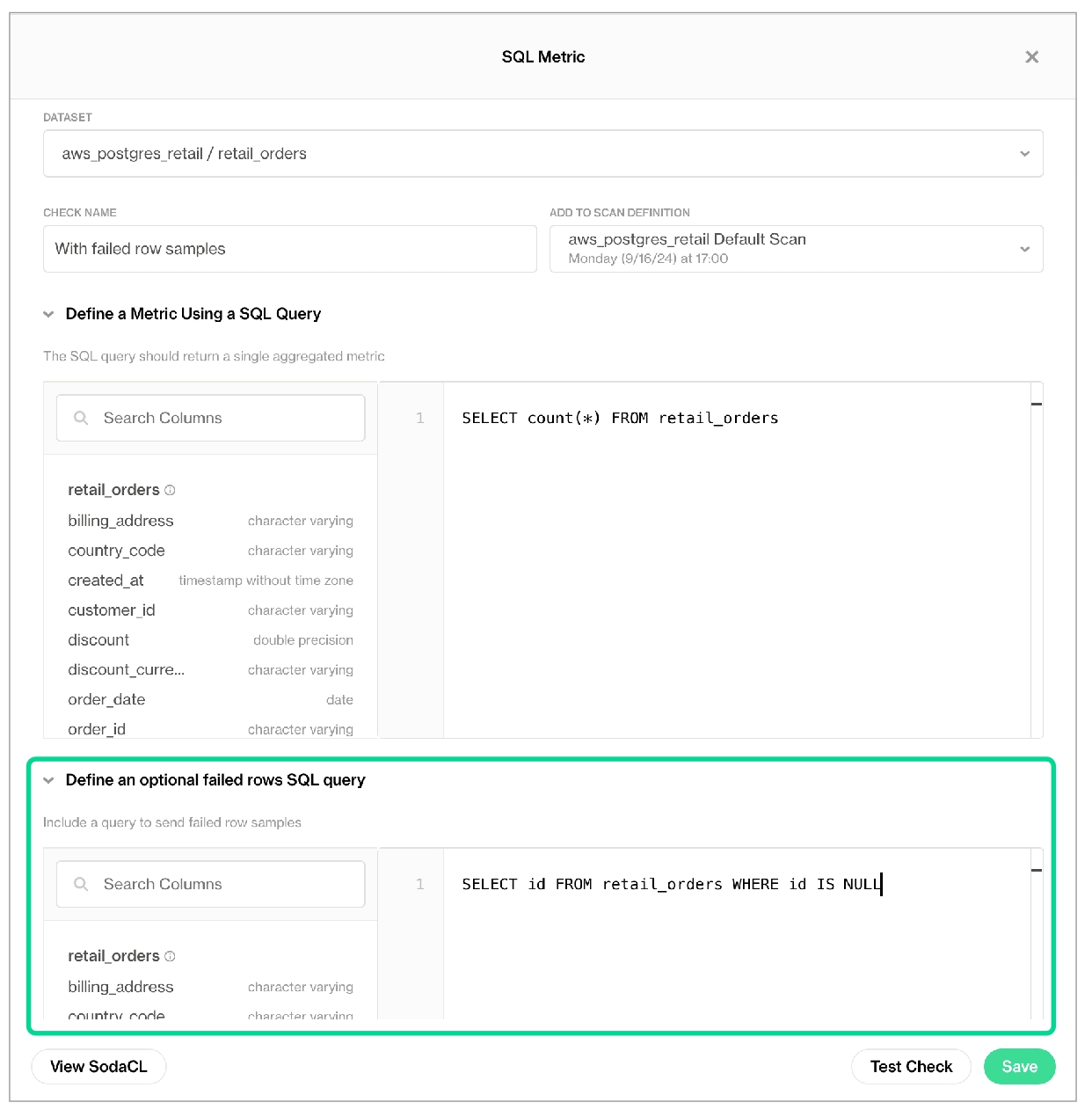
In Soda Cloud, you can add an optional failed rows query to a no-code SQL Metric check in the user interface, as in the image below. No-code SQL Metric checks are supported in Soda Cloud with Soda-hosted Agent or self-hosted Agent.
With many different options available to configure failed row sampling in various formats and at various levels (data source, dataset, check) with Soda, some combinations of customization may be complex. Generally speaking, configurations you define in configuration YAML or checks YAML files override settings defined in Soda Cloud, with the exception of the top-most setting that allows, or disallows, failed row sample collection entirely.
What follows is a hierarchy of configurations and settings to help you determine how Soda enforces failed row sample collection and display, in descending order of obedience.
prevents Soda from displaying any failed row samples for any checks as part of a Soda Library scan or Soda Cloud scheduled scan definition.
via data source disable_samples configuration prevents Soda from displaying any failed row samples for checks that implicitly collect samples and which are applied to datasets in the data source. If set to false while the above Sample Data setting in Soda Cloud is unchecked, Soda obeys the setting and does not display any failed rows samples for any checks.
to 0 via data source samples limit configuration prevents Soda from displaying any failed row samples for checks that implicitly collect samples and which are applied to datasets in the data source. If set to 10, for example, while the above disable_samples setting is set to true, Soda obeys the disable_samples setting and does not display failed row samples for checks for the data source.
via data source exclude_columns configuration prevents Soda from displaying any failed row samples for checks that implicitly collect samples and which are applied to datasets in the data source. If specified for a data source while the above data source samples limit configuration is set to 0, Soda objeys the samples limit and does not display failed row samples for checks for the data source.
via sampling parameters (samples columns or collect failed rows) in a SodaCL check configuration specifies sampling instructions, or prevents/allows sampling for individual checks that implicitly collect samples. If any of the above configurations conflict with the individual check settings, Soda obeys the above configurations. For example, if a duplicate_count check includes the configuration collect failed rows: true but the samples limit configuration in the data source configuration is set to 0, Soda objeys the samples limit and does not display failed row samples for the duplicate_count check.
However, if you specify a different samples columns or collect failed rows value for an individual check than is defined in the configurations for block for a dataset, Soda obeys the individual check’s instructions.
to Allow Soda to collect sample data and failed row samples only for datasets and checks with the explicit configuration to do so setting in Organization Settings in Soda Cloud limits failed row sample collection to only those checks which implicitly collect failed row samples and which include a samples columns or collect failed rows configuration, and/or to checks in datasets that are set to inherit organization settings for failed row samples, or for which failed row samples is disabled. If any of the above configurations conflict with this setting, Soda obeys the above configurations.
via Soda Cloud Edit Dataset > Failed Row Samples prevents Soda from displaying any failed row samples for checks that implicitly collect samples and which are applied the individual dataset. If any of the above configurations conflict with the dataset's Failed Row Samples settings, Soda obeys the above configurations. For example, if you set the value of Failed Rows Sample Collection for to Disabled for a dataset, then use SodaCL to configure an individual check to collect failed rows, Soda obeys the check configuration and displays the failed row samples for the individual check.
via Soda Cloud to collect samples only for columns you specify in the Collect Failed Row Samples For instructs Soda to display failed row samples for your specified columns for checks that implicitly collect samples and which are applied the individual dataset. If any of the above configurations conflict with the dataset's Collect Failed Row Samples For settings, Soda obeys the above configurations.
If the data you are checking contains sensitive information, you may wish to send any failed rows samples that Soda collects to a secure, internal location rather than Soda Cloud. These configurations apply to checks defined as no-code checks, in an agreement, or in a checks YAML file.
To do so, you have two options:
HTTP sampler: Create a function, such as a lambda function, available at a specific URL within your environment that Soda can invoke for every check result in a data source that fails and includes failed row samples. Use the function to perform any necessary parsing from JSON to your desired format (CSV, Parquet, etc.) and store the failed row samples in a location of your choice.
Python CustomSampler: If you run programmatic Soda scans of your data, add a custom sampler to your Python script to collect samples of rows with a fail check result. Once collected, you can print the failed row samples in the CLI, for example, or save them to an alternate destination.
Soda sends the failed rows samples as a JSON event payload and includes the following, as in the example below.
data source name
dataset name
scan definition name
check name
Configure an HTTP failed row sampler; see below.
In Soda Cloud, in the Data Sources tab, select the data source for which you wish to reroute failed rows samples, then navigate to its Connect the Data Source tab. If you use a configuration.yml file to store data source connection configuration details, open the file.
To the connection configuration, add the sampler and storage configuration as outlined below, then save.
The following is an example of a custom failed row sampler that gets the failed rows from the Soda event object (JSON payload, see example below) and prints the failed rows in CSV format.
Borrow from this example to create your own custom sampler that you can use to reroute failed row samples.
Example CSV output:
If you are running Soda scans programmatically, you can add a custom sampler to collect samples of rows with a fail check result.
The contents of the tabs below offer examples of how you can implement a custom sampler.
The Simple Example prints failed rows in the CLI.
The Example with Dataframes uses a scan context to read data from a scan and build a Dataframe with the results.
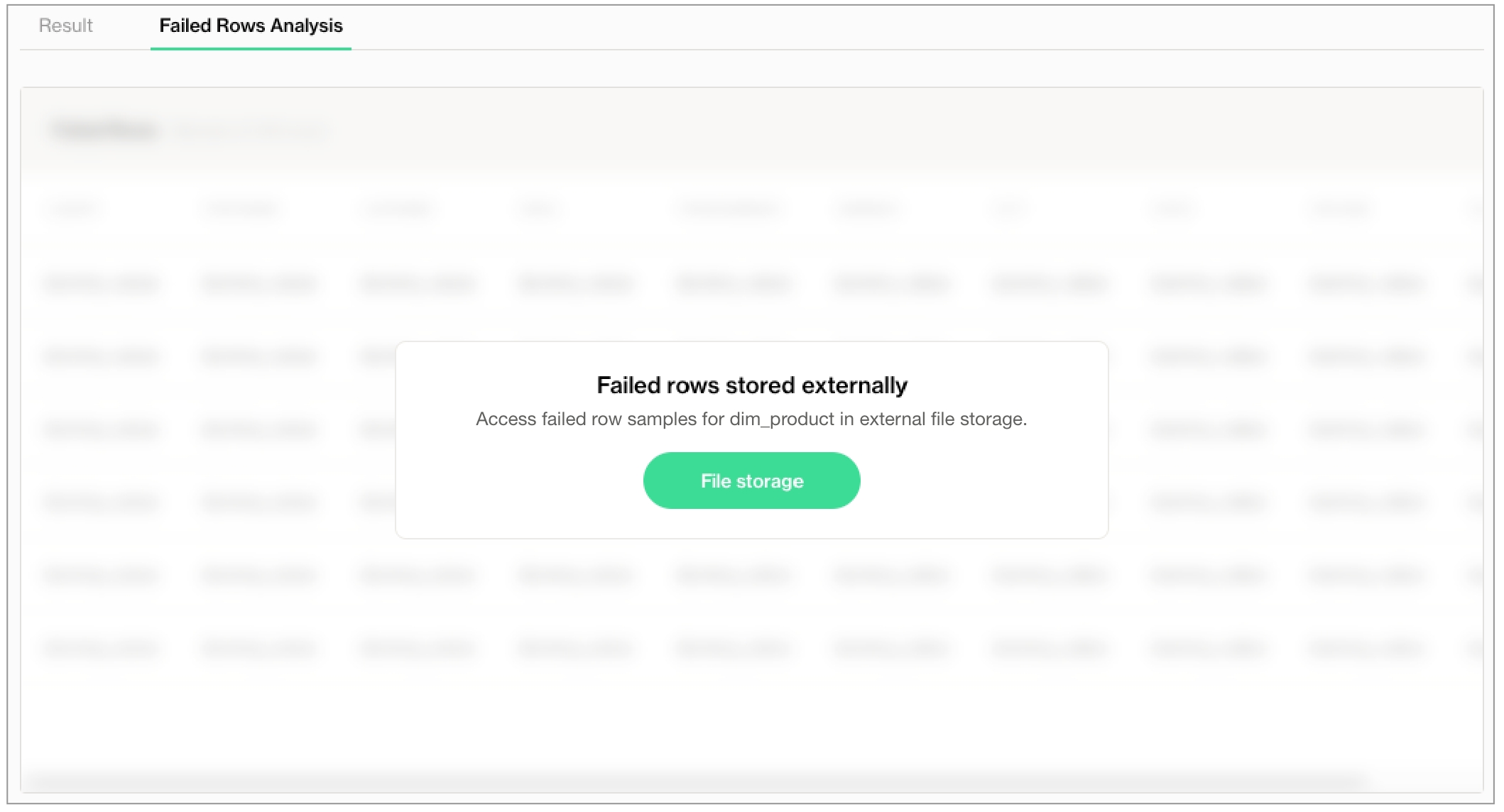
The Example with Sample Reference uses SampleRef to reroute failed rows and customize the message that appears in Soda Cloud to direct users to the alternate storage location, including using a variable to dynamically populate the message.
💡 To see this sampler in action, copy+paste and run an locally to print failed row samples in the CLI scan output.
This simple example prints the failed rows samples in the CLI. If you prefer to send the output of the failed row sampler to a destination other than Soda Cloud, you can do so by customizing the sampler as above, then using the Python API to save the rows to a JSON file. Refer to Python docs for for details.
This example uses a scan context to read data from, or write data to a scan. This enables users to build some data structure in the custom sampler, then use it after scan execution.
For example, you can use scan context to build a DataFrame that contains unique failed row samples (as opposed to standard failed row samples Soda collects per check and which can contain the same sample rows in different checks). You can also use scan context to pass data to a scan and make it available during execution so as to provide additional context that helps to build meaningful results using filters, for example.
For the most part, when you exclude a column from failed rows sampling, Soda does not include the column in its query to collect samples. In other words, it does not collect the samples then prevent them from sending to Soda Cloud, Soda does not query the column for samples, period. (There are some edge cases in which this is not the case and for those instances, a gatekeeper component ensures that no excluded columns are included in failed rows samples.)
As an example, imagine a check that looks for NULL values in a column that you included in your exclude_columns configuration. (A missing metric in a check implicitly collects failed rows samples.)
If the cat column were not an excluded column, Soda would generate two queries:
a query that executes the check
another query to collect failed rows samples for checks that failed
But because the cat column is excluded, Soda must generate three queries:
a query that executes the check
a query to gather the schema of the dataset to identify all columns
another query to collect failed rows samples for checks that failed, only on columns identified on the list returned by the preceding query
Follow a hands-on to reroute failed rows using a Python CustomSampler.
Learn more about in Soda Cloud.
Learn how to datasets.
Organize datasets in Soda CLoud using .
checks that use a duplicate metric
metric reconciliation check that include missing, validity, or duplicate metrics, or reference checks
Explicitly: Soda automatically collects 100 failed row samples for the following explicitly-configured checks:
user-defined checks that use the failed rows query configuration
Save the settings.
exclude_columnscustomerlast namesamples columnscustomerexclue_columnslast nameChecks in which you provide a complete SQL query, such as failed rows checks or user-defined checks that use a failed rows query, do not honor the exclude_column configuration. Instead, a gatekeeper component parses all queries that Soda runs to collect samples and ensures that none of columns listed in an exclude_column configuration slip through when generating the sample queries. In such a case, the Soda Library CLI provides a message to indicate the gatekeeper’s behavior:
Save your settings.
Save your settings.
✔️
Data source connection sampler configuration uses disable_samples: True to prevent failed row sample collection on all dataset in the data source
✔️
link_text
any string
(Optional) Provide text for the link button. For example, "View Failed Samples".
SampleRef, as in the example below, to display a message in Soda Cloud that directs users to the alternate location to find the rerouted failed row samples for a check.In the message parameter, you can use one or more of the following variables to customize the details of the message that Soda presents to users when directing them to the alternate location.
{scan_time}
{check_label}
{data_source_label}
{dataset_label}
Test data in a Dagster pipeline and reroute failed rows to Redshift.
Method:
Soda Cloud sampler
Description:
Enabled by default in Soda Cloud. By default, Soda collects up to 100 failed row samples for any check that implicitly or explicitly and displays them in a check’s Check History page in Soda Cloud.
Appropriate for:
• Some or none of the data being scanned by Soda is sensitive; it is okay for users to view samples in Soda Cloud. • Data is allowed to be stored outside your internal network infrastructure. • Teams would find failed row samples useful in investigating data quality issues.
Method:
HTTP custom sampler
Description:
By default, Soda collects up to 100 failed row samples for any check that implicitly or explicitly and routes them to the storage destination you specify in your customer sampler; see Configure an HTTP sampler.
Appropriate for:
• Teams define both no-code checks and checks in agreements in the Soda Cloud user interface, and may use SodaCL to define checks for use with CLI or programmatic scans. • Some or all data scanned by Soda is very sensitive. • Sample data is allowed to be stored outside your internal network infrastructure. • Teams would find it useful to have samples of failed rows to aid in data quality issue investigation. • Teams wish to use failed row samples to prepare other reports or dashboards outside of Soda Cloud. • Team wish to collect and store most or all failed row samples.
Method:
Python custom sampler
Description:
By default, Soda collects up to 100 failed row samples for any check that implicitly or explicitly and routes them to the storage destination you specify in your customer sampler; see Configure a Python custom sampler.
Appropriate for:
• Teams only define checks using SodaCL for use with CLI or programmatic scan; teams do not use no-code checks or agreements. • Some or all data scanned by Soda is very sensitive. • Sample data is allowed to be stored outside your internal network infrastructure. • Teams would find it useful to have samples of failed rows to aid in data quality issue investigation. • Teams wish to use failed row samples to prepare other reports or dashboards outside of Soda Cloud.
Method:
No sampler
Description:
Soda does not collect any failed row samples for any checks.
Appropriate for:
• All data scanned by Soda is very sensitive. • No sample data is allowed to be stored outside your internal network infrastructure. • Teams do not need samples of failed rows to aid in data quality issue investigation.
Applies to: ✔️ implicit collection of failed row samples ✖️ explicit collection of failed row samples
For checks defined as: ✔️ no-code checks in Soda Cloud ✔️ in an agreement in Soda Cloud ✔️ in a checks YAML file ✔️ inline in a programmatic scan
Applies to: ✔️ implicit collection of failed row samples ✖️ explicit collection of failed row samples
For checks defined as: ✔️ no-code checks in Soda Cloud ✔️ in an agreement in Soda Cloud ✔️ in a checks YAML file ✔️ inline in a programmatic scan
Applies to: ✔️ implicit collection of failed row samples ✔️ explicit collection of failed row samples
For checks defined as: ✔️ no-code checks in Soda Cloud ✔️ in an agreement in Soda Cloud ✔️ in a checks YAML file ✔️ inline in a programmatic scan
Applies to: ✔️ implicit collection of failed row samples ✖️ explicit collection of failed row samples
For checks defined as: ✔️ no-code checks in Soda Cloud ✔️ in an agreement in Soda Cloud ✔️ in a checks YAML file ✔️ inline in a programmatic scan
Applies to: ✔️ implicit collection of failed row samples ✖️ explicit collection of failed row samples
For checks defined as: ✖️ no-code checks in Soda Cloud ✔️ in an agreement in Soda Cloud ✔️ in a checks YAML file ✔️ inline in a programmatic scan
Setting or Configuration
Sampling parameters override settings or config
Sampling parameters DO NOT override settings or config
UNCHECKED Organization Settings > Allow Soda to collect sample data and failed row samples for all datasets
✔️
CHECKED Organization Settings > Allow Soda to collect sample data and failed row samples for all datasets AND CHECKED Allow Soda to collect sample data and failed row samples only for datasets and checks with the explicit configuration to do so
✔️
CHECKED Dataset Settings > Failed Row Samples > Disable all failed row sample collection
✔️
CHECKED Dataset Settings > Failed Row Samples > Enable failed row collection for specific columns AND The check's column is not selected for enablement.
✔️
Applies to: ✔️ implicit collection of failed row samples ✖️ explicit collection of failed row samples
For checks defined as: ✖️ no-code checks in Soda Cloud ✔️ in an agreement in Soda Cloud ✔️ in a checks YAML file ✔️ inline in a programmatic scan
Applies to: ✖️ implicit collection of failed row samples ✔️ explicit collection of failed row samples for a user-defined check, only
For checks defined as: ✔️ no-code checks in Soda Cloud ✔️ in an agreement in Soda Cloud ✔️ in a checks YAML file ✔️ inline in a programmatic scan
Only usable with a programmatic Soda scan
🟢
Displays failed row sample storage location in a message in Soda Cloud
🟢
🟢
Can pass a DataFrame into the scan to store the failed row samples, then access failed row samples after scan completion
🟢
🟢
Requires corresponding configuration in the datasource connection configuration
🟢
type
http
Provide an HTTP endpoint such as a Lambda function, or a custom Python HTTP service.
url
any URL
Provide a valid URL that accepts JSON payloads.
message
any string
(Optional) Provide a customized message that Soda Cloud displays in the failed rows tab, prepended to the sampler response, to instruct your fellow Soda Cloud users how to find where the failed rows samples are stored in your environment. For example, if you wish the complete message to read: "Failed rows have been sent to dir/file.json", configure the syntax as in the example above and return the file location path in the sampler's response.
link
any URL
(Optional) Provide a link to a web application through which users can access the stored sample.
Data source connection sampler configuration uses exclude columns to prevent failed row sample collection on all, or some, of its datasets and columns
Skipping samples from query 'retail_orders.last_name.failed_rows[missing_count]'. Excluded column(s) present: ['*'].data_source my_datasource:
type: postgres
...
sampler:
disable_samples: Truedata_source my_datasource_name:
type: postgres
...
sampler:
exclude_columns:
customer_info: ['*']
payment_methods: ['*']data_source my_datasource_name:
type: postgres
host: localhost
port: '5432'
username: ***
password: ***
database: postgres
schema: public
sampler:
exclude_columns:
dataset_sales:
- commission_percent
- salary
customer_%:
- birthdate
- credit%data_source my_datasource_name:
type: postgres
...
sampler:
exclude_columns:
dataset_sales: [commission_percent, salary]
customer_%: [birthdate, credit%]# disable all failed rows samples on all datasets
sampler:
exclude_columns:
'*': ['*']
# disable failed rows samples on all columns named "password" in all datasets
sampler:
exclude_columns:
'*': [password]
# disable failed rows samples on the "last_name" column and all columns that begin with "pii_" from all datasets that begin with "customer_"
sampler:
exclude_columns:
customer_*: [last_name, pii_*]data_source soda_test:
type: postgres
host: xyz.xya.com
port: 5432
...
sampler:
samples_limit: 50from soda.scan import Scan
scan = Scan()
scan._configuration.samples_limit = 50sampler:
exclude_columns:
retail_*: [password]
retail_customers: [last_name, pii_*]checks for dim_customer:
- duplicate_count(first_name) < 5:
collect failed rows: truechecks for dim_customer:
- duplicate_count(email_address) < 50:
samples columns: [last_name, first_name]configurations for dim_product:
samples columns: [product_line]
collect failed rows: true
checks for dim_product:
- duplicate_count(product_line) = 0
- missing_percent(standard_cost) < 3%checks for dim_customer:
- missing_count(number_cars_owned) >= 3
samples limit: 50checks for dim_customer:
- missing_percent(email_address) < 50:
samples limit: 99999checks for dim_customer:
- missing_percent(email_address) < 50:
samples limit: 0checks for retail_orders:
- test_sql:
test_sql query: SELECT count(*) FROM retail_orders
failed rows query: SELECT id FROM retail_orders WHERE id IS NULL
name: With failed row samples
fail: when > 0{
"check_name": "String",
"count": "Integer",
"dataset": "String",
"datasource": "String",
"rows": [
{
"column1": "String|Number|Boolean",
"column2": "String|Number|Boolean"
...
}
],
"schema": [
{
"name": "String",
"type": "String"
}
]
}data_source my_datasource_name:
type: postgres
host: localhost
port: '5432'
username: ***
password: ***
database: postgres
schema: public
sampler:
storage:
type: http
url: http://failedrows.example.com
message: Failed rows have been sent to
link: https://www.example-S3.url
link_text: S3import csv
import io
# Function to put failed row samples in a AWS Lambda function / Azure function / Google Cloud function
def lambda_handler(event):
check_name = event['check_name']
count = event['count']
dataset = event['dataset']
datasource = event['datasource']
rows = event['rows']
schema = event['schema']
csv_buffer = io.StringIO()
# Write data to CSV buffer
csv_writer = csv.writer(csv_buffer)
# Write row header
header_row = [column['name'] for column in schema]
csv_writer.writerow(header_row)
# Write each row of data
for row in rows:
csv_writer.writerow(row)
# Move to the beginning of the buffer
csv_buffer.seek(0)
# Read the content of the buffer
csv_content = csv_buffer.getvalue()
# Print the content
print(csv_content) column_1_name,column_2_name
row_1_column_1_value,row_1_column_2_value
row_2_column_1_value,row_2_column_2_valuefrom soda.scan import Scan
from soda.sampler.sampler import Sampler
from soda.sampler.sample_context import SampleContext
# Create a custom sampler by extending the Sampler class
class CustomSampler(Sampler):
def store_sample(self, sample_context: SampleContext):
# Retrieve the rows from the sample for a check.
rows = sample_context.sample.get_rows()
# Check SampleContext for more details that you can extract.
# This example simply prints the failed row samples.
print(sample_context.query)
print(sample_context.sample.get_schema())
print(rows)
if __name__ == '__main__':
# Create a Scan object.
s = Scan()
# Configure an instance of custom sampler.
s.sampler = CustomSampler()
s.set_scan_definition_name("test_scan")
s.set_data_source_name("aa_vk")
s.add_configuration_yaml_str(f"""
data_source test:
type: postgres
schema: public
host: localhost
port: 5433
username: postgres
password: secret
database: postgres
""")
s.add_sodacl_yaml_str(f"""
checks for dim_account:
- invalid_percent(account_type) = 0:
valid format: email
""")
s.execute()
print(s.get_logs_text())from soda.scan import Scan
from soda.sampler.sampler import Sampler
from soda.sampler.sample_context import SampleContext
import pandas as pd
class CustomSampler(Sampler):
def store_sample(self, sample_context: SampleContext):
# Read data from scan context and use it in the sampler.
# This example uses a list of unique ids from the scan context to filter the failed row sample DataFrame by ID.
unique_ids = sample_context.scan_context_get("unique_ids")
rows = sample_context.sample.get_rows()
filtered_rows = [row for row in rows if row[0] in unique_ids]
columns = [col.name for col in sample_context.sample.get_schema().columns]
df = pd.DataFrame(filtered_rows, columns=columns)
# scan_context_set takes both a string and a list of strings to set a nested value
# This example stores the sample DataFrame in the scan_context in a nested dictionary "samples.soda_demo.public.dim_employee.duplicate_count(gender) = 0": df
sample_context.scan_context_set(
[
"samples",
sample_context.data_source.data_source_name,
sample_context.data_source.schema,
sample_context.partition.table.table_name,
sample_context.check_name,
],
df,
)
if __name__ == "__main__":
s = Scan()
s.sampler = CustomSampler()
s.set_scan_definition_name("test_scan")
s.set_verbose(True)
s.set_data_source_name("soda_demo")
s.scan_context_set("unique_ids", [1, 2, 3, 4, 5])
s.add_configuration_yaml_str(
f"""
data_source soda_demo:
type: postgres
schema: public
host: localhost
username: ******
password: ******
database: postgres
"""
)
s.add_sodacl_yaml_str(
f"""
checks for dim_employee:
- missing_count(status) = 0
- failed rows:
fail condition: employee_key = 1
# The following check does not collect failed rows samples; it does not invoke the CustomSampler.
- duplicate_count(gender) = 0:
samples limit: 0
"""
)
s.execute()
# DataFrames created in CustomSampler are available in the scan context.
print(s.scan_context["samples"])
# Prints:
# {
# 'soda_demo': {
# 'public': {
# 'dim_employee': {
# 'missing_count(status) = 0': [df]
# 'failed rows': [df]
# }
# }
# }
# }
# This simple example collects all queries that end with ".failing_sql", which you can use to execute failed rows queries manually.
failed_rows_queries = [
query["sql"] for query in s.scan_results["queries"] if query["name"].endswith(".failing_sql")
]
print(failed_rows_queries)
# Prints two queries:
# [
# 'SELECT * FROM public.dim_employee \n WHERE (status IS NULL)',
# '\nWITH frequencies AS (\n SELECT gender\n FROM public.dim_employee\n WHERE gender IS NOT NULL\n GROUP BY gender\n HAVING COUNT(*) > 1)\nSELECT main.*\nFROM public.dim_employee main\nJOIN frequencies ON main.gender = frequencies.gender\n'
# ]checks for retail_orders:
- missing_count(cat) = 0SELECT * FROM dev_m1n0.sodatest_customers_6c2f3574
WHERE cat IS NULL
Query soda_test.cat.failed_rows[missing_count]:
SELECT * FROM dev_m1n0.sodatest_customers_6c2f3574
WHERE cat IS NULLSELECT
COUNT(CASE WHEN cat IS NULL THEN 1 END)
FROM sodatest_customers
Query soda_test.get_table_columns_sodatest_customers:
SELECT column_name, data_type, is_nullable
FROM information_schema.columns
WHERE lower(table_name) = 'sodatest_customers'
AND lower(table_catalog) = 'soda'
AND lower(table_schema) = 'dev_1'
ORDER BY ORDINAL_POSITION
Skipping columns ['cat'] from table 'sodatest_customers' when selecting all columns data.
Query soda_test.cat.failed_rows[missing_count]:
SELECT id, cst_size, cst_size_txt, distance, pct, country, zip, email, date_updated, ts, ts_with_tz FROM sodatest_customers
WHERE cat IS NULLfrom soda.scan import Scan
from soda.sampler.sampler import Sampler
from soda.sampler.sample_context import SampleContext
# import SampleRef
from soda.sampler.sample_ref import SampleRef
# Create a custom sampler by extending the Sampler class
class CustomSampler(Sampler):
def store_sample(self, sample_context: SampleContext):
rows = sample_context.sample.get_rows()
sample_schema = sample_context.sample.get_schema()
# Provide details about where to access failed row samples
return SampleRef(
name=sample_context.sample_name,
schema=sample_schema,
total_row_count=row_count,
stored_row_count=row_count,
type=SampleRef.TYPE_PYTHON_CUSTOM_SAMPLER,
link="https://www.example.com",
message="Access failed row samples for {dataset_label} in external file storage.",
link_text="File storage",
)
if __name__ == '__main__':
# Create a Scan object.
s = Scan()
...
Need help? Join the Soda community on Slack.