> For the complete documentation index, see [llms.txt](https://docs.soda.io/llms.txt). Markdown versions of documentation pages are available by appending `.md` to page URLs; this page is available as [Markdown](https://docs.soda.io/soda-documentation/soda-v3/learning-resources/basics.md).
# Soda Runner basic concepts
Establish a baseline understanding of the concepts involved in deploying a Soda Runner.
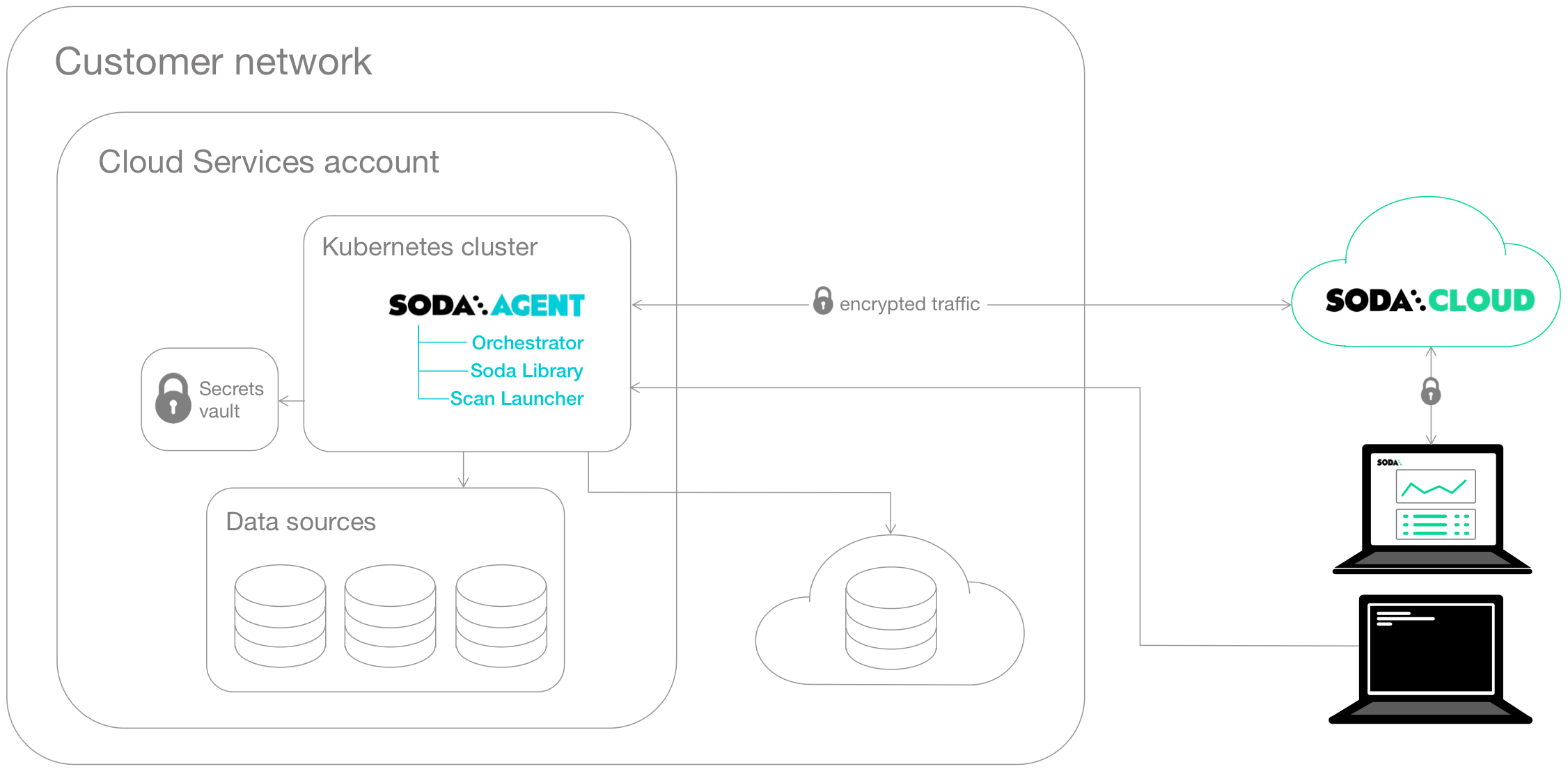
The **Soda Runner** is a tool that empowers Soda Cloud users to securely access data sources to scan for data quality. For a self-hosted runner, create a Kubernetes cluster in a cloud services provider environment, then use Helm to deploy a Soda Runner in the cluster.
This setup enables Soda Cloud users to securely connect to data sources (Snowflake, Amazon Athena, etc.) from within the Soda Cloud web application. Any user in your Soda Cloud account can add a new data source via the runner, then write their own no-code checks to check for data quality in the new data source.
What follows is an extremely abridged introduction to a few basic elements involved in the deployment and setup of a self-hosted Soda Runner.
**Soda Library** is a Python library and command-line tool that serves as the backbone of Soda technology. It is the software that performs the work of converting user-defined input into SQL queries that execute when you run scans for data quality in a data source. Connect Soda Library to a **Soda Cloud** account where you and your team can use the web application to collaborate on data quality monitoring.
Both Soda Library and Soda Cloud make use of **Soda Checks Language (SodaCL)** to write checks for data quality. The checks are tests that Soda Library executes when it runs a scan of your data.
**Soda Runner** is essentially Soda Library functionality that you deploy in a Kubernetes cluster in your own cloud services provider environment. When you deploy a runner, you also deploy two types of workloads in your Kubernetes cluster from a Docker image:
* a **Soda Runner Orchestrator** which creates Kubernetes Jobs to trigger scheduled and on-demand scans of data
* a **Soda Runner Scan Launcher** which wraps around Soda Library, the tool which performs the scan itself
**Kubernetes** is a system for orchestrating containerized applications; a **Kubernetes cluster** is a set of resources that supports an application deployment.
You need a Kubernetes cluster in which to deploy the containerized applications that make up the **Soda Runner**. Kubernetes uses the concept of **Secrets** that the Soda Runner Helm chart employs to store connection secrets that you specify as values during the Helm release of the Soda Runner. Depending on your cloud provider, you can arrange to store these Secrets in a specialized storage such as [Azure Key Vault](https://learn.microsoft.com/en-us/azure/key-vault/general/basic-concepts) or [AWS Key Management Service (KMS)](https://docs.aws.amazon.com/kms/latest/developerguide/overview.html). See: [Integrate with a secrets manager](/soda-documentation/soda-v3/use-case-guides/quick-start-secrets.md).
The Jobs that the runner creates access these Secrets when they execute. Learn more about [Kubernetes concepts](https://www.youtube.com/watch?v=BOj1sgWVXko).
Within a cloud services provider environment is *where* you create your Kubernetes cluster. You can deploy a Soda Runner in any environment in which you can create Kubernetes clusters such as:
* Amazon Elastic Kubernetes Service (EKS)
* Microsoft Azure Kubernetes Service (AKS)
* Google Kubernetes Engine (GKE)
* Any Kubernetes cluster version 1.21 or greater which uses standard Kubernetes
* Locally, for testing purposes, using tools like [Minikube](https://minikube.sigs.k8s.io/docs/), [microk8s](https://microk8s.io/docs), [kind](https://kind.sigs.k8s.io/), [k3s](https://docs.k3s.io/), or [Docker Desktop](https://www.docker.com/products/docker-desktop/) with Kubernetes support.
**Helm** is a package manager for Kubernetes which bundles YAML files together for storage in a public or private repository. This bundle of YAML files is referred to as a **Helm chart**. The Soda Runner is a Helm chart. Anyone with access to the Helm chart’s repo can deploy the chart to make use of YAML files in it. Learn more about [Helm concepts](https://www.youtube.com/watch?v=-ykwb1d0DXU).
The Soda Runner Helm chart is stored on a [public repository](https://helm.soda.io/soda-runner/) and published on [ArtifactHub.io](https://artifacthub.io/packages/helm/soda-runner/soda-runner). Anyone can use Helm to find and deploy the Soda Runner Helm chart in their Kubernetes cluster
## Go further
* [Deploy a Soda Runner](/soda-documentation/soda-v3/quick-start-sip/deploy.md) in a Kubernetes cluster.
> Need help? Join the [Soda community on Slack](https://community.soda.io/slack).
---
# Agent Instructions
This documentation is published with GitBook. GitBook is the documentation platform designed so that both humans and AI agents can read, navigate, and reason over technical content effectively. Learn more at gitbook.com.
## Querying This Documentation
If you need additional information that is not directly available in this page, you can query the documentation by asking a question.
Perform an HTTP GET request on the following URL with the `ask` and `goal` query parameters:
```
GET https://docs.soda.io/soda-documentation/soda-v3/learning-resources/basics.md?ask=&goal=
```
`ask` is the immediate question: it should be specific, self-contained, and written in natural language.
`goal` is what the user is ultimately trying to achieve, the reason they need the answer. Sharing it helps GitBook give you a better, more relevant answer. A goal is most helpful when it describes the outcome the user wants rather than restating the question. For example, with `ask=how do I create an API token`, a goal like `automate deployments from our CI pipeline` lets GitBook tailor the answer to that use case.
The response will contain a direct answer to the question and relevant excerpts and sources from the documentation.
Use this mechanism when the answer is not explicitly present in the current page, you need clarification or additional context, or you want to retrieve related documentation sections.