> For the complete documentation index, see [llms.txt](https://docs.soda.io/llms.txt). Markdown versions of documentation pages are available by appending `.md` to page URLs; this page is available as [Markdown](https://docs.soda.io/soda-documentation/soda-v3/integrate-soda/integrate-github.md).
# Integrate Soda with a GitHub Workflow
Use the GitHub Action for Soda to automatically scan for data quality during development.
Add the [**Soda GitHub Action**](https://github.com/marketplace/actions/soda-library-action) to your GitHub Workflow to automatically execute scans for data quality during development.
```yaml
name: Scan for data quality
on: pull_request
jobs:
soda_scan:
runs-on: ubuntu-latest
name: Run Soda Scan
steps:
- name: Checkout
uses: actions/checkout@v3
- name: Perform Soda Scan
uses: sodadata/soda-github-action@v1
env:
SODA_CLOUD_API_KEY: ${{ secrets.SODA_CLOUD_API_KEY }}
SODA_CLOUD_API_SECRET: ${{ secrets.SODA_CLOUD_API_SECRET }}
SNOWFLAKE_USERNAME: ${{ secrets.SNOWFLAKE_USERNAME }}
SNOWFLAKE_PASSWORD: ${{ secrets.SNOWFLAKE_PASSWORD }}
with:
soda_library_version: v1.0.4
data_source: snowflake
configuration: ./configuration.yaml
checks: ./checks.yaml
```
## About Soda and the Soda GitHub Action
**Soda** works by taking the data quality checks that you prepare and using them to run a scan of datasets in a data source. A scan is a CLI command which instructs Soda to prepare optimized SQL queries that execute data quality checks on your data source to find invalid, missing, or unexpected data. When checks fail, they surface bad-quality data and present check results that help you investigate and address quality issues.
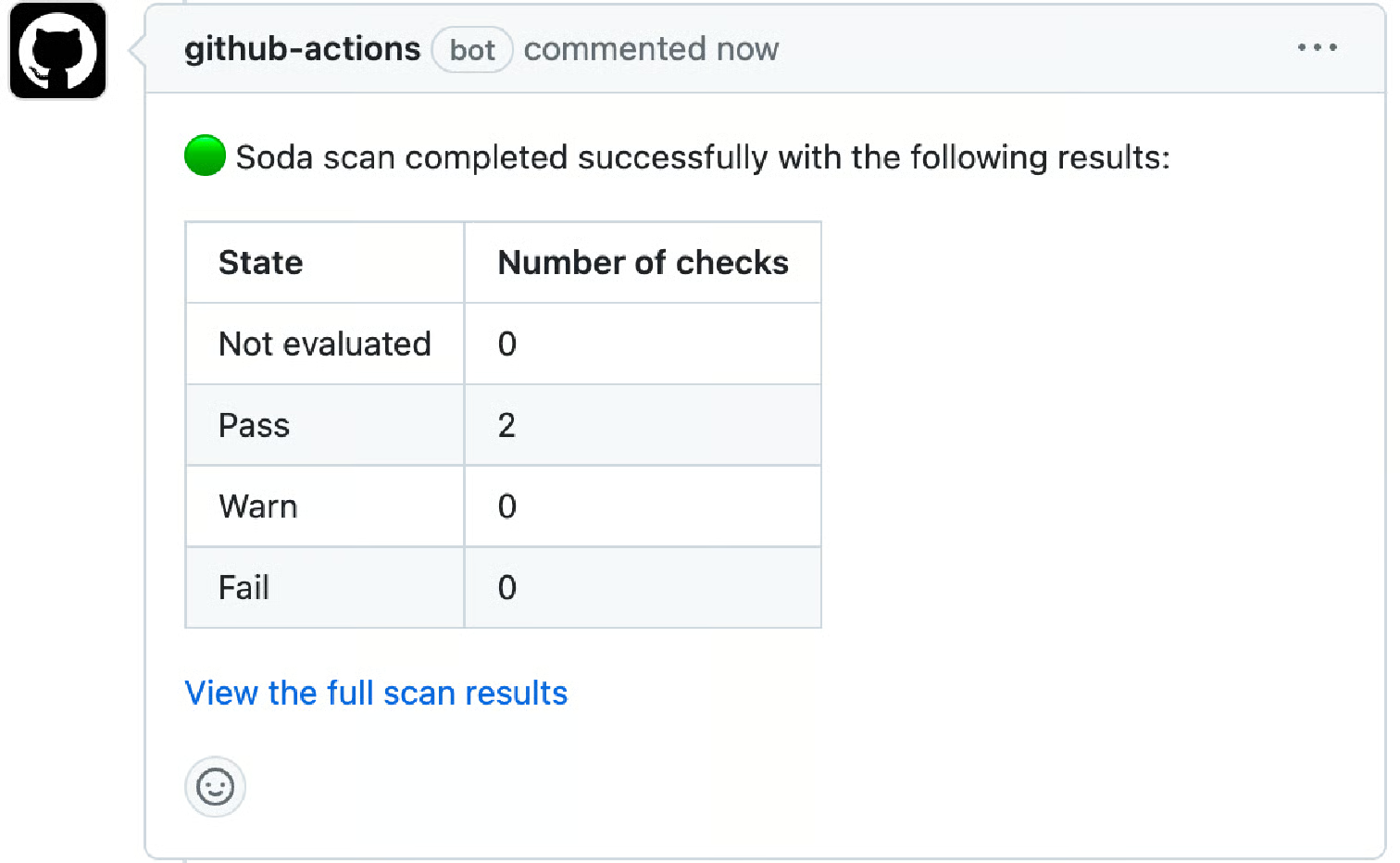
For example, in a repository in which are adding a transformation or making changes to a dbt model, you can add the **GitHub Action for Soda** to your workflow, as above. With each new pull request, or commit to an existing one, it executes a Soda scan for data quality and presents the results of the scan in a comment in the pull request, and in a report in Soda Cloud.
Where the scan results indicate an issue with data quality, Soda notifies you in both a PR comment and by email so that you can investigate and address any issues before merging your PR into production. Note that the Action does not yet support sending notifications via Slack, only email; see [Notes and limitations](/soda-documentation/soda-v3/integrate-soda/integrate-github.md#notes-and-limitations).
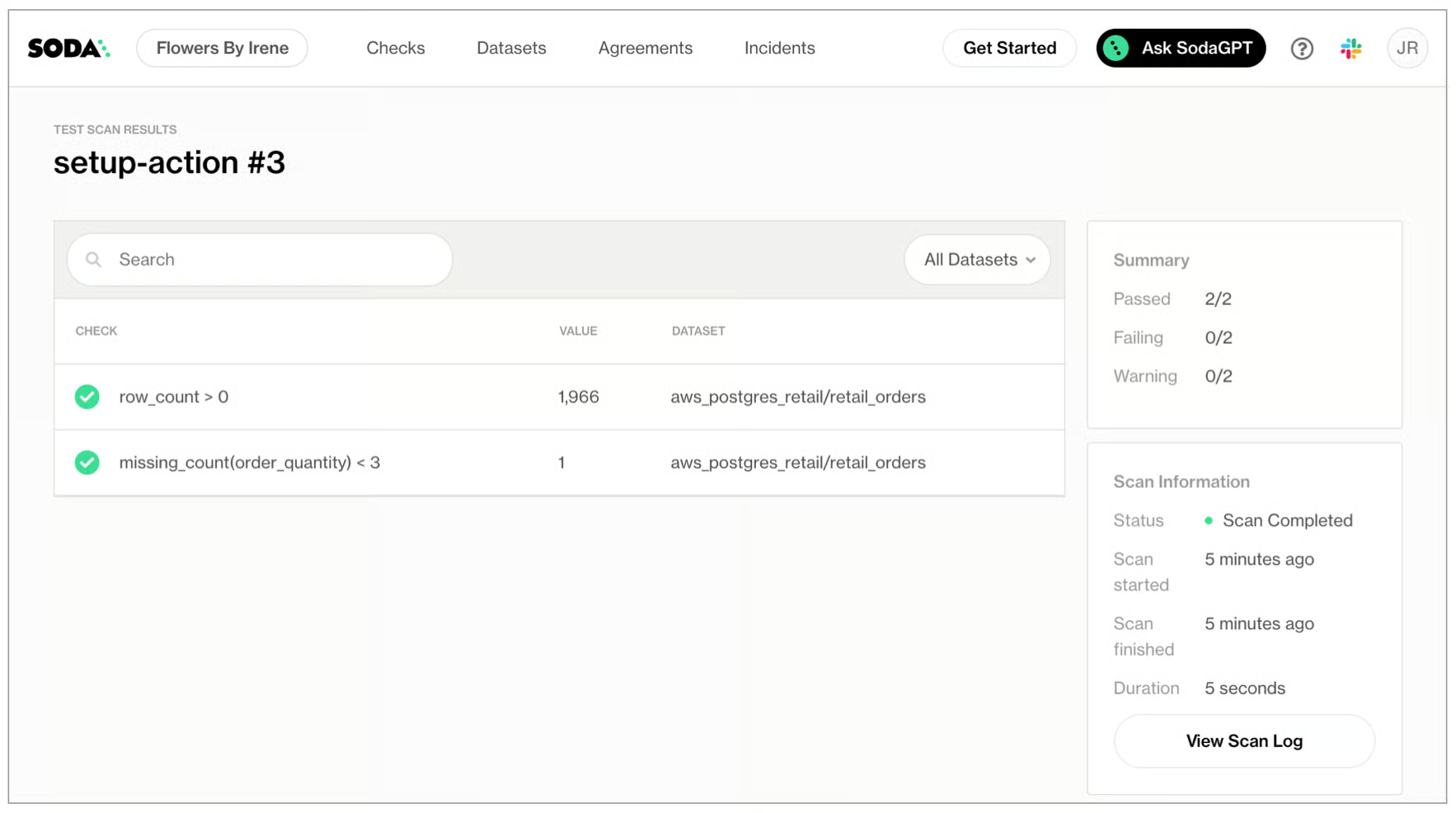
Further, you can access a full report of the data quality scan results, including scan logs, in your Soda Cloud account via the link in the PR comment.
## Prerequisites
* You have a GitHub account, and are familiar with using [GitHub Workflows](https://docs.github.com/en/actions/using-workflows) and [Actions](https://docs.github.com/en/actions).
* You have access to the data source login credentials that Soda needs to access your data to run a scan for quality.
## Add the Action to a Workflow
1. If you have not already done so, [create a Soda Cloud account](https://cloud.soda.io/signup), which is free for a 45-day trial.
Why do I need a Soda Cloud account?
To validate your account license or free trial, the Soda Library Docker image that the GitHub Action uses to execute scans must communicate with a Soda Cloud account via API keys.\
Create [new API keys](https://go.soda.io/api-keys) in your Soda Cloud account, then use them to configure the connection between the Soda Library Docker image and your account in step 4 of this procedure.
2. In the GitHub repository in which you wish to include data quality scans in a Workflow, create a folder named `soda` for the configuration files that Soda requires as input to run a scan.
3. In this folder, create two files:
* a `configuration.yml` file to store the connection configuration Soda needs to connect to your data source and your Soda Cloud account.
* a `checks.yml` file to store the SodaCL checks you wish to execute to test for data quality. A check is a test that Soda executes when it scans a dataset in your data source.
4. Follow the [instructions](/soda-documentation/soda-v3/quick-start-sip/install.md#configure-soda) to add connection configuration details for both your data source and Soda Cloud account to the `configuration.yml`, and add checks for data quality for a dataset to your `checks.yml`. Examples of each follow.
```yaml
# configuration.yml file
data_source aws_postgres_retail:
type: postgres
host: soda-demo
username: ${POSTGRES_USERNAME}
password: ${POSTGRES_PASSWORD}
database: postgres
schema: public
# Refer to https://go.soda.io/api-keys
soda_cloud:
host: cloud.us.soda.io
api_key_id: ${SODA_CLOUD_API_KEY}
api_key_secret: ${SODA_CLOUD_API_KEY}
```
```yaml
# checks.yml file
checks for retail_orders:
- row_count > 0
- missing_count(order_quantity) < 3
```
5. In the `.github/workflows` folder in your GitHub repository, open an existing Workflow or [create a new workflow](https://docs.github.com/en/actions/using-workflows/about-workflows#create-an-example-workflow) file. Determine where you wish to add a Soda scan for data quality in your workflow, such as after a trasnformation and dbt run. Refer to [Test data in development](/soda-documentation/soda-v3/use-case-guides/quick-start-dev.md) for a recommended approach.
6. Access the GitHub Marketplace to access the [Soda GitHub Action](https://github.com/marketplace/actions/soda-library-action). Click **Use latest version** to copy the code snippet for the Action.
7. Paste the snippet into your new or existing workflow as an independent step, then add the required action inputs as in the following example. Refer to [table below](#required-action-input) for input details.
```yaml
- name: Soda Library Action
uses: sodadata/soda-github-action@v1.0.0
with:
soda_library_version: v1.0.4
data_source: aws_postgres_retail
configuration: .soda/configuration.yaml
checks: .soda/checks.yaml
```
8. (Optional) Following best practice, add a list of variables for sensitive login credentials and keys, as in the following example. Read more about [GitHub encrypted secrets](https://docs.github.com/en/actions/security-guides/encrypted-secrets).
```yaml
- name: Perform Soda Scan
uses: sodadata/soda-github-action@v1
env:
SODA_CLOUD_API_KEY: ${{ secrets.SODA_CLOUD_API_KEY }}
SODA_CLOUD_API_SECRET: ${{ secrets.SODA_CLOUD_API_SECRET }}
POSTGRES_USERNAME: ${{ secrets.POSTGRES_USERNAME }}
POSTGRES_PASSWORD: ${{ secrets.POSTGRES_PASSWORD }}
with:
soda_library_version: v1.0.4
data_source: snowflake1
configuration: .soda/configuration.yaml
checks: .soda/checks.yaml
```
9. Save the changes to your workflow file, then test the action's functionality by triggering the event that workflow job in GitHub, such as creating a pull request.\
To monitor the progress of the workflow, access the **Actions** tab in your GitHub repository, select the workflow in which you added the GitHub Action for Soda, then find the run in the list of **Workflow Runs**.
10. When the job completes, navigate to the pull request’s **Conversation** tab to view the comment the Action posted via the github-action bot. To examine the full scan report and troubleshoot any issues, click the link to **View the full scan results** in the comment, then click **View Scan Log**. Use [Troubleshoot SocaCL](broken://pages/6yfeUkiE4RmxsHyFggFp) for help diagnosing issues with SodaCL checks.
**Next:**
* Add more SodaCL checks to your `checks.yml` file to validate data according to your own use cases and requirements. Refer to [SodaCL](/soda-documentation/soda-v3/sodacl-reference/metrics-and-checks.md) reference documentation, and the [SodaCL tutorial](/soda-documentation/soda-v3/soda-cl-overview/quick-start-sodacl.md).
* Follow the guide for [Test data during development](/soda-documentation/soda-v3/use-case-guides/quick-start-dev.md) for more insight into a use case for the GitHub Action for Soda.
#### Required Action input
| Input | Description | Required |
| ---------------------- | -------------------------------------------------------------------------------------------------------------------------------------------------------------------------------------------------------------------------------------------------------------------------------------- | :------: |
| `soda_library_version` |
Version of the Soda Library that runs the scan. Supply a specific version, such as v1.0.4, or latest. See soda-library docker images for possible versions. Compatible with Soda Library 1.0.4 and higher.
| ✓ |
| `data_source` | Name of data source on which to perform the scan. | ✓ |
| `configuration` | File path to configuration YAML file. See Soda docs. | ✓ |
| `checks` |
File path to checks YAML file. See Soda docs. Compatible with shell filename extensions. Identify multiple check files, if you wish. For example: ./checks\_\*.yaml or ./{check1.yaml,check2.yaml}
| ✓ |
## Notes and limitations
* Be aware that for self-hosted runners in GitHub:
* Windows runners are not supported, including the use of official Windows-based images such as windows-latest
* MacOS runners require Docker installation because the macos-latest does not come with Docker pre-installed.
* The scan results that the GitHub Action for Soda produces *do not* appear among your primary checks results. The results are ephemeral and serve only to flag and fix issues during development. Though the results are ephemeral, checks that Soda executes via the GitHub Action for Soda count towards the check allotment associated with your license.
* The ephemeral scan results that the GitHub Action for Soda produces *do not* persist historical measurements. Thus, checks that normally evaluate against stored values in the Cloud Metric Store, such as schema checks, do not evaluate in scans that the GitHub Action for Soda executes.
* The ephemeral scan results that the GitHub Action for Soda produces *cannot* send notifications according to **Notification Rules** in your Soda Cloud account. The only notifications for the results are:
* the status report in the GitHub PR comment
* an email to the email address you used to create your Soda Cloud account
## Go further
* Learn how to [Test data in an Airflow pipeline](/soda-documentation/soda-v3/use-case-guides/quick-start-prod.md).
* Learn more about using [webhooks](/soda-documentation/soda-v3/integrate-soda/integrate-webhooks.md) to integrate Soda Cloud with other third-party service providers.
* Access a list of [all integrations](https://www.soda.io/integrations) that Soda Cloud supports.
> Need help? Join the [Soda community on Slack](https://community.soda.io/slack).
---
# Agent Instructions
This documentation is published with GitBook. GitBook is the documentation platform designed so that both humans and AI agents can read, navigate, and reason over technical content effectively. Learn more at gitbook.com.
## Querying This Documentation
If you need additional information that is not directly available in this page, you can query the documentation by asking a question.
Perform an HTTP GET request on the following URL with the `ask` and `goal` query parameters:
```
GET https://docs.soda.io/soda-documentation/soda-v3/integrate-soda/integrate-github.md?ask=&goal=
```
`ask` is the immediate question: it should be specific, self-contained, and written in natural language.
`goal` is what the user is ultimately trying to achieve, the reason they need the answer. Sharing it helps GitBook give you a better, more relevant answer. A goal is most helpful when it describes the outcome the user wants rather than restating the question. For example, with `ask=how do I create an API token`, a goal like `automate deployments from our CI pipeline` lets GitBook tailor the answer to that use case.
The response will contain a direct answer to the question and relevant excerpts and sources from the documentation.
Use this mechanism when the answer is not explicitly present in the current page, you need clarification or additional context, or you want to retrieve related documentation sections.