> For the complete documentation index, see [llms.txt](https://docs.soda.io/llms.txt). Markdown versions of documentation pages are available by appending `.md` to page URLs; this page is available as [Markdown](https://docs.soda.io/soda-documentation/data-observability/late-arriving-data.md).

# Late-arriving data

Make Soda wait for late data before it analyzes a period, so your monitors see complete data.

Each scan analyzes the period that just ended. That works when the data for that period has already landed. Often it has not. Rows tend to land a while after the moment they describe, so the scan reads a period that is still filling up.

The monitors still report a value. But that value describes an incomplete period. Partition row count comes out low. Most recent timestamp comes out stale. The anomaly detection algorithm learns from those values, so it learns the wrong normal.

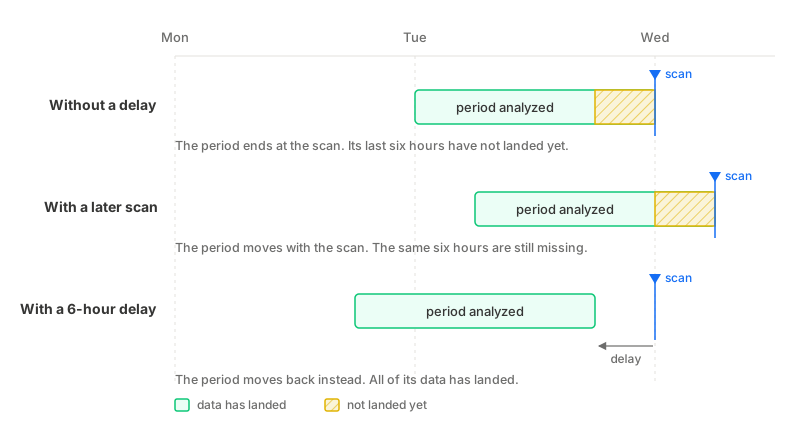
A **delay** fixes this. Each scan then analyzes an older period instead of the one that just ended. Set a delay of two days, and Monday's data is analyzed on Wednesday. By then it has arrived.

<figure><img src="https://1123167021-files.gitbook.io/~/files/v0/b/gitbook-x-prod.appspot.com/o/spaces%2FA2PmHkO5cBgeRPdiPPOG%2Fuploads%2Fgit-blob-96eb35868775129494f70ffb744db8c543035031%2Fdata-delay-timeline.svg?alt=media" alt=""><figcaption><p>A dataset with daily partitions, whose rows land up to six hours after the moment they describe. A later scan time moves the analyzed period along with it, so the same six hours stay missing. A delay moves the period back instead.</p></figcaption></figure>

## Delay length

A delay should be as long as your data's lag, and no longer. A longer delay still catches all your data, but you wait longer for the results of each period.

To measure the lag, take one row. Note the time its time partition column says it belongs to. Then note when that row actually landed in your dataset. The gap between the two is your delay.

Two examples:

* Rows stream in about two hours behind their own timestamp. Use a two-hour delay.
* Your supplier sends each day's file three days later. Use a three-day delay.

What counts is the size of the gap, not how it compares to your partition. Two hours of lag on daily partitions still needs a two-hour delay. Without it, every scan misses the last two hours of the day it analyzes.

## Scan time versus delay

Moving the scan later is a tempting alternative, but it does not work. The period a scan analyzes ends at the scan itself. Move the scan two hours later, and the period moves two hours later too. The same two hours are still missing, just later in the day.

A delay moves the period without moving the scan. That is what closes the gap. Your scans keep running on the same schedule, at the same frequency. Only the period each one looks at moves back.

Use the [scan time](/soda-documentation/data-observability/scan-time-and-scan-time-strategy.md) to decide when your scans run. It sets which compute window they fall in, and whether your team is around to act on the results. Use a delay for data that arrives late.

## Affected monitors

A delay applies to the monitors that read your data through the **time partition column**:

* Partition row count
* Most recent timestamp
* All column monitors

Metadata monitors are not affected: total row count, total row count change, last modification time, and schema changes. They read the data source directly at scan time, so there is no period to move.

{% hint style="info" %}
A delay needs a [time partition column](/soda-documentation/data-observability/metric-monitoring-dashboard/dataset-monitors.md#time-partition-column). Without one there are no partitions to move. Soda saves the delay, but it does nothing until you configure a time partition column.
{% endhint %}

## Configure a delay

You can set a delay in three places:

* **During onboarding**, for all your datasets at once. See [onboard datasets](/soda-documentation/onboard-data-sources-and-datasets/onboard-datasets-on-soda-cloud.md).
* **In bulk**, from the Datasets list. Select your datasets, then click **Configure Metric Monitoring**.
* **For a single dataset**, on its **Metric Monitors** tab. Click **Configure Metric Monitoring**, then open **Late-arriving data**.

Then pick one of two options:

* **No delay**: each scan analyzes the period that just ended. This is the default.
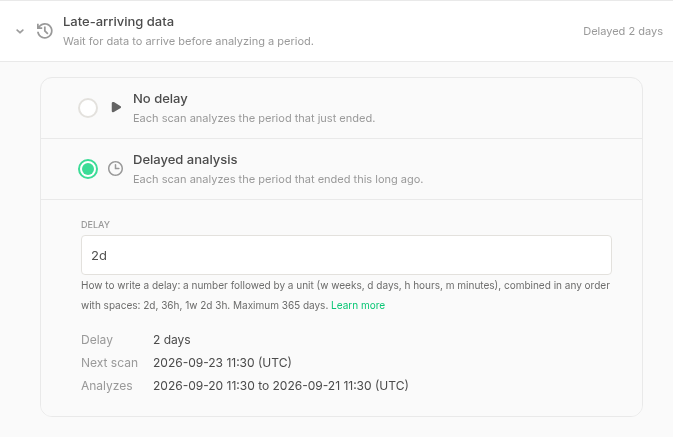
* **Delayed analysis**: each scan analyzes an older period. Type how much older in the **Delay** field.

<figure><img src="https://1123167021-files.gitbook.io/~/files/v0/b/gitbook-x-prod.appspot.com/o/spaces%2FA2PmHkO5cBgeRPdiPPOG%2Fuploads%2Fgit-blob-8dbd14c37bac8143550fe7cfca617d5235fc5a5c%2Fdata-delay-configuration.png?alt=media" alt=""><figcaption><p>Delayed analysis with a two-day delay. The preview underneath shows the next scan, and the exact period that scan will analyze.</p></figcaption></figure>

Write a delay as a number and a unit. Use `w` for weeks, `d` for days, `h` for hours, and `m` for minutes. Combine them in any order, separated by spaces: `2d`, `36h`, `1w 2d 3h`. The longest delay you can set is 365 days.

Soda previews the result under the field. It shows the delay, the time of the next scan, and the exact period that scan will analyze. Compare that period with the time your data usually lands, then save.
{% hint style="warning" %}
**Changing the delay clears the monitoring history**

Old measurements describe a different period than new ones, so Soda cannot compare them. When you change the delay, Soda clears this dataset's monitoring history, and the anomaly detection algorithm starts learning again. Changing the time partition column does the same.

Anomaly detection stays quiet until the new baseline builds up.
{% endhint %}

## Let Soda recommend a delay

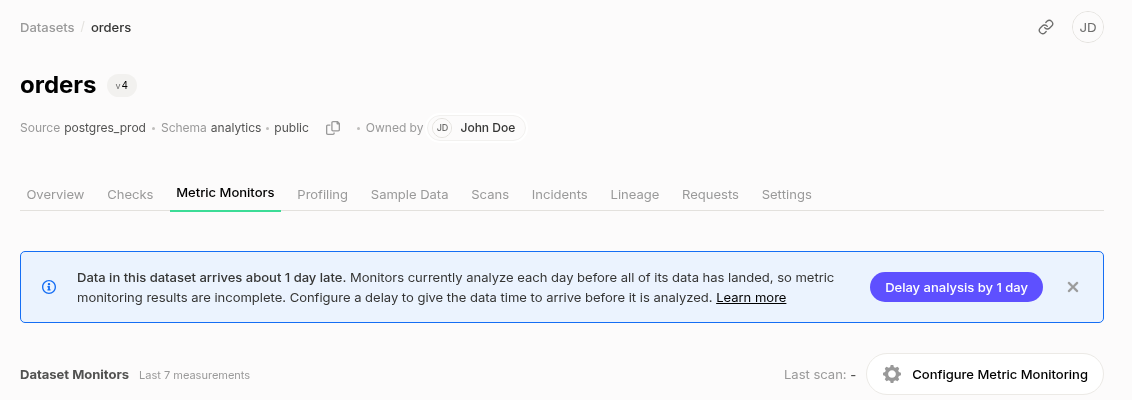
Soda can suggest a delay for you. It watches the **Most recent timestamp** monitor, which tracks how far behind your newest row is at each scan. When that lag is stable and bigger than half a partition, Soda shows a suggestion on the **Metric Monitors** tab.

<figure><img src="https://1123167021-files.gitbook.io/~/files/v0/b/gitbook-x-prod.appspot.com/o/spaces%2FA2PmHkO5cBgeRPdiPPOG%2Fuploads%2Fgit-blob-b55ae5ad8acd9dd71dc0161186c95f1def335e15%2Fdata-delay-recommendation.png?alt=media" alt=""><figcaption><p>The suggestion appears on the Metric Monitors tab, above the monitors it is about.</p></figcaption></figure>

**Delay analysis by ...** opens the panel with the delay already filled in. Nothing is saved yet. Review the period it will analyze, change the value if you want, or close the panel to leave the dataset as it was.

**Dismiss** hides the banner. It only comes back if Soda arrives at a clearly different delay, so a dismissed 2-day suggestion will not reappear tomorrow.

You may see no suggestion at all. The common reasons:

* **Too little history.** Soda needs at least a week of measurements, so a newly onboarded dataset has nothing to go on yet.
* **The lag jumps around.** If data is one day late one time and four days late the next, no single delay fixes it. Soda does not guess.
* **The lag is small.** Soda only suggests a delay when the lag is more than half a period, so it does not nudge you over a few minutes. A shorter delay is still yours to set by hand.
* **The data is very old.** If the newest row is over a year old, the dataset has probably stopped loading. That is a different problem.

## Set a delay through the API

The dataset update endpoint accepts `dataDelaySeconds`, the delay in seconds. Send `null` to go back to analyzing the period that just ended. See the [REST API](broken://pages/qOmWPvixdxBUojZ2sOEb).

<br>

***

{% hint style="info" %}
You are **not logged in to Soda** and are viewing the default public documentation. Learn more about [Licensing & documentation access](/soda-documentation/reference/documentation-access-and-licensing.md).
{% endhint %}


---

# Agent Instructions
This documentation is published with GitBook. GitBook is the documentation platform designed so that both humans and AI agents can read, navigate, and reason over technical content effectively. Learn more at gitbook.com.

## Querying This Documentation
If you need additional information that is not directly available in this page, you can query the documentation by asking a question.

Perform an HTTP GET request on the following URL with the `ask` and `goal` query parameters:

```
GET https://docs.soda.io/soda-documentation/data-observability/late-arriving-data.md?ask=<question>&goal=<user_goal>
```

`ask` is the immediate question: it should be specific, self-contained, and written in natural language.
`goal` is what the user is ultimately trying to achieve, the reason they need the answer. Sharing it helps GitBook give you a better, more relevant answer. A goal is most helpful when it describes the outcome the user wants rather than restating the question. For example, with `ask=how do I create an API token`, a goal like `automate deployments from our CI pipeline` lets GitBook tailor the answer to that use case.

The response will contain a direct answer to the question and relevant excerpts and sources from the documentation.

Use this mechanism when the answer is not explicitly present in the current page, you need clarification or additional context, or you want to retrieve related documentation sections.