> For the complete documentation index, see [llms.txt](https://docs.soda.io/llms.txt). Markdown versions of documentation pages are available by appending `.md` to page URLs; this page is available as [Markdown](https://docs.soda.io/organization-and-admin-settings/general-settings.md).
# General settings
The **General Settings** page allows you to configure foundational settings for your organization in Soda Cloud. These settings impact how your organization operates and how users interact with the platform.
## Organization name
Set the name of your organization. This name appears throughout Soda Cloud, such as in dashboards, reports and notifications.
## Allow "Login As"
Enable the **Login As** feature to allow the Soda Support team to log in as an admin within your organization. This can be useful when troubleshooting issues or providing assistance.
## Enable or disable the Soda-hosted Runner
You can choose whether to use the Soda-hosted Runner by enabling or disabling it in the Organization Settings:
* Check the **Soda-hosted Runner** option to **enable** or **disable** the runner for your organization.
* Disabling the runner prevents Soda Cloud from running scans or checks via the managed runner. You’ll need to use a self-hosted runner or Soda Core in your environment instead.
***
## IP Allowlist
{% hint style="warning" %}
This feature requires the **Manage organization settings** permission. Learn more about [Global and Dataset Roles](/organization-and-admin-settings/global-and-dataset-roles.md).
{% endhint %}
IP allowlisting lets you **restrict access** to your Soda Cloud organization to a defined set of **IP addresses** or **CIDR ranges**. Once enabled, any request originating from an IP address not on the list is blocked regardless of whether the user has valid credentials.
Use IP allowlisting when your organization requires network-level access controls. For example, to enforce that Soda Cloud can only be accessed from a corporate network or VPN.
### Enable IP allowlisting
{% stepper %}
{% step %}
**Open Organization Settings**
Click your avatar in the top right corner, then select **Organization Settings**. Navigate to the **Organization** tab.
{% endstep %}
{% step %}
**Enable the restriction**
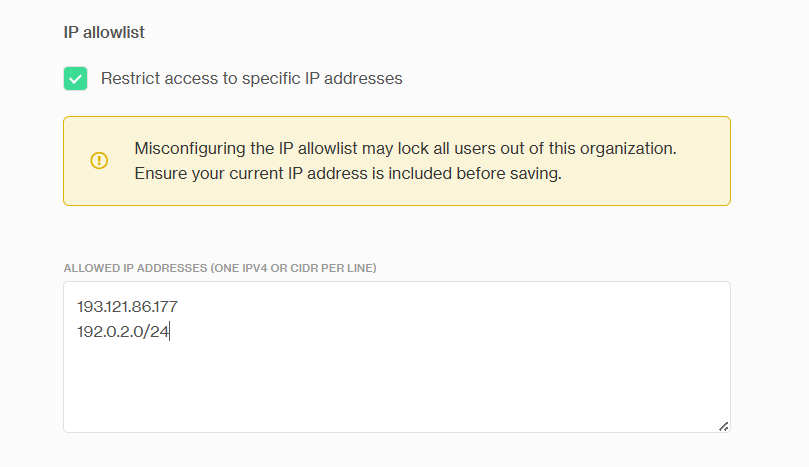
Check **Restrict access to specific IP addresses**. An empty IP allowlist appears below the checkbox.
{% endstep %}
{% step %}
**Add IP addresses or ranges**
Add entries to the list. Each entry can be either:
* An exact IP address, for example `193.121.86.177`
* A CIDR range, for example `192.0.2.0/24`
Add one entry per row.
{% endstep %}
{% step %}
**Click Save**
{% endstep %}
{% endstepper %}
Once saved, Soda Cloud will only accept traffic from the addresses on your list. Requests from any other IP are blocked at the network level, before authentication.
{% hint style="danger" %}
**Changes made to the allowlist take effect immediately after saving**. Before enabling IP allowlisting or removing entries, confirm your current IP address is included in the list, if applicable.
{% endhint %}
### Disable IP allowlisting
In order to disable allowlisting and remove all IP restrictions, uncheck the same box: **Restrict access to specific IP addresses** in **Organization Settings > Organization**. All users with valid credentials will immediately regain access regardless of their IP address.
***
## Profiling
Soda can collect dataset profiling information, such as column-level statistics, and display it in Soda Cloud to help users better understand the datasets they are working with.
> Read more about [Profiling](/data-observability/profiling.md).
If you prefer not to send profiling data to Soda Cloud, you can disable this feature for your organization. Uncheck **Profiling** to turn profiling off.
This ensures that no profiling information is collected or pushed to Soda Cloud. Only check and monitor results, along with the dataset schema required for Data Contract and Metric Monitoring, will be processed.
You can also **manage access to profiling information at the dataset level** in Soda Cloud by configuring dataset-level permissions and applying row-level access controls where supported.
> Learn more about [global and dataset roles](/organization-and-admin-settings/global-and-dataset-roles.md).
## Soda AI
Soda AI settings allow you to **enable AI-powered assistants in Sod**a to help users get answers faster and collaborate more effectively on data contracts.
### Enable Ask AI (powered by Kapa)
When enabled, **Ask AI** provides an assistant that users can use to ask general questions about:
* Soda features and functionality
* How to configure and use Soda product capabilities
* Guidance and help related to data contracts
### Enable Contract Copilot (powered by OpenAI)
When enabled, **Contract Copilot** helps users create and improve Soda Contracts with AI-assisted suggestions.
> For more information, see [Soda Contract Copilot](/soda-ai/contract-copilot.md).
### Enable Contract Autopilot (powered by OpenAI)
When enabled, **Contract Autopilot** helps you automatically create Soda Contracts tailored to your data.
> For more information, see [Soda Contract Autopilot](/soda-ai/contract-autopilot.md).
#### Send row-level data to Soda
To generate a contract via Autopilot, Soda sends dataset metadata to the OpenAI API.
To improve the quality of your auto-generated data contract, you can enable this option to **allow Soda to send a small sample of row data to OpenAI** in addition to the dataset metadata.
> Learn more about [Contract Autopilot privacy & security](/soda-ai/contract-autopilot.md#privacy-and-security).
## Enable data source secrets
Manage secure storage of secrets such as API keys, credentials or connection details. Secrets can be used in data source configurations, checks, and other automated processes.
> For more information on how to enable secrets, see the [Soda Cloud onboarding flow](https://docs.soda.io/organization-and-admin-settings/pages/cHo9ixopiR0flOMCbyUF#id-2.3.-secure-your-credentials-with-secrets).
***
{% hint style="info" %}
You are **not logged in to Soda** and are viewing the default public documentation. Learn more about [Licensing & documentation access](/reference/documentation-access-and-licensing.md).
If you do have a Soda license, make sure to **log in to Soda Cloud in this same browser**.
{% endhint %}
---
# Agent Instructions
This documentation is published with GitBook. GitBook is the documentation platform designed so that both humans and AI agents can read, navigate, and reason over technical content effectively. Learn more at gitbook.com.
## Querying This Documentation
If you need additional information that is not directly available in this page, you can query the documentation dynamically by asking a question.
Perform an HTTP GET request on the current page URL with the `ask` query parameter, and the optional `goal` query parameter:
```
GET https://docs.soda.io/organization-and-admin-settings/general-settings.md?ask=&goal=
```
`ask` is the immediate question: it should be specific, self-contained, and written in natural language.
`goal` is optional and describes the broader end goal you are ultimately trying to accomplish on behalf of the user. GitBook uses it to tailor the answer towards what is most useful for that goal.
The response will contain a direct answer to the question and relevant excerpts and sources from the documentation.
Use this mechanism when the answer is not explicitly present in the current page, you need clarification or additional context, or you want to retrieve related documentation sections.