> For the complete documentation index, see [llms.txt](https://docs.soda.io/llms.txt). Markdown versions of documentation pages are available by appending `.md` to page URLs; this page is available as [Markdown](https://docs.soda.io/manage-issues/incidents.md).
# Incidents
Incidents help you track, investigate, and resolve data quality issues when they occur. An incident is created when a data issue, such as a failed or warning check, has been confirmed and assigned to someone for resolution.
An incident is linked to one or more checks through their check results. The checks can belong to different datasets and data sources, so a single incident can track an issue that surfaces in several places, such as a failed load that breaks checks on several downstream tables.
## How to create an incident
{% hint style="warning" %}
Only users with the **Manage incidents** permission on a check's dataset can create an incident for that check. Read about [Global and Dataset Roles](/organization-and-admin-settings/global-and-dataset-roles.md) and [who can view and manage an incident](#who-can-view-and-manage-an-incident).
{% endhint %}
You can start an incident from several places in Soda Cloud:
* On the **Incidents** page, click **New Incident**.
* On a **Dataset Page**, open the **Incidents** tab and click **Create incident**.
* In a list of checks, such as the **Checks** tab of a dataset, open the **context menu** of a check and select **Create Incident**.
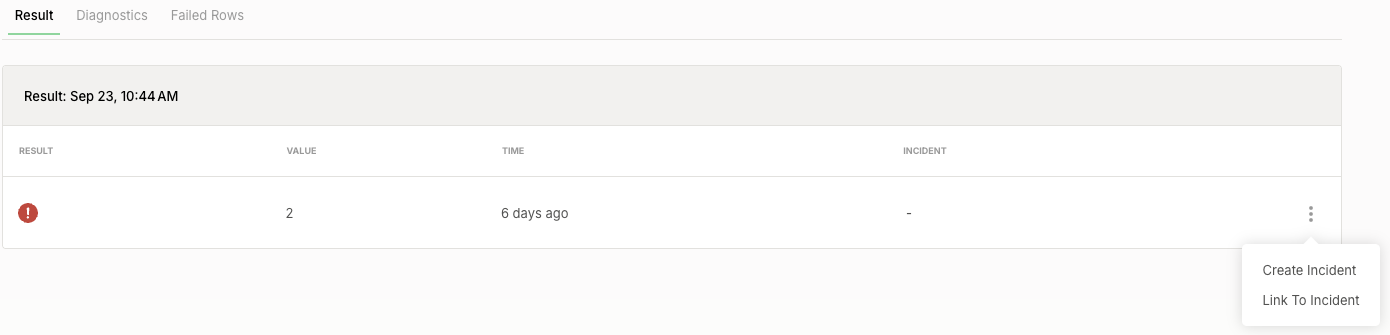
* On a check or monitor page, open the **context menu** of a result, such as the one on the **Result** tab of a check, and select **Create Incident**.
{% stepper %}
{% step %}
#### Select the check
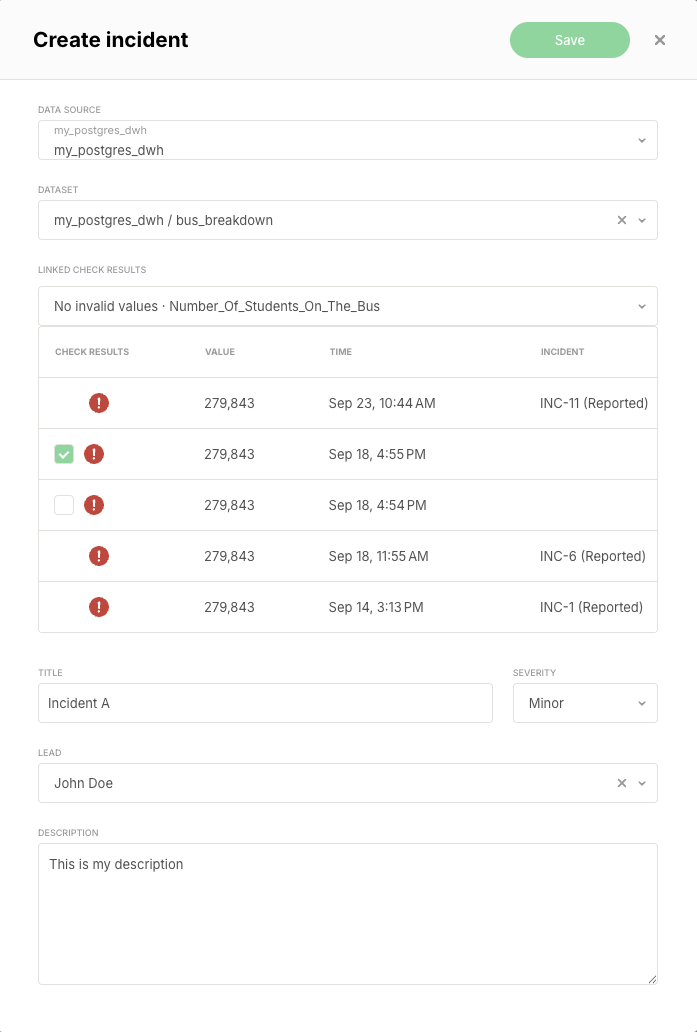
Select the **data source**, the **dataset**, and the **check** the incident is about. If you start from a dataset, the dialog opens with that dataset selected; if you start from a check or a result, it opens with that check selected.
{% endstep %}
{% step %}
#### Connect the incident to check results
Select one or multiple **check results** of that check to associate with the incident. A check result can belong to only one incident, so results that are already linked to another incident can't be selected.
{% endstep %}
{% step %}
#### Describe the incident
Provide a **title**, a **severity**, and a **description**, and optionally assign a **lead**.
{% endstep %}
{% step %}
#### Create the incident
:octagon-check: Click **Save** to proceed
{% endstep %}
{% endstepper %}
An incident starts with one check. To add checks from the same dataset or from other datasets, link them to the incident.
## Link a check to an incident
You can link a check to an existing incident from the check or from the incident page.
{% hint style="info" %}
Only unresolved incidents accept new checks. A resolved incident can't be changed, and the link dialog doesn't list resolved incidents.
{% endhint %}
### From a check
{% stepper %}
{% step %}
#### Open the link dialog
In a list of checks, open the **context menu** of a check and select **Link To Incident**. On a check or monitor page, you can do the same for a single result.
{% endstep %}
{% step %}
#### Select the incident
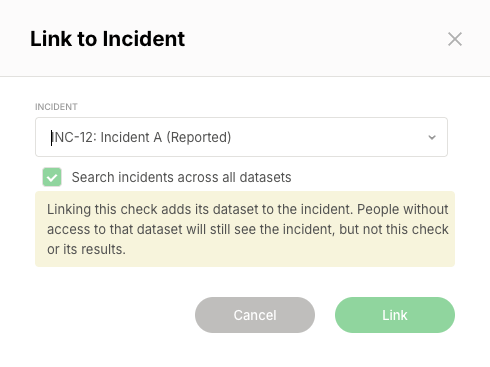
The list shows the unresolved incidents on the check's dataset, newest first. To pick an incident from another dataset, select **Search incidents across all datasets**.
{% endstep %}
{% step %}
#### Select the check results
If you start from a check whose latest result is already linked to an incident, select which of its results to link. Otherwise, Soda links the result you started from: the check's latest result, or the result you selected on a check or monitor page.
{% endstep %}
{% step %}
#### Link the check
Click **Link**.
{% endstep %}
{% endstepper %}
When the incident doesn't include the check's dataset yet, the dialog warns you before you link. Users without access to that dataset still see the incident, but not this check or its results.
### From the incident page
{% stepper %}
{% step %}
#### Open the link dialog
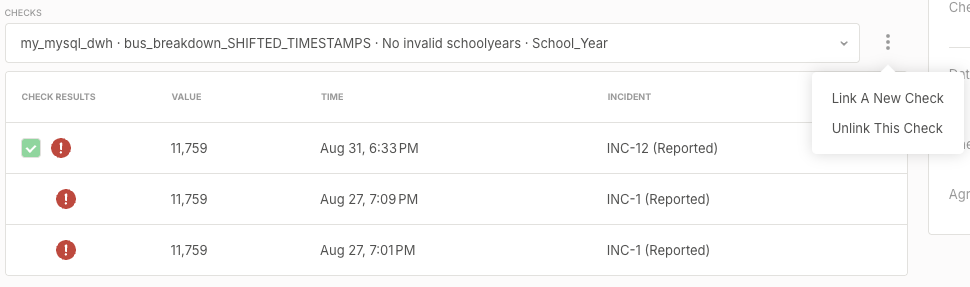
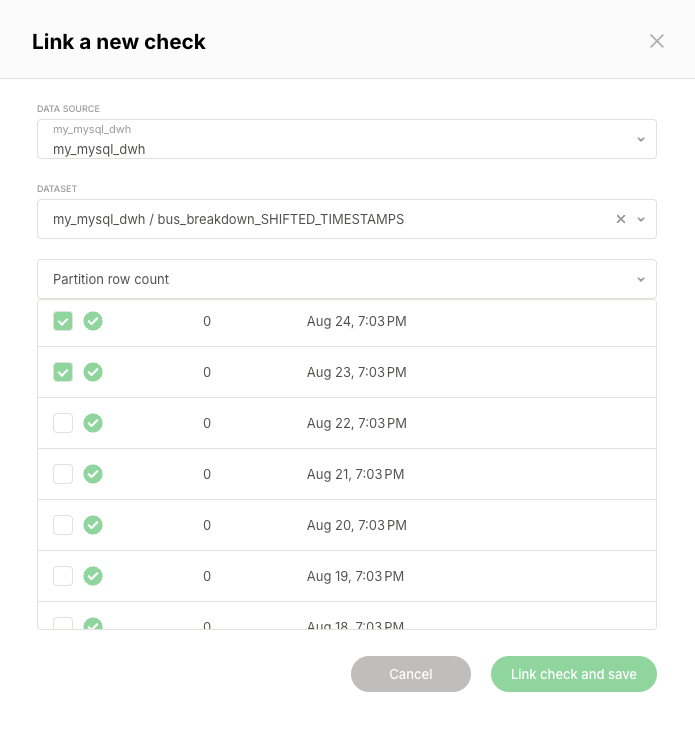
On the incident page, open the **context menu** next to **Checks** and select **Link A New Check**.
{% endstep %}
{% step %}
#### Select the check and its results
Select the **data source**, the **dataset**, and the **check**, then select the check results to link. The dialog warns you when the dataset is not part of the incident yet.
{% endstep %}
{% step %}
#### Save the link
Click **Link check and save**. Soda saves the link right away, without the need to click **Save** on the incident page.
{% endstep %}
{% endstepper %}
## Review the checks of an incident
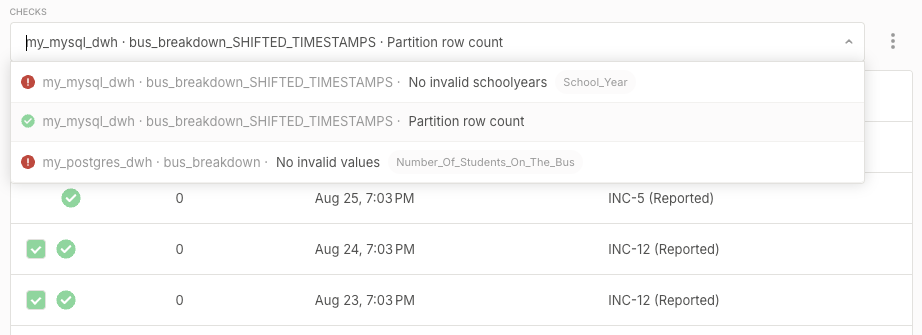
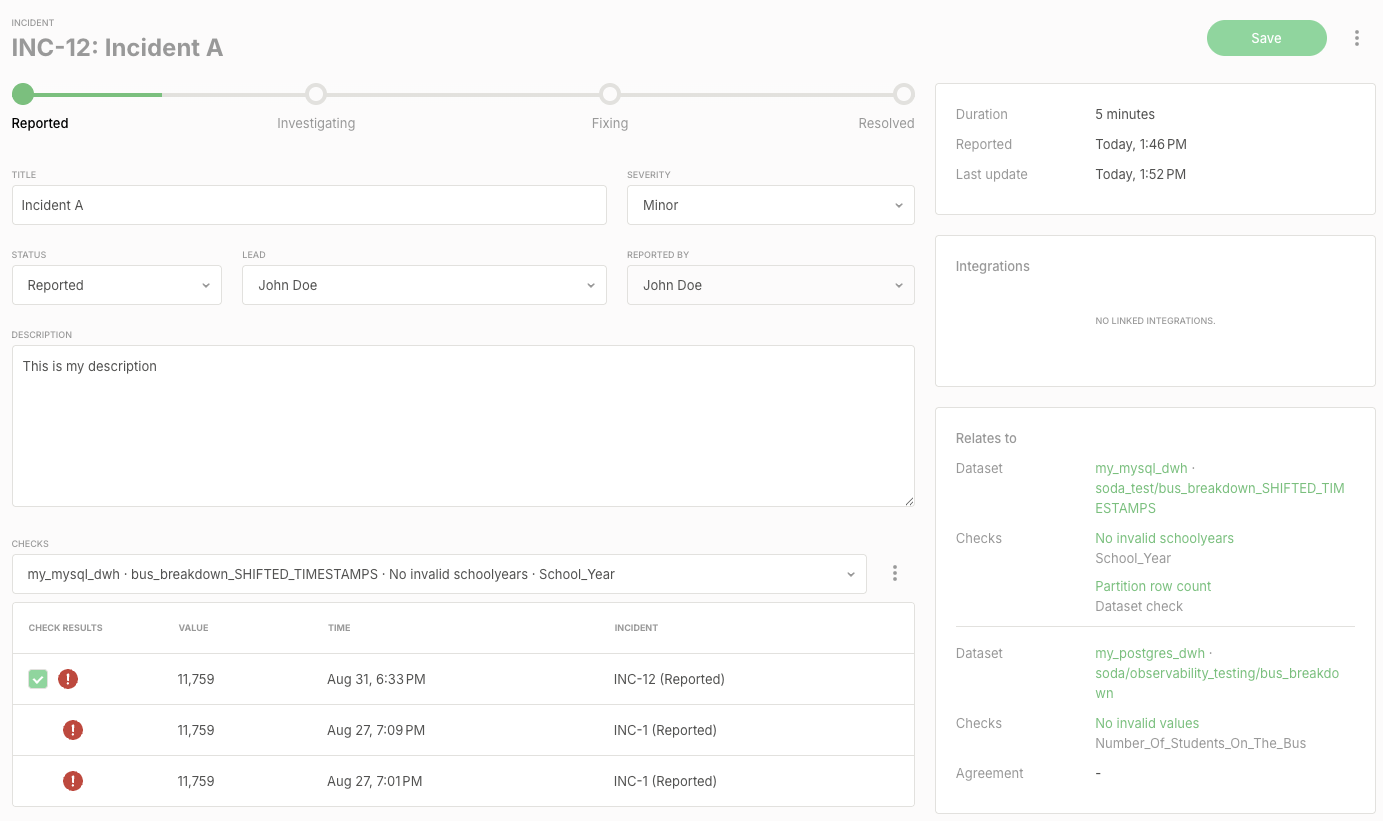
The **Checks** section of the incident page shows one linked check at a time. Use the dropdown to switch between checks, or type in it to filter the list. Each entry shows the check name, the column the check applies to, if any, and the outcome of the check's latest result, so you can see which checks have recovered since the incident was created. When the incident spans more than one dataset, each entry also starts with its data source and dataset.
Below the dropdown, a table lists the results of the selected check, with the results that are linked to the incident selected. To change which results are linked, select or clear results and click **Save**. If you clear every result of a check, saving unlinks the check from the incident.
The **Relates to** panel groups the linked checks by dataset. Each group shows the dataset with its data source, followed by the checks linked from that dataset, each with the column it applies to, or **Dataset check** for a check that isn't tied to a column.
## Unlink a check from an incident
Unlinking a check removes all of its check results from the incident. You can unlink a check from the incident page, or from a check or monitor page.
On the incident page, select the check in the **Checks** dropdown, open the **context menu** next to **Checks**, and select **Unlink This Check**. Confirm with **Unlink and save**; Soda saves the change right away.
On a check or monitor page, open the **context menu** of a result that is linked to an incident, select **Unlink From Incident**, and confirm with **Unlink**.
{% hint style="info" %}
An incident always keeps at least one check. **Unlink This Check** is unavailable while only one check is linked, and unlinking the only check from a check or monitor page is refused. To replace an incident's only check, link the new check first, then unlink the old one.
{% endhint %}
## Who can view and manage an incident
Access to an incident follows the datasets of its linked checks. When an incident spans several datasets, you need a permission on only one of them to open or manage the incident, but you only see the checks on datasets you can view.
| Action | Required permission |
| --------------------------------------------------------------------- | ------------------------------------------------------------------------ |
| Open an incident | **View dataset** or **Manage incidents** on at least one of its datasets |
| See a linked check and its results | **View dataset** on the check's dataset |
| Create an incident | **Manage incidents** on the check's dataset |
| Edit the title, description, severity, lead, or status, or resolve it | **Manage incidents** on at least one of the incident's datasets |
| Link or unlink a check | **Manage incidents** on that check's dataset |
When part of an incident is hidden from you, a banner at the top of the incident page says so. The hidden checks stay linked, whatever you change on the page, and the root cause analysis report is not shown. If you don't have **Manage incidents** on any of the incident's datasets, the page is read-only.
{% hint style="info" %}
Linking a check from another dataset also opens the incident to users of that dataset. They can see the incident's title, description, and status, but only the checks on datasets they can view.
{% endhint %}
## View incidents for a dataset
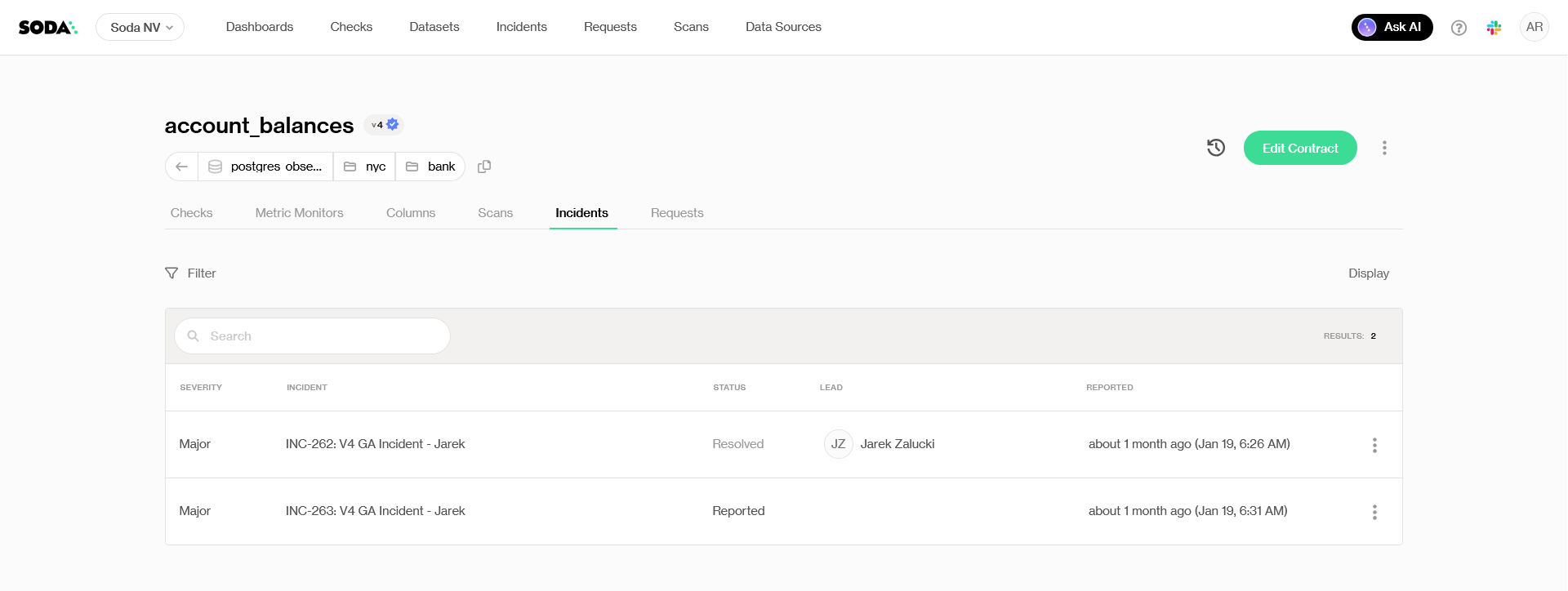
Once created, the incident will appear in the **Incidents tab** of the corresponding **Dataset Page**. An incident that links checks from several datasets appears in the Incidents tab of each of them.
It is possible to filter incidents based on lead, status, reporter, and severity.
## View incidents across the organization
Incidents can also be seen in a central place in Soda Cloud. In the top navigation, click on Incidents to see all the incidents of the organization.
Use the title search and the filters to find relevant incidents. You can filter on data source, dataset, lead, reporter, severity, and status.
## Updating an incident
### Assign a lead
Assign a **lead:** the user responsible for resolving the issue.
### Update status
Track progress by updating the incident’s status as the investigation and resolution evolve.
### Add a resolution note
When marking an incident as **resolved**, a resolution note is mandatory to document what was done.
### Include more check results
If new results are failing, you can include them in the incident: select them in the results table of their check on the incident page, or link another check.
> Read how in [Review the checks of an incident](#review-the-checks-of-an-incident) and [Link a check to an incident](#link-a-check-to-an-incident).
{% hint style="success" %}
After changing fields or check results, click **Save** or **Resolve** on the top right corner to apply them. Linking and unlinking a check through the context menu next to **Checks** is saved right away.
{% endhint %}
## Delete a check that is linked to an incident
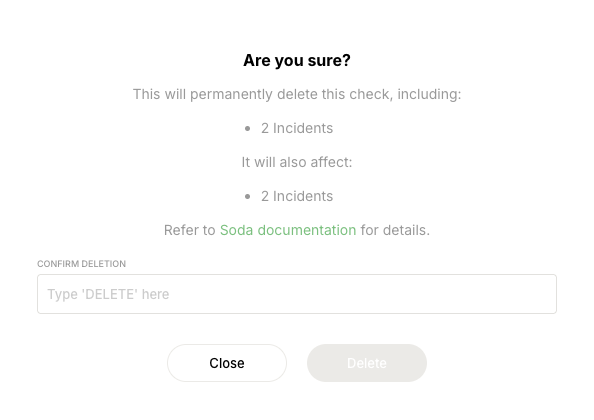
Deleting a check removes its check results from every incident they're linked to. An incident that has other checks linked keeps them; an incident whose only check you delete is deleted as well. Before you confirm, the delete dialog shows how many incidents will be deleted and how many will only lose the check.
## Integration with external systems
You can integrate incidents with Slack, MS Teams, or other external systems using Soda’s **webhook** capabilities or the **Incidents API**.
> Learn on how to integrate with Soda: [Integrations](/integrations.md).
The Incidents API returns each incident with its linked checks, datasets, and data sources, and can link check results to an existing incident or unlink them. It offers the same changes as the incident page, including assigning a lead.
> For endpoints and request fields, refer to the [REST API](/reference/soda-apis/rest-api.md) reference.
> To let an AI agent investigate a failing check and publish its root cause analysis onto the incident, refer to [Root cause analysis agent](/soda-ai/rca-agent.md).
***
{% hint style="info" %}
You are **not logged in to Soda** and are viewing the default public documentation. Learn more about [Licensing & documentation access](/reference/documentation-access-and-licensing.md).
If you do have a Soda license, make sure to **log in to Soda Cloud in this same browser**.
{% endhint %}
---
# Agent Instructions
This documentation is published with GitBook. GitBook is the documentation platform designed so that both humans and AI agents can read, navigate, and reason over technical content effectively. Learn more at gitbook.com.
## Querying This Documentation
If you need additional information that is not directly available in this page, you can query the documentation by asking a question.
Perform an HTTP GET request on the following URL with the `ask` and `goal` query parameters:
```
GET https://docs.soda.io/manage-issues/incidents.md?ask=&goal=
```
`ask` is the immediate question: it should be specific, self-contained, and written in natural language.
`goal` is what the user is ultimately trying to achieve, the reason they need the answer. Sharing it helps GitBook give you a better, more relevant answer. A goal is most helpful when it describes the outcome the user wants rather than restating the question. For example, with `ask=how do I create an API token`, a goal like `automate deployments from our CI pipeline` lets GitBook tailor the answer to that use case.
The response will contain a direct answer to the question and relevant excerpts and sources from the documentation.
Use this mechanism when the answer is not explicitly present in the current page, you need clarification or additional context, or you want to retrieve related documentation sections.