> For the complete documentation index, see [llms.txt](https://docs.soda.io/llms.txt). Markdown versions of documentation pages are available by appending `.md` to page URLs; this page is available as [Markdown](https://docs.soda.io/soda-documentation/find/data-testing/data-reconciliation.md).
# Data reconciliation
This page describes how Soda handles data reconciliation through different types of reconciliation checks.
**Reconciliation checks** are a **validation step** used to ensure that data remains consistent and accurate when moving, transforming, or syncing between different systems. The core purpose is to confirm that the **target data matches one or more source datasets,** whether that's during a one-time migration, a recurring data pipeline run, or ongoing synchronization across environments.
For instance, if you are migrating from a MySQL database to Snowflake, reconciliation checks can verify that the data transferred into Snowflake staging is intact and reliable before promoting it to production. This **minimizes the risk of data loss, duplication, or corruption during critical migrations**.
Beyond migrations, reconciliation checks are also used in **data pipelines and integrations**. They help validate that transformations applied in-flight do not compromise accuracy, and that downstream datasets remain coherent with upstream sources.
Other use cases include **regulatory compliance**, where organizations must prove that financial or operational data has been faithfully replicated across systems, and **system upgrades**, where schema changes or infrastructure shifts can introduce unexpected mismatches.
By systematically applying reconciliation checks, teams can maintain trust in their data, reduce operational risk, and streamline incident detection when anomalies arise.
## Multiple source datasets
Reconciliation supports comparing your target dataset against **multiple source datasets** simultaneously. This is useful when:
* **Multiple upstream systems** feed into a single target: for example, validating that a consolidated data warehouse matches both a staging environment and an operational database.
* **Cross-environment validation**: ensuring consistency across regional databases, different cloud providers, or separate business units that all contribute to one target.
* **Phased migrations**: during gradual cutovers, you may need to reconcile against both the old and new source systems until the migration is complete.
Each source is defined with a `name` and a `dataset`, and each check specifies which source it targets using the `source:` field. This gives you full control over which validations run against which upstream system.
> Learn more about the syntax in the [reconciliation checks reference](/soda-documentation/developer-tools/contract-language-reference/reconciliation-checks.md).
## Defining source datasets
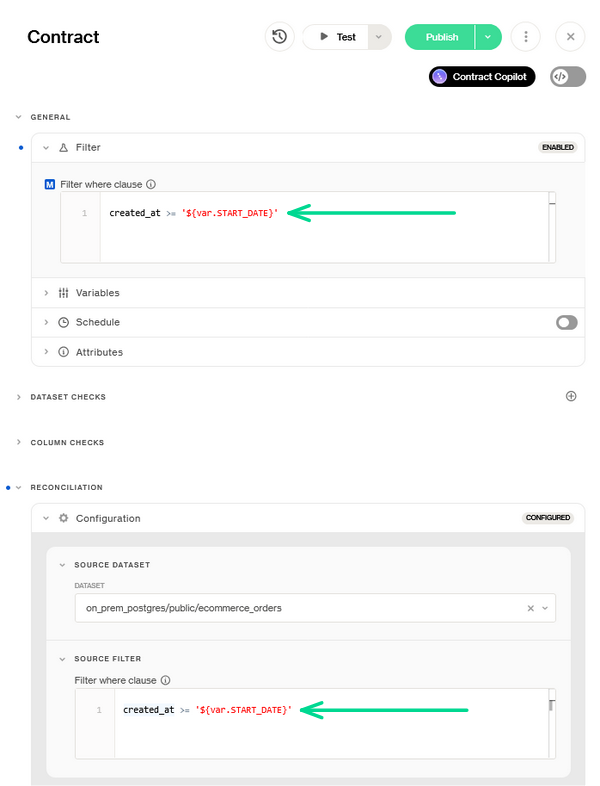
Before defining reconciliation checks, you specify one or more **source datasets** in the `sources:` list. Each source represents a system of record against which you want to validate consistency. It is possible to define a **filter** on each source dataset, allowing you to reconcile only a subset of records that match certain criteria (for example, only transactions from the current month, or only rows belonging to a specific business unit).
For the **target dataset**, the reconciliation check applies the **dataset filter defined at the top of the contract** (see [Author a contract in Soda Cloud](/soda-documentation/find/data-testing/cloud-managed-data-contracts/author-a-contract-in-soda-cloud.md#key-concepts-in-contract-authoring)).
Ensure that both source and target are constrained to the same logical scope before comparisons are made, keeping the validation consistent and relevant.
> A filter always applies to one **side** of the comparison. For the complete picture of which filter applies where, see the [filter application matrix](/soda-documentation/developer-tools/contract-language-reference/reconciliation-checks.md#filter-application-matrix).
In a data contract, configure a reconciliation check by defining the source dataset and applying aligned filters
## **Metric-Level Reconciliation**
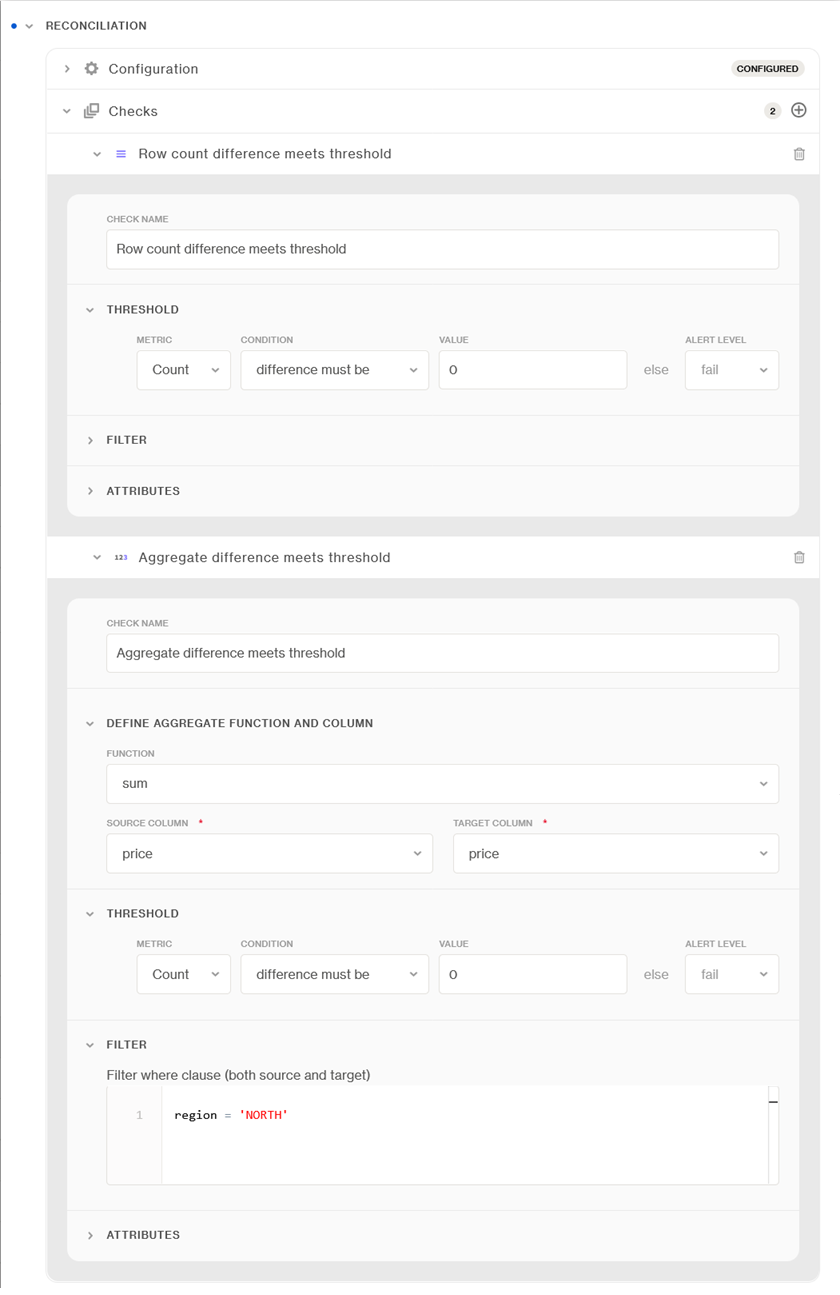
At this level, aggregate metrics from the source and target datasets are compared. Examples include totals (e.g., revenue, number of rows), averages, or other summary statistics. This approach is efficient and provides a high-level signal that the data remains consistent. It is especially useful for large-scale migrations or pipelines where exact row-by-row comparison may not be necessary at all times.
### Thresholds
Comparisons at the metric level are evaluated against a defined threshold, which represents the **acceptable difference between source and target**. This tolerance can be set depending on the business context. Some use cases may allow small discrepancies (e.g., rounding differences), while others require exact equality.
When comparing integrity checks such as missing values, duplicates, or invalid entries, you can reconcile either by looking at the **raw count** of affected records or by comparing the **percentage metric** (e.g., the percentage of rows with missing values in each dataset). This flexibility ensures that reconciliation is meaningful regardless of dataset size or distribution.
### Check-level filter
In addition to dataset-level filters, reconciliation checks support **check-level filters**, which are applied consistently to both the source and target within the scope of a specific check. These filters make it possible to validate a **subset of the data** relevant to the context of the check. The check-level filter is applied **on top of any existing source or target dataset filters**.
## **Row-level reconciliation**
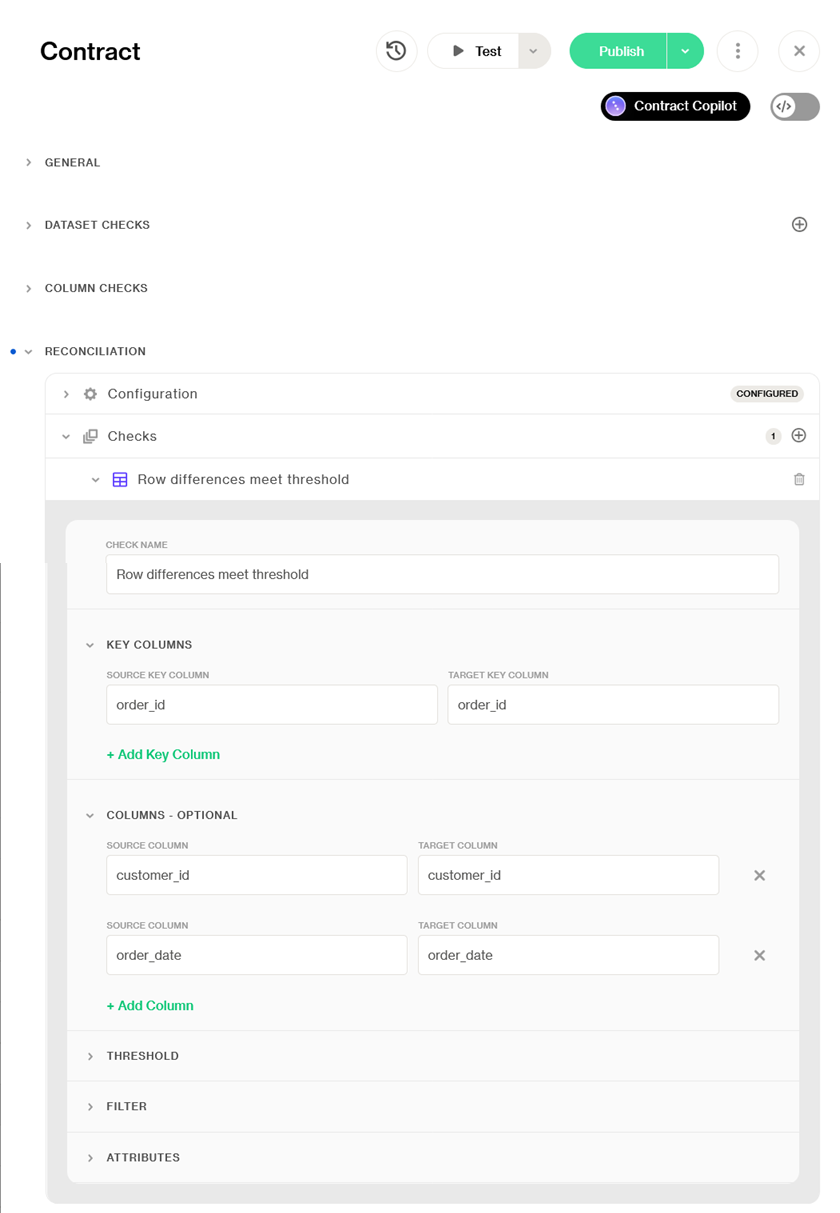
For more granular validation, reconciliation can be performed at the **row level**. This type of check surfaces detailed differences such as **missing records**, **mismatched values**, or **unexpected duplicates**. Row-level reconciliation is critical in scenarios where accuracy at the record level is non-negotiable—such as record that address financial transactions, user data, or regulatory reporting.
This requires specifying a **primary key (or a composite key)** to uniquely identify rows between the source and the target. Once rows are aligned, you can define a **list of columns to test** for exact matches or acceptable tolerances. If no column list is provided, the check defaults to comparing **all columns in order**. This flexibility ensures that comparisons can range from broad validation across the entire dataset to focused checks on only the most critical attributes.
{% hint style="warning" %}
[Rows diff](/soda-documentation/developer-tools/contract-language-reference/reconciliation-checks.md#rows-diff) reconciliation checks are **not supported in Synapse**.
{% endhint %}
{% hint style="warning" %}
A narrower set of reconciliation checks applies when the source is Salesforce. See [Salesforce](/soda-documentation/developer-tools/data-source-reference-for-soda-core/salesforce.md).
{% endhint %}
### Thresholds
Row-level reconciliation supports thresholds expressed either as the **count of differing rows** between source and target, or as the **percentage of differing rows relative to the source dataset row count**. These thresholds determine the acceptable level of variance before the check is considered failed, giving you fine control over sensitivity and tolerance.
This dual approach allows teams to adapt reconciliation logic to different contexts, using absolute counts when every record matters, and percentages when evaluating proportional differences in large datasets.
### Check-level filter
As with metric-level checks, you can define a **check-level filter** that is applied on top of any existing dataset filters. This allows you to reconcile only a targeted segment of data within the context of the specific check—for example, testing only a single business unit, product family, or date range.
#### Filtering each side independently
A single filter expression only works when the same SQL is valid against both datasets. That is often not the case: a legacy source and its migrated copy routinely differ in column names, status encodings, or partitioning conventions.
Every check type except schema diff can therefore filter each side on its own terms, with a **source filter** and a **target filter** on the same check. Both are optional and independent — set one, the other, or both. The source filter is combined with the filter declared on the source dataset itself, so both constraints apply.
The single both-sides filter remains available and unchanged; the two forms are mutually exclusive on the same check.
> Learn more about the syntax and the rules in [Filters](/soda-documentation/developer-tools/contract-language-reference/reconciliation-checks.md#filters).
### Keys and NULL values
Row-level reconciliation aligns the two datasets on their key columns, so a `NULL` key cannot be matched with anything. Rows with a `NULL` in a key column are **excluded from the comparison** on the side where they occur, counted in the check's diagnostics, and reported as a warning in the scan log. The check still evaluates on the remaining rows.
Pick keys that are unique and not nullable. A high count of excluded rows means a large part of the dataset was never actually compared.
### Values stored in different shapes
Two systems routinely hold the same fact in two shapes. A legacy source pads its text with trailing spaces where the migrated target does not; a source records a discount as `95` where the target records `0.95`. A plain row-level comparison reports every one of those rows as changed, even though the data agrees.
A row-level check can therefore carry a **per-column SQL expression** on either side — `TRIM(name)`, `amount / 100`, a cast — applied before the values are compared. Everything downstream sees the transformed value: the comparison itself, the check's diagnostics, and the failed-row samples in Soda Cloud, so what you look at is what was compared. Take care with expressions on **key** columns: normalizing a key can merge values that used to be distinct, and row-level reconciliation expects keys to be unique.
The same expressions are available on the [referential-integrity check](#referential-integrity-reconciliation), where they normalize the values before the two sides' distinct sets are compared — `UPPER(TRIM(code))` on both sides makes a code that differs only in case or padding count as the same code, rather than as one value missing on each side. There are no key columns there, so the caution above does not apply.
The aggregate and freshness checks name one column per side and take a single expression per side instead of a map — rescale a cents column before summing it, or cast a text timestamp before taking its maximum.
Between the three ways of shaping what a check compares, take the lightest one that fits: a **filter** chooses which rows are compared, a **per-column expression** reshapes one column's values, and a **custom query** replaces what is read on that side.
> Learn more in [Transform values before comparing](/soda-documentation/developer-tools/contract-language-reference/reconciliation-checks.md#transform-values-before-comparing) and [Choosing between filters, expressions, and custom queries](/soda-documentation/developer-tools/contract-language-reference/reconciliation-checks.md#choosing-between-filters-expressions-and-custom-queries).
### Reconciling derived data
Sometimes the two things you want to compare are not two tables. The source may need a join to be comparable, or the comparison may be meaningful only at an aggregated grain.
* **Views are the default path.** Create a view over the derived data on either side and onboard it as a dataset. Views behave like any other dataset in Soda: they are discovered and profiled, they can carry their own contract and data standards, and other checks can reuse them.
* **Custom SQL queries are the power-user path.** When creating a view is not possible in your organization, or the derivation genuinely belongs in the contract, a row-level check can take a full SQL query for the source side, the target side, or both. This buys flexibility at the cost of the guarantees a dataset gives you: the query is yours to keep deterministic, it is re-executed once per page, and it never gains discovery or profiling coverage.
* **For aggregate-level comparisons**, compare the result of two SQL queries as a single metric instead of a row set. That is far cheaper than a row-level diff when you only need to know *whether* the two systems agree, not *which* records disagree.
> Learn more in [Compare derived data with custom SQL queries](/soda-documentation/developer-tools/contract-language-reference/reconciliation-checks.md#compare-derived-data-with-custom-sql-queries) and [Metric diff](/soda-documentation/developer-tools/contract-language-reference/reconciliation-checks.md#metric-diff).
### Performance considerations
Row-level reconciliation is inherently **heavier** than metric-level reconciliation, as it requires comparing records across potentially large datasets. To enable comparisons even when data lives in different systems, data is loaded into memory from both the source and the target, where the diff is executed. A **paginated approach** is used to maintain scalability; this ensures that memory usage remains stable, but execution time will increase as the dataset size and column count grow.
### Benchmarks
| Dataset Shape | Change Rate | Memory Usage | Execution Time |
| ---------------------- | ----------- | ------------ | -------------- |
| 10 columns, 500K rows | 1% changes | <80MB RAM | **9s** |
| 360 columns, 100K rows | 1% changes | <80MB RAM | **1m** |
| 360 columns, 1M rows | 1% changes | <80MB RAM | **35m** |
**Recommendations**
* **Leverage filters to scope checks to new or incremental batches of data** wherever possible, rather than repeatedly reconciling the entire dataset. This reduces both execution time and operational overhead.
* Use **metric-level reconciliation as a first line of validation**. It is significantly more efficient and scalable, and can quickly highlight whether deeper row-level analysis is even necessary.
## Referential-integrity reconciliation
Sometimes the question is narrower than "are these two datasets the same". You only need to know whether every key on one side still has a counterpart on the other: foreign keys, code tables, and dimension keys that must stay aligned with a system of record living in another database. A reference reconciliation check compares the **distinct values** of one or more columns between source and target, and reports the values that exist on one side only.
Pick the direction that matches the relationship — the target constrained to the values of the source (the usual case when the source is the system of record), the source constrained to the target, or the two required to hold exactly the same set. Because the comparison is over distinct values, duplicates are irrelevant and no key column has to be declared; rows whose compared columns are `NULL` are left out on the side where they occur.
> Learn more in [Reference diff](/soda-documentation/developer-tools/contract-language-reference/reconciliation-checks.md#reference-diff).
## Schema-level reconciliation
Before comparing values, it is often worth asking whether the two datasets still have the **same shape**. A schema reconciliation check compares the actual columns and data types of the source dataset with those of the target, and reports which columns are missing on either side and which types diverge. Renamed columns can be mapped explicitly, and technical columns that exist on one side by design can be excluded.
This is distinct from the [schema check](/soda-documentation/developer-tools/contract-language-reference.md#schema-check), which compares a **single** dataset against the structure declared in its contract. Schema reconciliation compares **two live datasets** against each other, which is what you want when validating that a migration or replication reproduced the source faithfully — regardless of what any contract declares. The two are complementary, and a contract can carry both.
Schema reconciliation is also the fastest way to explain a row-level check that cannot align its two sides: if the source and target project a different number of columns, a schema check tells you exactly which ones.
> Learn more in [Schema diff](/soda-documentation/developer-tools/contract-language-reference/reconciliation-checks.md#schema-diff).
## Caveats
### Data should be quiescent during a scan
Row-level reconciliation reads both sides page by page, and each page is a separate query execution — Soda does not hold a snapshot across them. If rows are inserted, deleted, or re-ordered while the scan runs, rows can be read twice or skipped, and the check reports differences that exist in neither dataset.
Schedule reconciliation for a window in which neither side is being written to, or constrain both sides to a **closed partition** whose rows can no longer change.
### One dataset can back several sources
Entries in the source list may reference the same dataset, each through its own filter — for example, two differently filtered slices of one dataset compared against the target. Where the slicing only differs per check, a single source with per-check filters keeps the contract shorter.
> See [Caveats and limitations](/soda-documentation/developer-tools/contract-language-reference/reconciliation-checks.md#caveats-and-limitations) for the full list, including data-source-specific restrictions.
***
## Implement reconciliation checks programmatically
Soda is suitable for no-code and programmatic users alike. If you are implementing checks programmatically, you can learn more about the **contract language syntax for reconciliation** on the [Contract Language reference](/soda-documentation/developer-tools/contract-language-reference/reconciliation-checks.md). Reconciliation checks can be used for both metric- and row-level validation.
> Learn more in the [reconciliation checks reference](/soda-documentation/developer-tools/contract-language-reference/reconciliation-checks.md).
***
{% hint style="info" %}
You are **not logged in to Soda** and are viewing the default public documentation. Learn more about [Licensing & documentation access](/soda-documentation/govern/security-licensing-and-compliance/documentation-access-and-licensing.md).
{% endhint %}
---
# Agent Instructions
This documentation is published with GitBook. GitBook is the documentation platform designed so that both humans and AI agents can read, navigate, and reason over technical content effectively. Learn more at gitbook.com.
## Querying This Documentation
If you need additional information that is not directly available in this page, you can query the documentation by asking a question.
Perform an HTTP GET request on the following URL with the `ask` and `goal` query parameters:
```
GET https://docs.soda.io/soda-documentation/find/data-testing/data-reconciliation.md?ask=&goal=
```
`ask` is the immediate question: it should be specific, self-contained, and written in natural language.
`goal` is what the user is ultimately trying to achieve, the reason they need the answer. Sharing it helps GitBook give you a better, more relevant answer. A goal is most helpful when it describes the outcome the user wants rather than restating the question. For example, with `ask=how do I create an API token`, a goal like `automate deployments from our CI pipeline` lets GitBook tailor the answer to that use case.
The response will contain a direct answer to the question and relevant excerpts and sources from the documentation.
Use this mechanism when the answer is not explicitly present in the current page, you need clarification or additional context, or you want to retrieve related documentation sections.